Inspiring
March 15, 2021
Resuelto

Linking an external Alpha Channel file

  • March 15, 2021
  • 3 respuestas
  • 1579 visualizaciones

Hi all


I have a series of different photoshop design files which a share the same alpha channel, which i have to tweak occasionally. 


Rather than updating one then manually copy/pasting to every other design file everytime i make a change (16 files), is there a way of creating an external greyscale .psd and linking it to all the alpha channels?  Therefore, simply updating once and refresshing across the whole set of designs? 


From what ive seen, there's no provision for smart objects in the channels.


Many thanks!


Este tema ha sido cerrado para respuestas.
Mejor respuesta de derrickt24686396

I typed out a reply, but it doesnt seem to let me post the damn thing


Thanks @Stephen Marsh 

Sorry, been a bit sidetracked by some other work. 

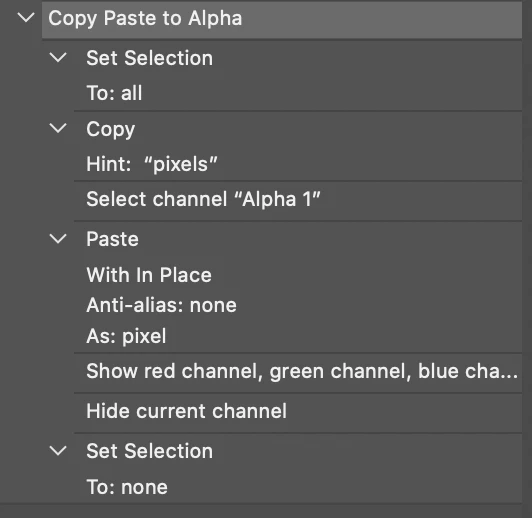
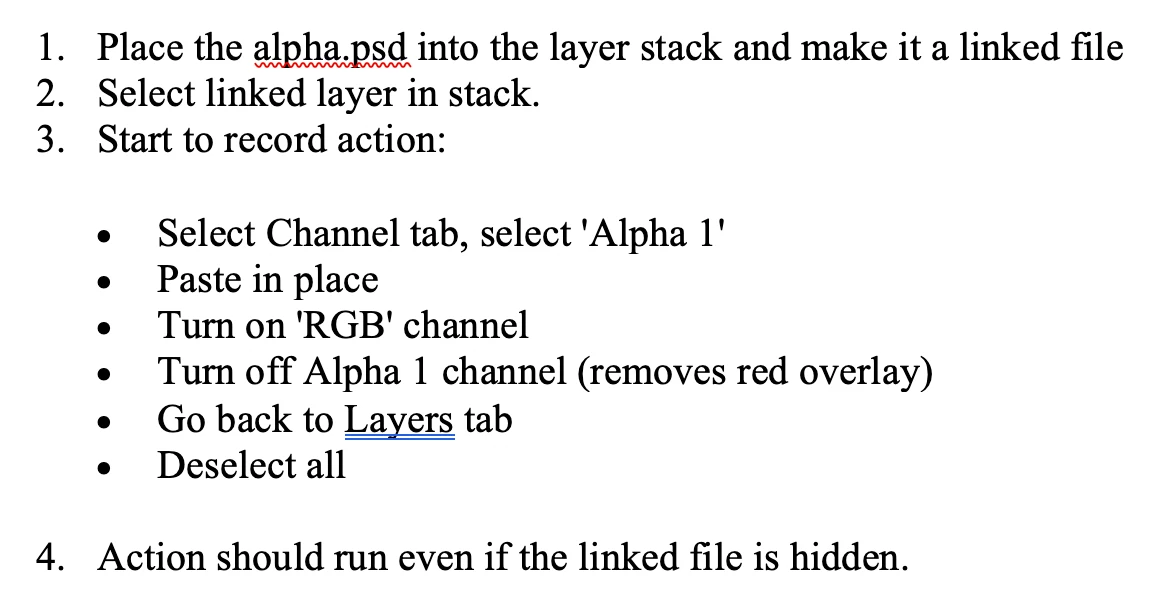
Your suggestion has been a great help, ive slimmed the workflow down... some reason this forum wont let me list so ive screen shotted my workflow:

This seems to work ok, unsure how robust it is so it may need modifying for a different purpose.

Cheers!

D

3 respuestas

Stephen Marsh
Community Expert
Community Expert
March 18, 2021

Are all the docs using the same alpha channel name?


Can I presume that the source file for the alpha is static in name and location.


If so it should be simple enough to bulk update, using an action or script.


Are all the files to be updated in the same folder? Or do you wish to update all 16 open files?


More info is needed as there are a lot of unknowns in how to exactly automate this task. I do believe that it can certainly be semi/fully automated...

Inspiring
March 18, 2021

Thanks for your reply @Stephen_A_Marsh 


I was intending to use two or three differnt alphas depending on the design used in the 16 psds - but can reduce it to a single alpha if the process dictates.


The 16 psds +  greyscale psd (alpha) are located in the same folder.  My intention was to link each psd to the alpha individually, as opposed to bulk processing them a single set - if that makes sense?


I originally hoped I could operate a linked alpha, much in the same way as a linked layer (see pic) works.  If I can automate a process which replicates this function - that would be brilliant! This means i can work on a single greyscale psd and apply it as an alpha across all my files.... rather than copy/paste into the alpha channel 16 times for every update.


Cheers.


D.

Stephen Marsh
Community Expert
Community Expert
March 18, 2021

I have not tested, what I am proposing could be handled by two actions in an action set:


Action Set 1:

1) Open Alpha, copy to clipboard, close without saving


Action Set 2:

1) On an open doc, target the required channel, such as Alpha 1

2) Select All, Paste

3) Save (and possibly close)


One could then run Action Set 2 using Batch, Image Processor or Image Processor Pro scripts. You may need to put the Alpha file into a sub folder so that it is not batch processed.


Alternatively, if you had all 16 files open at once, a script could do similar to the action while cycling through all open docs until all docs were saved/closed. Or a script could do similar to the action + batch process. Apply image could also be used if the alpha was open as a 17th file. Or only two files open, apply the alpha file to the other file, then save/close and repeat until all input files are processed. These are just variations on the same theme.


I am simply automatiing the manual steps that you would otherwise take, nothing special going on.

c.pfaffenbichler
Community Expert
Community Expert
March 17, 2021

»From what ive seen, there's no provision for smart objects in the channels.«

Blend if-settings Knockout and Groups enable one to work around that. 


Could you please post screenshots with the pertinent Panels (Toolbar, Layers, Options Bar, …) visible? 


Edit: 

Inspiring
March 17, 2021

Unsure if this is what you need? 


Cant see how blend-if is connected with channels?  Very keen to see what your suggested solution 🙂

Stephen Marsh
Community Expert
Community Expert
March 16, 2021

An Action or Scripting could help automate, it may or may not be easy depending on the consistency of your files, such as the name being the same for all 16 files.

Inspiring
March 17, 2021

Thanks Stephen


So you're thinking its more of an automated file swapping process rather than a dynamic link?


D

Stephen Marsh
Community Expert
Community Expert
March 17, 2021

As there are no direct smart channels, using a linked smart object could work to help update an alpha using an action or script, however this would still be semi-automated and cumbersome having the smart object in the file with it's only purpose being to aid in updating the alpha channel. I have not tested, so I may be wrong.