Mohamed Hameed21513110
Inspiring
September 15, 2023
Answered

load selection to selected layers

  • September 15, 2023
  • 1 reply
  • 1779 views

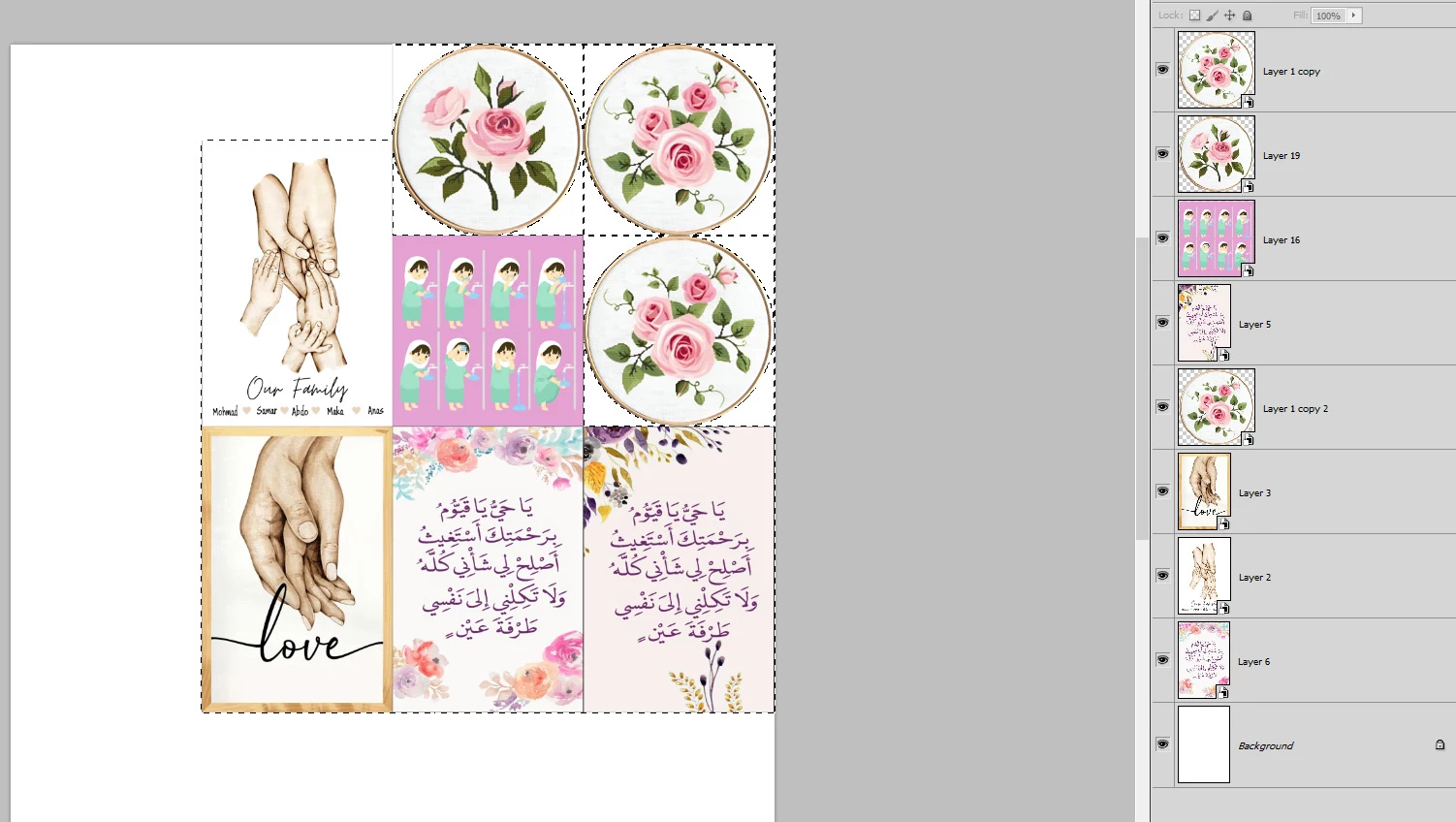
How can I make a Load Selection for all selected layers?
Without pressing ctrl+ Mouse Click to select each layer every time

This topic has been closed for replies.
Correct answer Stephen Marsh

@Mohamed Hameed21513110 


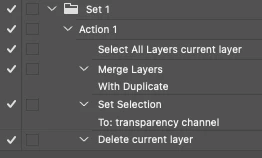
You can use an action:


A script has the added bonus of being able to offer a single history step:


/*
Load Selected Layers Transparency to Selection.jsx
Stephen Marsh, 8th September 2021
v1.0
NOTE: Previously selected layers are deselected, it would be nice to retain the selected layers...
*/

function loadSelLayersTransparency() {

    // Select all layers (ignores Background layer, ignores visibility)
    app.runMenuItem(stringIDToTypeID('selectAllLayers'));

    // Create temp merged layer
    mergedLayer();

    // Rename layer
    app.activeDocument.activeLayer.name = "_temp";

    // Load layer transparency
    loadLayerTrans();

    // Remove temp merged layer
    app.activeDocument.activeLayer.remove();


    /****************** Functions ******************/

    function mergedLayer() {
        var idmergeLayersNew = stringIDToTypeID("mergeLayersNew");
        var desc291 = new ActionDescriptor();
        var idduplicate = stringIDToTypeID("duplicate");
        desc291.putBoolean(idduplicate, true);
        executeAction(idmergeLayersNew, desc291, DialogModes.NO);
    }

    function loadLayerTrans() {
        var idset = stringIDToTypeID("set");
        var desc323 = new ActionDescriptor();
        var idnull = stringIDToTypeID("null");
        var ref75 = new ActionReference();
        var idchannel = stringIDToTypeID("channel");
        var idselection = stringIDToTypeID("selection");
        ref75.putProperty(idchannel, idselection);
        desc323.putReference(idnull, ref75);
        var idto = stringIDToTypeID("to");
        var ref76 = new ActionReference();
        var idchannel = stringIDToTypeID("channel");
        var idchannel = stringIDToTypeID("channel");
        var idtransparencyEnum = stringIDToTypeID("transparencyEnum");
        ref76.putEnumerated(idchannel, idchannel, idtransparencyEnum);
        desc323.putReference(idto, ref76);
        executeAction(idset, desc323, DialogModes.NO);
    }
}

// Single history step
app.activeDocument.suspendHistory("Load Selected Layers Transparency to Selection", "loadSelLayersTransparency()");


Remove or comment out the following to only use the selected layers instead of all layers:


// Select all layers (ignores Background layer, ignores visibility)
    app.runMenuItem(stringIDToTypeID('selectAllLayers'));

1 reply

Stephen Marsh
Community Expert
Stephen MarshCommunity ExpertCorrect answer
Community Expert
September 15, 2023

@Mohamed Hameed21513110 


You can use an action:


A script has the added bonus of being able to offer a single history step:


/*
Load Selected Layers Transparency to Selection.jsx
Stephen Marsh, 8th September 2021
v1.0
NOTE: Previously selected layers are deselected, it would be nice to retain the selected layers...
*/

function loadSelLayersTransparency() {

    // Select all layers (ignores Background layer, ignores visibility)
    app.runMenuItem(stringIDToTypeID('selectAllLayers'));

    // Create temp merged layer
    mergedLayer();

    // Rename layer
    app.activeDocument.activeLayer.name = "_temp";

    // Load layer transparency
    loadLayerTrans();

    // Remove temp merged layer
    app.activeDocument.activeLayer.remove();


    /****************** Functions ******************/

    function mergedLayer() {
        var idmergeLayersNew = stringIDToTypeID("mergeLayersNew");
        var desc291 = new ActionDescriptor();
        var idduplicate = stringIDToTypeID("duplicate");
        desc291.putBoolean(idduplicate, true);
        executeAction(idmergeLayersNew, desc291, DialogModes.NO);
    }

    function loadLayerTrans() {
        var idset = stringIDToTypeID("set");
        var desc323 = new ActionDescriptor();
        var idnull = stringIDToTypeID("null");
        var ref75 = new ActionReference();
        var idchannel = stringIDToTypeID("channel");
        var idselection = stringIDToTypeID("selection");
        ref75.putProperty(idchannel, idselection);
        desc323.putReference(idnull, ref75);
        var idto = stringIDToTypeID("to");
        var ref76 = new ActionReference();
        var idchannel = stringIDToTypeID("channel");
        var idchannel = stringIDToTypeID("channel");
        var idtransparencyEnum = stringIDToTypeID("transparencyEnum");
        ref76.putEnumerated(idchannel, idchannel, idtransparencyEnum);
        desc323.putReference(idto, ref76);
        executeAction(idset, desc323, DialogModes.NO);
    }
}

// Single history step
app.activeDocument.suspendHistory("Load Selected Layers Transparency to Selection", "loadSelLayersTransparency()");


Remove or comment out the following to only use the selected layers instead of all layers:


// Select all layers (ignores Background layer, ignores visibility)
    app.runMenuItem(stringIDToTypeID('selectAllLayers'));
Mohamed Hameed21513110
Inspiring
September 15, 2023

@Stephen Marsh 

Thank you very much for helping me, sir

c.pfaffenbichler
Community Expert
Community Expert
September 17, 2023

@c.pfaffenbichler 
I didn't understand what you mean
Is this a modification within the code or what?


You can modify the code anyway you want or need to adapt it to Photoshop CS5.