MahaB82A
September 7, 2025
Answered

Lock Sign Issue

  • September 7, 2025
  • 3 replies
  • 476 views

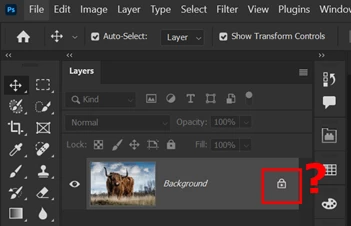
What is the reason JPG comes with a lock sign? PNG does not come.
 

Correct answer jane-e

Adding a little history to Dave's correct reply, Photoshop used to require a Background layer, which is a unique layer that could not be deleted, renamed, reordered, or have transparency. 


Background layers have not been required since Alvy Ray Smith came up with the formula for transparency:

 "αA + (1-α)B" 

and in 1999 Photoshop 5.5 was released. Details here:

https://www.cs.princeton.edu/courses/archive/spring05/cos426/papers/smith95c.pdf


Jane


3 replies

MahaB82A
MahaB82AAuthor
September 7, 2025

Thanks for all

Glenn 8675309
Legend
September 7, 2025

just click on the lock to be able to do stuff to that image.  

davescm
Community Expert
Community Expert
September 7, 2025

It indicates a background layer, which is a specific type of layer that cannot be transparent.  That matches the file it came from as a jpeg cannot contain transparency either.

A png can contain transparency, so opens as an ordinary layer - Layer 0.

You can convert a background layer to an ordinary layer, but remember if you make any pixels transparent then that will not be supported in a jpeg.

Dave

MahaB82A
MahaB82AAuthor
September 7, 2025

Is there any special usage for layers without transperency? 

MahaB82A
MahaB82AAuthor
September 7, 2025

No. They were required through PS 5.0 (not CS5.0). JPEGs still require a Background layer, but otherwise they are unnecessary.


Jane


My question is incorrect. I use PNG layer often, if there is no need for background image. But I am not clear about JPG layer. Today I watched a video, video shows about using Leves & Curves. Presenter used JPG layer. I wish to know is there any special purpose of using JPG layer?