

Trevor.Dennis
Community Expert
Community Expert
January 12, 2019
Question

Logitech Gaming Hardware

  • January 12, 2019
  • 2 replies
  • 9794 views

OK, I know I go on a bit out using gaming keyboards and mice so as to use their programmable G-Keys to provide a one click trigger of functions in Photoshop and other apps (I don't play games).  One thing that frustrated me was that LGS (Logitech Gaming software) was not as good as Razer's Synapse software at auto detecting the active app and switching to the relative device profiles.  Logitech have put out a beta version of new software called G-Hub, and it has no problems in that respect.

I have only been using it for a day, and I am fining it less intuitive than LGS, but it seems to be more powerful.  I could easily get LGS to assign a web link  — like the Photoshop Troubleshoot, or the OSX Known Issue pages we paste into forum answers every day — to a G-key.  I 'think' we can still do this with the Macro option, but only by typing in a character at a time, and I don't know if we can make them paste as hyperlinks.

G-Hub has a restricted list of supported devices at this time.  I switched to a G502 from the G602 I have been using for a few years, so no problems.   I notice that JJ's G13 keyboard is not supported, but it's no hardship as LGS does much the same thing as G-Hub.
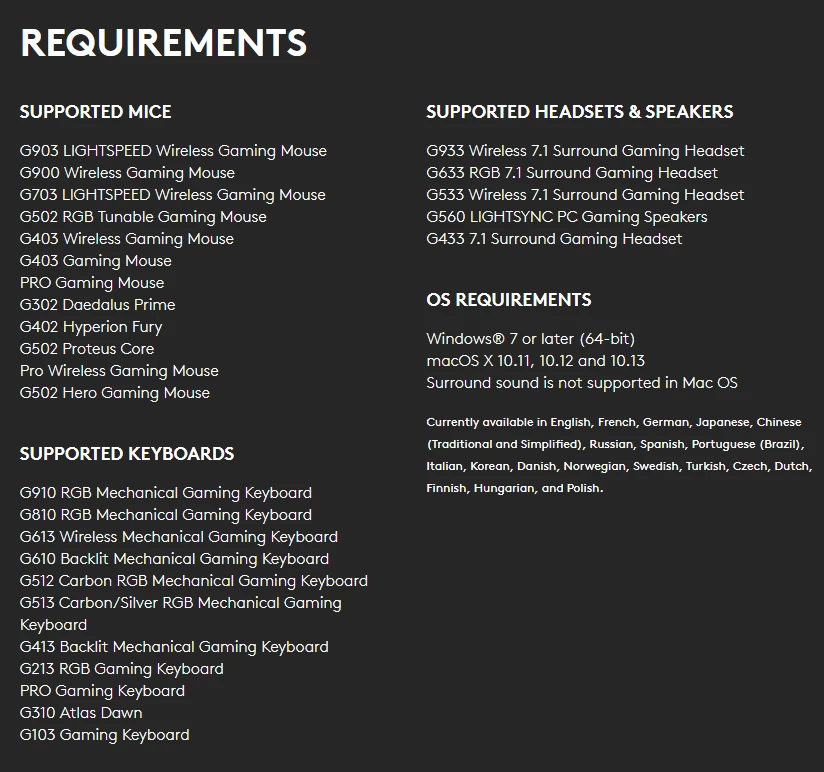
There is bugger all information out there right now.  You can RTFM at the link below, but there are no video tutorials that I can find, and recording macros with G-Hub is not particularly clear.

https://www.logitech.com/assets/65550/ghub.pdf

If you are using LGS or G-Hub with Photoshop and want to collaborate, drop me a PM or email  (my email is easy to find).

    This topic has been closed for replies.

    2 replies

    Participant
    September 22, 2022

    To be honest, I don't use the g13 very often. When I do this, I rest my left hand on it to keep track of where the keys are, but my keyboard skills are lacking. My Wacom pen or g502 mouse is in my right hand. I frequently switch between the mouse and the pen. I assign the pen to one display and many palettes to the display that the pen does not cover.


    A profile can have three sets of keys that you can quickly switch between by pressing a key. You can browse through multiple profiles. Applications such as Chrome, Photoshop, and games can have profiles that are activated automatically when the application receives focus. My motor memory is terrible; I play DA 2 (link removed) games in which I know I will win. I did most of Zelda on the Switch, but I had to use my secret weapon (my son) a few times to get through some sections.

    JJMack
    Community Expert
    Community Expert
    January 12, 2019

    Looks like it does not support their G13 keyboard...however, profile switching seems to work well on the G13. My G502 mouse I switch with its button

    JJMack
    Trevor.Dennis
    Community Expert
    Community Expert
    January 12, 2019

    JJ there is still discussion on the Logitech forums about a G13 replacement.   Most of the comments are from obvious gamers, and they seem to wear them out — one user was on his third!  I think us non gamers are much lighter on the hardware, so your G13 is probably not about to die.  I'll write off my Razer Orbweaver and get a G13 replacement if it ever appears.

    BTW  One of my favourite features on the G502 is the 'sniper' switch.  It is much easier to press than the awkwardly positioned sensitivity switches on the G602, so it is much easier to switch the mouse to fine control for point placement etc.

    Trevor.Dennis
    Community Expert
    Community Expert
    January 14, 2019

    To tell the truth I do not use the g13 very much.  When I do i rest my left hand on it so I know where the keys are but my keyboard skill are poor. My right hand has my Wacom pen or g502 mouse in it .I switch often between the mouse and pen.  I map the pen to one display and many palettes on in the display the pen does not cover.

    A profile can have three set of keys you can quickly switch between with a key press. You can have many profiles you can scroll through.  Applications like Chrome, Photoshop, games can have profiles that can be automatically activate when the  application get focus.  My motor memory is the pits I don't play games I know I loose.   I did do most of Zelda on the switch but had to use my secret weapon(my son) a few time to get past a few parts.


    JJ an interesting fact I have come across while obsessing over getting to grips with G-Hub the last few days, is that the benefits of these gaming hardware tools might be irrelevant, because some of the online multiplayer servers ban you for life if they can see you are using macros.  I imagine they detect key sequences that arrive at the servers at speeds impossible for even the youngest of players who when not gaming for 15 hours a day, are texting at equally inhuman speeds.

    On the plus side, this does underline the advantage this hardware can have with an app like Photoshop, but we seem to have agreed that remote keyboards (like the G13 and Orbweaver) are not as advantageous as gaming keys on you main keyboard, and to a lesser extent your mouse.  I still absolutely love all the single key operations I get with the G910, and I  am starting to think that three banks of nine keys is enough for most things.

    BTW  It's a long time since I played a proper computer game, but I play Mine Sweeper most days, and I've managed a 1.59 clearance once (Expert).