Known Participant
January 22, 2018
Answered

Looking for a Mirror-Plugin

  • January 22, 2018
  • 5 replies
  • 7126 views

Hi there! For a project that I'm doing I want to take normal photographs and "mirror" them.

What I'm doing is very easy: the left half of the image will be the "normal" side, the right side of the same image will be it's "mirrored" side.

For sure I know how to do this in Photoshop manually (duplicate layer, transform, etc...). My problem is, that I would like to be able to move, scale and rotate the original image layer (left side) along the mirror-axis (middle), and see the result on the mirrored side (right side) in real time if possible, so that I can find exactly the right mirror axis easily.

Is there any way I could work with some script or some trick with a smart object that would enable me to do so? Or maybe someone knows a plugin or app that would help me to do so? It would take a lot of blind guessing out of my work if I could just move one original layer and see the mirrored layer being updated in real time...

I've found some app called KaleidoFx, it's for making Kaleidoscopes (obviously), but it's not what I'm looking for.

Any idea would be greatly welcome!!!

Thanks, S
This topic has been closed for replies.
Correct answer davescm

Until you find a suitable plug in you can try this. It is not quite as convenient as a live update but workable until you find something more suitable:

1. Open your image

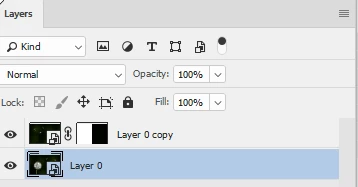
2. Convert it to a smart object

3. Ctrl+J to duplicate the smart object

4. Flip the copy horizontally

5. Add a layer mask hiding half the copy

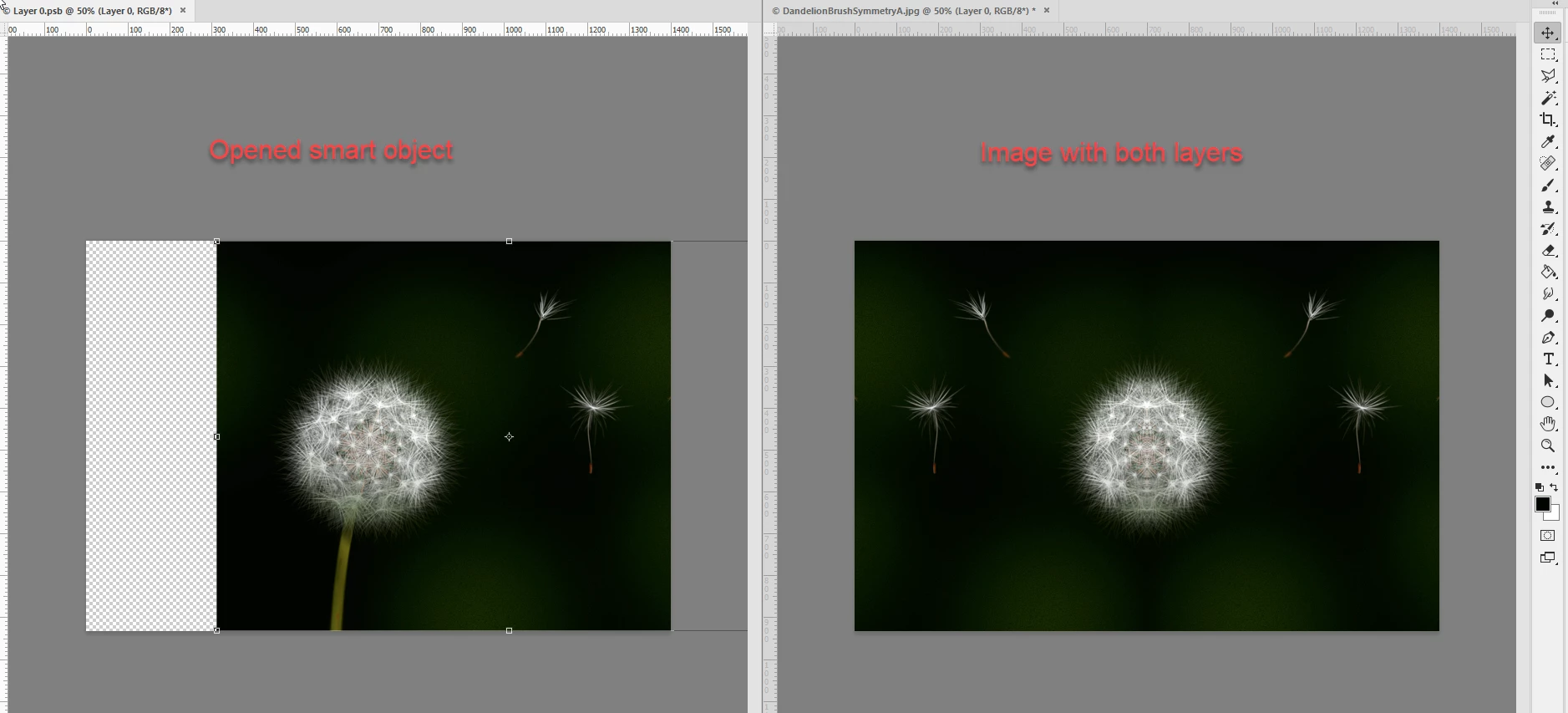
6. Now double click the smart object to open it

7 Use Window arrange two up vertical to view both the smart object and the mirrored image

8 Use the move tool to move/nudge the image in the smart object each time hitting Ctrl+S to update the mirrored version

Dave

5 replies

March 13, 2023

hey i was looking to do this too and i figured something out its kind of like the smart object idea but.

open your document .  open windows toolbar -> arrange -> new window for your document (at the bottom)


and on one side selected go to view -> "flip horizontal" and line them up vertically (windows -> arrange -> 2 up vertical) .. its more cumbersome than that smart object approach but updates faster

Trevor.Dennis
Community Expert
Community Expert
March 13, 2023

I might not be following you 100%, so just in case, do you know the purpose of View > Flip Horizontally and how it works?  It's a tool artists and illustrators might use to flip the canvas because that different perspective can sometimes reveal problems with an image.  It is not actually flipping the document or layer in the same way that Free Transform can do.


If you check Flip Horizontally and save the image as a JPG, then when you load or view that JPG, it will have reverted to its original state.  My apologies if you knew that and are using the tool in a clever way.

March 14, 2023

oh yea i meant in the context of creating with a "mirror" on as you are creating.  by having two windows side by side with the right doing the horizontal flip, it was the closest i can get to having a mirroring effect on as i am creating.  at the end you have to manually mirror,.,.,.

verstaerker
Inspiring
August 15, 2021

i treid the smart-object use as a workaround. It works okay. But still nothing compared to the great mirrorplugin in Affinity Photo. 

Is there any similar and cheap plugin for PS on  the Mac available? 

Jeff Arola
Community Expert
Community Expert
January 22, 2018

What version of photoshop and operating system are you using?

Here are some Mirror Effects Creative Scripts:

Creative Scripts | Tonton Pixel

A mirror plugin if your using windows:

http://www.mehdiplugins.com/english/quickmirror.htm

Trevor.Dennis
Community Expert
Community Expert
January 22, 2018

This is a bit of a long shot, but Flaming Pear's 'Flood' might do what you want.  You can set the amount of ripple in the water to zero to make it a perfect mirror.  You might have to rotate the image through 90°, run Flood, and rotate it back again — it's a long time since I've used it, and there is even a new version since I used to play with it.

Flood Photoshop plug-in adds water to photos - Flaming Pear Software

I'm a wee bit full on right now, but I think I'll download the trial and see what has changed when I get some time.

Known Participant
January 23, 2018

Thanks for your reply! Will look into it!! xo, S

davescm
Community Expert
davescmCommunity ExpertCorrect answer
Community Expert
January 22, 2018

Until you find a suitable plug in you can try this. It is not quite as convenient as a live update but workable until you find something more suitable:

1. Open your image

2. Convert it to a smart object

3. Ctrl+J to duplicate the smart object

4. Flip the copy horizontally

5. Add a layer mask hiding half the copy

6. Now double click the smart object to open it

7 Use Window arrange two up vertical to view both the smart object and the mirrored image

8 Use the move tool to move/nudge the image in the smart object each time hitting Ctrl+S to update the mirrored version

Dave

Known Participant
January 23, 2018

Hi Dave, many thanks for this response! It's pretty much exactly what I needed! Cheers, Sebastian

davescm
Community Expert
Community Expert
January 23, 2018

You're welcome

Dave