
Participant
March 12, 2020
Question

Looking to fade images to border color

  • March 12, 2020
  • 1 reply
  • 425 views

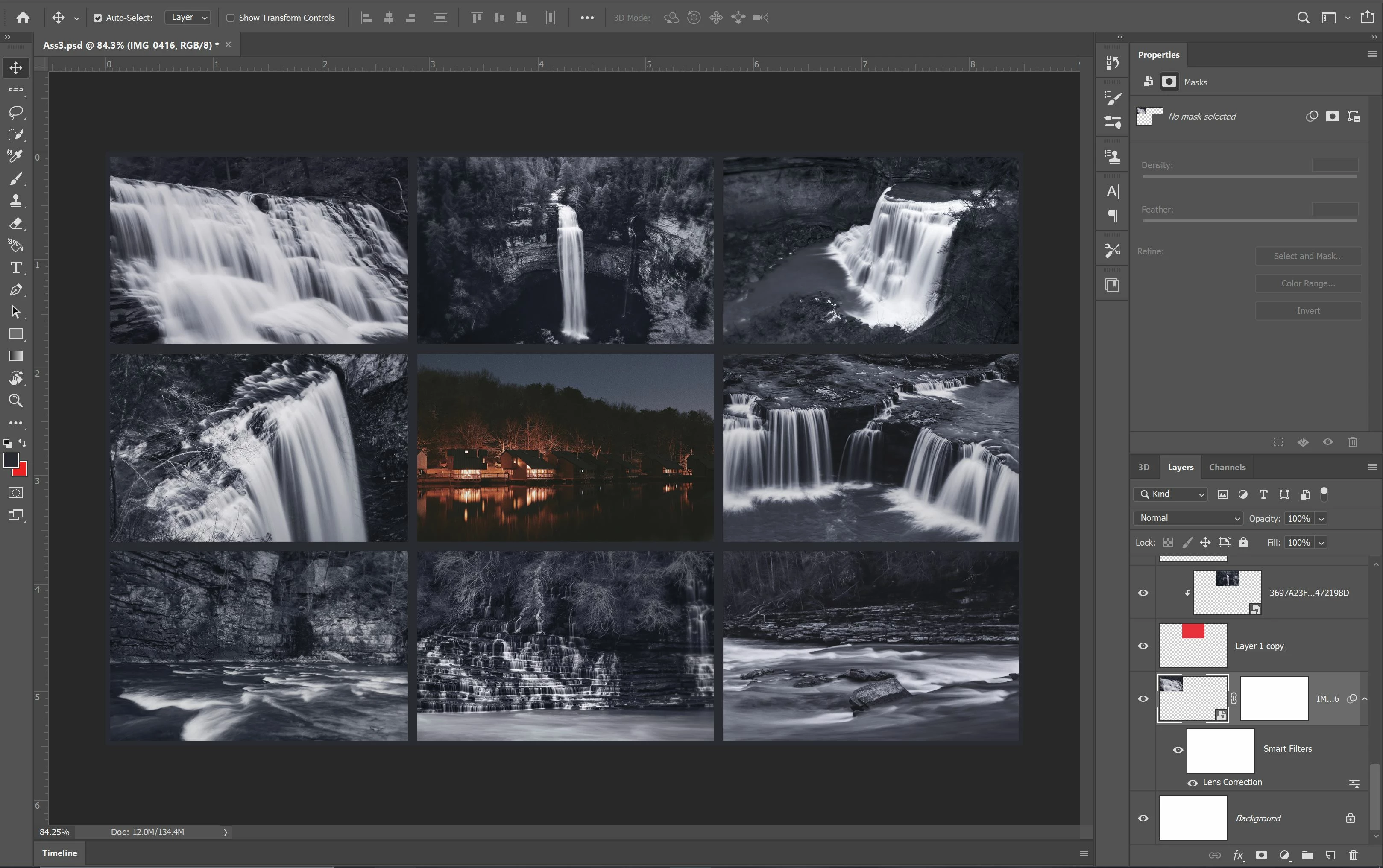
Working on making this collage for a class project. I have all of the pictures positioned how I want, but I want to add one final touch where the edges of each picture is blended to the same color as the border. I thought about possibly doing a vignette colored the same as the border for each of the nine pictures, but could not get this to work. Picture attached of what I am looking at!

How could I go about this? Any help appreciated.
    This topic has been closed for replies.

    1 reply

    JJMack
    Community Expert
    Community Expert
    March 12, 2020

    Collare images normallt have ar Layer mask to constrain the imagest the the collage imags location size and shape.  Your Collage looka a bit strange.  Sone of your images are placer image file thet have bet transformed  to the collaget imags ares. Wich will distort imagse comtent if the images do not have the correct collage imags aspect ratio.  Other image layer  look like they were pasted in and the layer transfotm perhaps also trimed.  So you could select eack layer conteent and feather the selection then add the selection to the layer as a layer mask to feather each image's edges into the background layer color.


    Collages are eraser to create using a Photo College Template PSD.  Template are very east to create.


    Free Photoshop Photo Collage and Mockup Toolkit 

    JJMack