Known Participant
November 11, 2023
Question

Loop apply an action to each text layers

  • November 11, 2023
  • 2 replies
  • 900 views

To clarify this, I need to introduce my work:

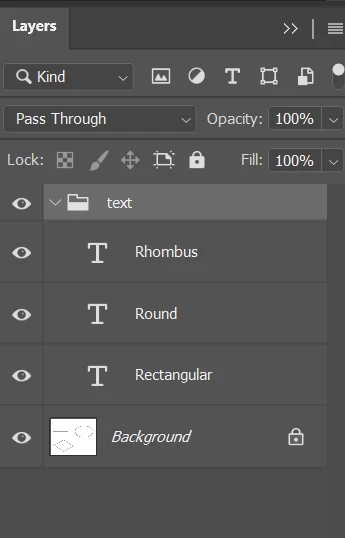
For example, I have a file with different shapes and some text layers like this:
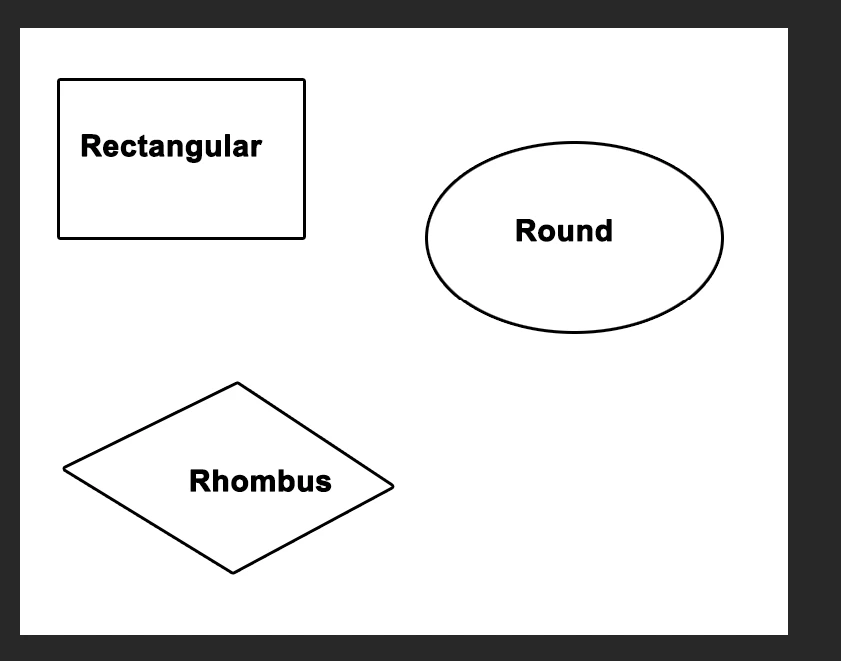
My goal is to make the text layers in each of these shapes are center aligned of them. Like this:
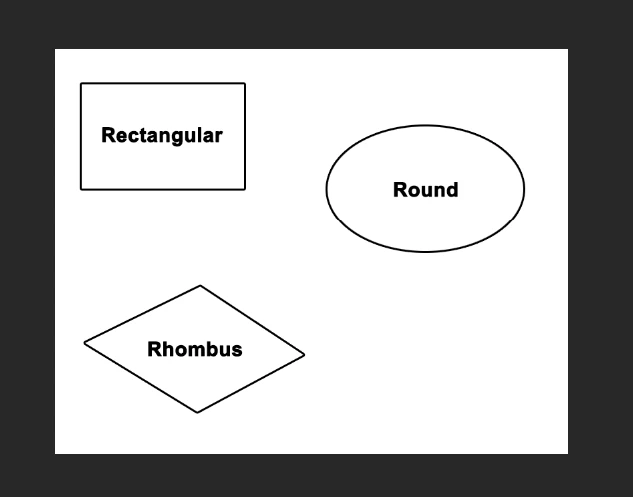
My way is to use the magic wand to create a selection below each text, then center it with the move tool. 
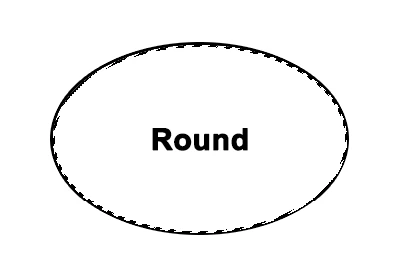
 

Sometimes it has many gaps like this so I create an action (but it need to create the selection by magicwand first, anyway):
 

As you can see, I have to center every text layers one by one, and each time I have to create another selection. Anyway, I've found a topic that has similar with my tasks - thanks to c.pfaffenbichler that reduce a step to my action:

https://community.adobe.com/t5/photoshop-ecosystem-discussions/create-a-bubble-below-the-text-based-on-an-existing-image-by-magic-wand-script/m-p/13371086

By the way, I need to upgrade my action because there are a lot of tasks, so I can't run the action for each text layer once a time. Can you help me to center every text base on the selection below it?

There also some text layers which don't need to center, I'll lock them all before run. 

Thank you so much for helping me and have a nice day!

This topic has been closed for replies.

2 replies

Stephen Marsh
Community Expert
Community Expert
November 11, 2023

@Zipser31550168t845 


Thinking about this from another perspective, if the text is "roughly" within the required shape, then perhaps a script could:


1) For the active text layer

2) Get the bounds and the coordinates for the centre of the text

3) Select the background layer

4) Use the previous coordinates for the magic wand tool to set the selection

5) Return to the previous text layer and then centre align to the selection and deselect


Repeat in a loop over all text layers.


EDIT:


The following is proof of concept code. It doesn't cycle over all of the text layers, you need to manually select the required text layer and then run the script. This appears to do the job, if so, then all that is needed is a loop over text layers.


var origRulerUnits = app.preferences.rulerUnits;
app.preferences.rulerUnits = Units.PIXELS;

var layerBounds = activeDocument.activeLayer.bounds;
var layerLeft = layerBounds[0].value;
var layerTop = layerBounds[1].value;
var layerRight = layerBounds[2].value;
var layerBottom = layerBounds[3].value;
var layerWidth = layerBounds[2].value - layerBounds[0].value;
var layerHeight = layerBounds[3].value - layerBounds[1].value;
var layerXCenter = layerLeft + (layerWidth / 2);
var layerYCenter = layerTop + (layerHeight / 2);
var theLayer = activeDocument.activeLayer;

try {
    activeDocument.activeLayer = activeDocument.backgroundLayer;
} catch (error) {}

setMagicWand(layerXCenter, layerYCenter, 4);

activeDocument.activeLayer = theLayer;

align2Selection('AdCH');
align2Selection('AdCV');

activeDocument.selection.deselect();

app.preferences.rulerUnits = origRulerUnits;


///// Functions /////

function setMagicWand(horizontal, vertical, tolerance) {
    var s2t = function (s) {
        return app.stringIDToTypeID(s);
    };
    var descriptor = new ActionDescriptor();
    var descriptor2 = new ActionDescriptor();
    var reference = new ActionReference();
    reference.putProperty(s2t("channel"), s2t("selection"));
    descriptor.putReference(s2t("null"), reference);
    descriptor2.putUnitDouble(s2t("horizontal"), s2t("pixelsUnit"), horizontal);
    descriptor2.putUnitDouble(s2t("vertical"), s2t("pixelsUnit"), vertical);
    descriptor.putObject(s2t("to"), s2t("paint"), descriptor2);
    descriptor.putInteger(s2t("tolerance"), tolerance);
    descriptor.putBoolean(s2t("antiAlias"), true);
    executeAction(s2t("set"), descriptor, DialogModes.NO);
}

function align2Selection(method) {
    /*
    AdLf = Align Left
    AdRg = Align Right
    AdCH = Align Centre Horizontal
    AdTp = Align Top
    AdBt = Align Bottom
    AdCV = Align Centre Vertical
    */
    var desc = new ActionDescriptor();
    var ref = new ActionReference();
    ref.putEnumerated(charIDToTypeID("Lyr "), charIDToTypeID("Ordn"), charIDToTypeID("Trgt"));
    desc.putReference(charIDToTypeID("null"), ref);
    desc.putEnumerated(charIDToTypeID("Usng"), charIDToTypeID("ADSt"), charIDToTypeID(method));
    try {
        executeAction(charIDToTypeID("Algn"), desc, DialogModes.NO);
    } catch (e) {}
}


https://prepression.blogspot.com/2017/11/downloading-and-installing-adobe-scripts.html


Stephen Marsh
Community Expert
Community Expert
November 11, 2023

@Zipser31550168t845 


OK, here it is in a loop over all top-level text layers:


var origRulerUnits = app.preferences.rulerUnits;
app.preferences.rulerUnits = Units.PIXELS;

for (var i = 0; i < activeDocument.layers.length; i++) {
    try {
        activeDocument.activeLayer = activeDocument.layers[i];
        var layerBounds = activeDocument.activeLayer.bounds;
        var layerLeft = layerBounds[0].value;
        var layerTop = layerBounds[1].value;
        var layerRight = layerBounds[2].value;
        var layerBottom = layerBounds[3].value;
        var layerWidth = layerBounds[2].value - layerBounds[0].value;
        var layerHeight = layerBounds[3].value - layerBounds[1].value;
        var layerXCenter = layerLeft + (layerWidth / 2);
        var layerYCenter = layerTop + (layerHeight / 2);
        if (activeDocument.activeLayer.kind == LayerKind.TEXT) {
            var theLayer = activeDocument.activeLayer;
            activeDocument.activeLayer = activeDocument.backgroundLayer;
            setMagicWand(layerXCenter, layerYCenter, 4);
            activeDocument.activeLayer = theLayer;
            align2Selection('AdCH');
            align2Selection('AdCV');
            activeDocument.selection.deselect();
        }
    } catch (e) {}
}

app.preferences.rulerUnits = origRulerUnits;


///// Functions /////

function setMagicWand(horizontal, vertical, tolerance) {
    var s2t = function (s) {
        return app.stringIDToTypeID(s);
    };
    var descriptor = new ActionDescriptor();
    var descriptor2 = new ActionDescriptor();
    var reference = new ActionReference();
    reference.putProperty(s2t("channel"), s2t("selection"));
    descriptor.putReference(s2t("null"), reference);
    descriptor2.putUnitDouble(s2t("horizontal"), s2t("pixelsUnit"), horizontal);
    descriptor2.putUnitDouble(s2t("vertical"), s2t("pixelsUnit"), vertical);
    descriptor.putObject(s2t("to"), s2t("paint"), descriptor2);
    descriptor.putInteger(s2t("tolerance"), tolerance);
    descriptor.putBoolean(s2t("antiAlias"), true);
    executeAction(s2t("set"), descriptor, DialogModes.NO);
}

function align2Selection(method) {
    /*
    AdLf = Align Left
    AdRg = Align Right
    AdCH = Align Centre Horizontal
    AdTp = Align Top
    AdBt = Align Bottom
    AdCV = Align Centre Vertical
    */
    var desc = new ActionDescriptor();
    var ref = new ActionReference();
    ref.putEnumerated(charIDToTypeID("Lyr "), charIDToTypeID("Ordn"), charIDToTypeID("Trgt"));
    desc.putReference(charIDToTypeID("null"), ref);
    desc.putEnumerated(charIDToTypeID("Usng"), charIDToTypeID("ADSt"), charIDToTypeID(method));
    try {
        executeAction(charIDToTypeID("Algn"), desc, DialogModes.NO);
    } catch (e) {}
}


The default wand tolerance is 4, but that can be changed.


An action could also be called to run after the basic magic wand selection if you have developed one that handles more complex shapes.


Let me know how you go!


Known Participant
November 13, 2023

There can only be one special Background layer, as per your original screenshot. The script was based around that particular setup, multiple text layers and a single Background layer.


oh, that's a pity, I'm so sorry for my omission! I should have told about this earlier instead of giving a poor example 😞 So could you please try with this file? I'm looking forward to hearing from you!

Stephen Marsh
Community Expert
Community Expert
November 11, 2023

How and when are the text layers created in relation to the underlying raster "shape" areas?


Is this something that you need to batch run against many images?


Or just do multiple times, but not in a batch?


If each raster shape in the background layer was a separate unique layer, directly stacked under the text layer, then you would probably have an easier time with automation.


Known Participant
November 11, 2023

Thank you Sir for lend me a hand! I'm new to Photoshop so I don't know much about Action and Scripting, I though I could combine them haha ^^ Maybe I need a video to describe what I need, please take a look!

And I also make a video with the action I've mentioned, it's a bit faster than the creating selection by magicwand, but its nature is still the same, because the Script I used is for the hide text - use magicwand - create a selection below it - show the text. The action is also more convinient because it worked for bubble that has many gaps than using the magicwand like before - like this video

What I need is to batch the action to every text layers that available (no locked) in a file. As you can see, it have no separate layers, I know this is a hard mission, but I cannot apply the action one by one to thousands of text layers every time 😞 

Stephen Marsh
Community Expert
Community Expert
November 11, 2023

@Zipser31550168t845 


The second script that I posted loops  over all top-level text layers and centres them over the underlying raster shape.


Adjustments can be made from your feedback.


If you just want to batch apply your action to every top-level text layer without the script doing anything else, then that's easy for me to adjust for you.