
Exit
  • Global community
    • Language:
      • Deutsch
      • English
      • Español
      • Français
      • Português
  • 日本語コミュニティ
  • 한국 커뮤니티
1

Magic Wand

Participant ,
Feb 27, 2024 Feb 27, 2024

When I use the magic wand, it is acting as though I am selecting a "color range" throughout the entire image vs selecting only pixels within the contiguous region. 


Am I missing something in the prefs?  Or did this feature change?


M. Jackson
TOPICS
macOS
363
Translate
Report
Community guidelines
Be kind and respectful, give credit to the original source of content, and search for duplicates before posting. Learn more
community guidelines

correct answers 1 Correct answer

Community Expert , Feb 27, 2024 Feb 27, 2024

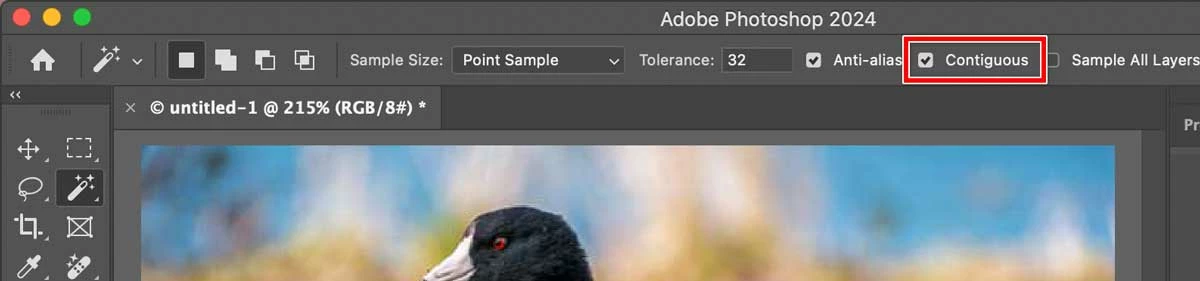
In the current version there should still be a Contiguous option in the options bar when the Magic Wand tool is selected.


Photoshop-Magic-Wand-Contiguous.jpg

Translate
Adobe
Community Expert ,
Feb 27, 2024 Feb 27, 2024

In the current version there should still be a Contiguous option in the options bar when the Magic Wand tool is selected.


Photoshop-Magic-Wand-Contiguous.jpg

Translate
Report
Community guidelines
Be kind and respectful, give credit to the original source of content, and search for duplicates before posting. Learn more
community guidelines
Participant ,
Feb 27, 2024 Feb 27, 2024
LATEST

Thanks...I found the little check box right after making the post. Works like I remember now. MJ


Translate
Report
Community guidelines
Be kind and respectful, give credit to the original source of content, and search for duplicates before posting. Learn more
community guidelines
Community Expert ,
Feb 27, 2024 Feb 27, 2024

Try holding down the Shift key and keep applying the Magic Wand until it fills in.

Translate
Report
Community guidelines
Be kind and respectful, give credit to the original source of content, and search for duplicates before posting. Learn more
community guidelines