
Known Participant
April 26, 2017
Answered

Making a gradient less severe

  • April 26, 2017
  • 2 replies
  • 388 views

Hi,

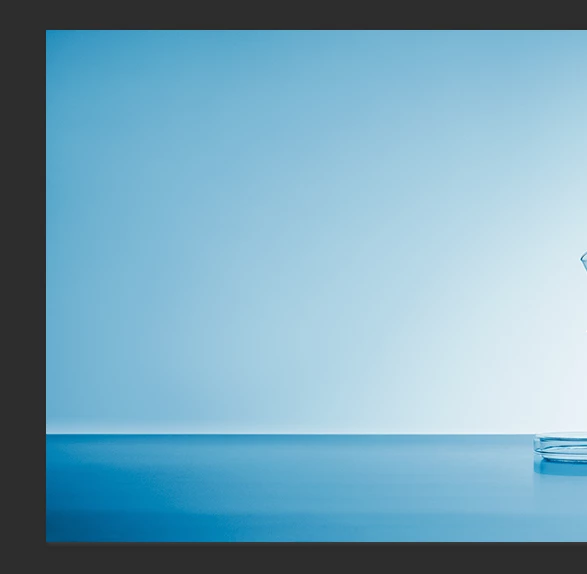
In the attached, how can I make the transition from Blue on the left to white on the right be a little more gradual?

This is a flattened file so whatever is changed will have to be an addition. I can't edit the existing gradient. Thanks!
    This topic has been closed for replies.
    Correct answer Chuck Uebele

    First of all, you should use a 16bit file, if you're not already doing so. If you want the exact end colors, then there's not much you can do, as there are only so many step the gradation can take.You can change the end points, so there is not such a wide difference between the two (Lighter blue, or bluer white).

    2 replies

    Michael Riordan
    Inspiring
    April 28, 2017

    Okay, I'm trying again with a video response! Assuming the change to the gradient is to reduce the contrast of the back "wall" and not the ground plane, Here's a video explanation of one of many ways that this could be accomplished.

    Michael Riordan

    Owner/Adobe Certified Instructor

    Digital DesignLab

    Oak Park, Illinois USA

    www.learnadobesoftware.com

    Chuck Uebele
    Community Expert
    Chuck UebeleCommunity ExpertCorrect answer
    Community Expert
    April 27, 2017

    First of all, you should use a 16bit file, if you're not already doing so. If you want the exact end colors, then there's not much you can do, as there are only so many step the gradation can take.You can change the end points, so there is not such a wide difference between the two (Lighter blue, or bluer white).

    Known Participant
    April 27, 2017

    Thanks.

    davescm
    Community Expert
    Community Expert
    April 28, 2017

    You can also add intermediate points to a gradient so you could, for example, have a fairly steep transition at the ends but a more gradual middle section see examples below:

    Dave