Tom Goodman
Inspiring
May 11, 2024
Answered

Making selections

  • May 11, 2024
  • 1 reply
  • 905 views

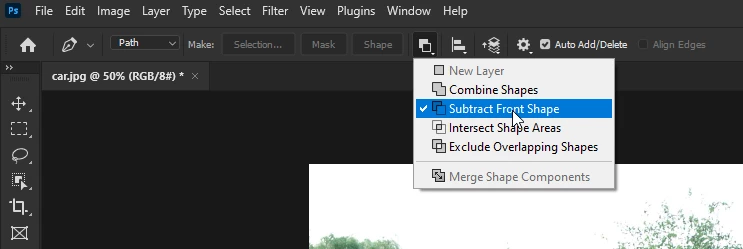
Whenever I have made selection with the pen tool in the past, the selection creates a new layer of the selected area only.  Suddenly, having made the selection, the new layer includes the entire image, not just the selected portion.  I am forced to add the step of selecting the inverse to isolate only the selected area.
This topic has been closed for replies.
Correct answer Ged_Traynor

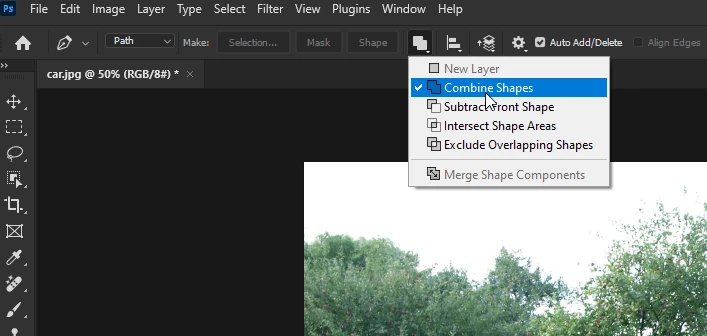
@Tom Goodman in screenshot 1 you have Subtract Front Shape selected, select Combine Shapes instead

1 reply

didiermazier
Community Expert
Community Expert
May 11, 2024

Could you show a screenshot of the selection with the layers panel?

Tom Goodman
Inspiring
May 11, 2024

Attached are four screenshots showing four stages of selection using pen tool.

1-use pen tool to make selection.

2-Bring up dialog box to make selection

3-make selection

4-note selection chooses entire image.  I don't have entire image visible so you can see the details, but note the right edge of the frame is included in selecton.  The entire image is selected

Ged_Traynor
Community Expert
Ged_TraynorCommunity ExpertCorrect answer
Community Expert
May 11, 2024

@Tom Goodman in screenshot 1 you have Subtract Front Shape selected, select Combine Shapes instead