artistic_Glimmer5E1B
Inspiring
October 20, 2019
Answered

Making the stroke effect include corners?
  • October 20, 2019
  • 2 replies
  • 854 views

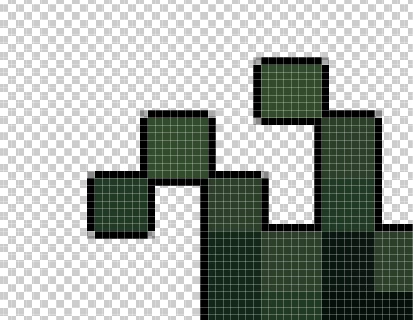
When using the stroke effect, it does not fill in outer corners, instead leaving them with some opacity. Is there a way to make the corners be filled in? If not, I was wondering if anyone knew of a script/other that could perform this for me.


Appreciate any help and thanks!


ASQ
This topic has been closed for replies.
Correct answer davescm

Hi

Your first post showed a 1 pixel stroke.
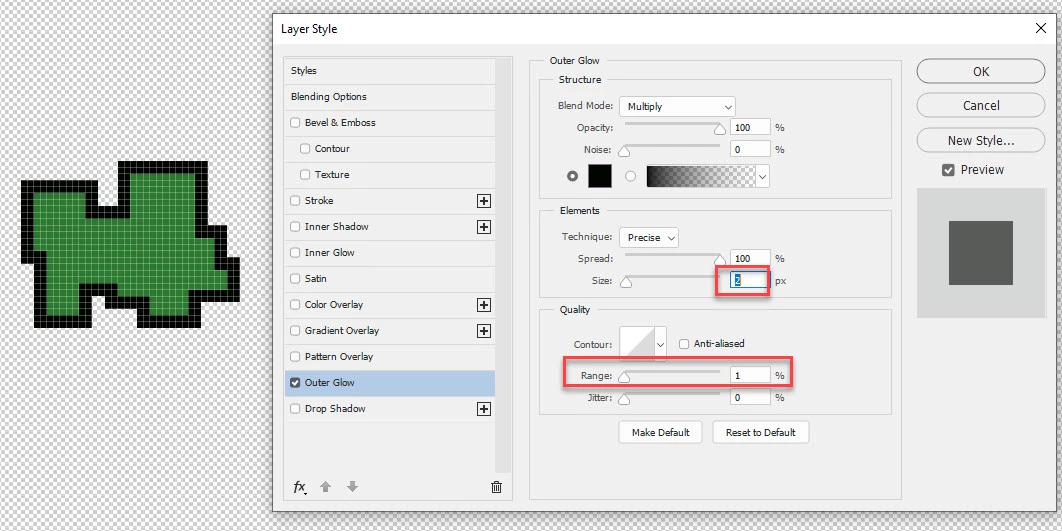
For 2 pixels adjust the range


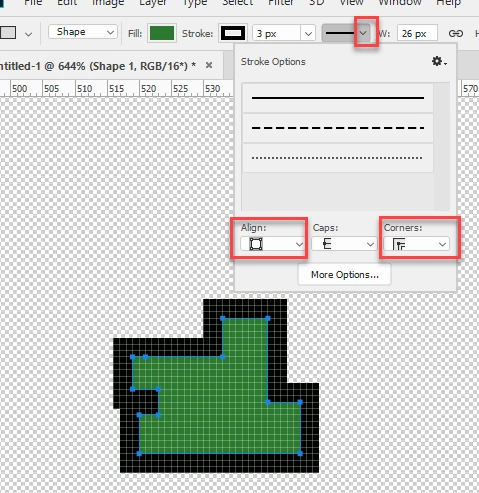
For 3 or more, use shapes with stroke set to "Outside" and corners to "square"

Dave

2 replies

davescm
Community Expert
davescmCommunity ExpertCorrect answer
Community Expert
October 21, 2019

Hi

Your first post showed a 1 pixel stroke.
For 2 pixels adjust the range


For 3 or more, use shapes with stroke set to "Outside" and corners to "square"

Dave

artistic_Glimmer5E1B
Inspiring
October 21, 2019

Awesome, thank you. Have a nice day!

davescm
Community Expert
Community Expert
October 21, 2019

You're welcome 🙂

Dave

davescm
Community Expert
Community Expert
October 20, 2019

Try using an outer glow with the following settings instead of a stroke :

Dave

artistic_Glimmer5E1B
Inspiring
October 21, 2019

Not sure why this is marked as the correct answer. It does not work with 2px "glows" like I want.


Legend
October 21, 2019
Do you want to use only effect?
You can stroke the path with a square pencil of the right size and with spacing = 1

P.S. For a 2px effect, change the slope of the contour curve.