Participating Frequently
April 19, 2023
Answered

Manually Modify Selection

  • April 19, 2023
  • 1 reply
  • 966 views

Hi 


Help please. I am blanking on how to manually change or adjust the selection line prior to applying a mask and changing a color.

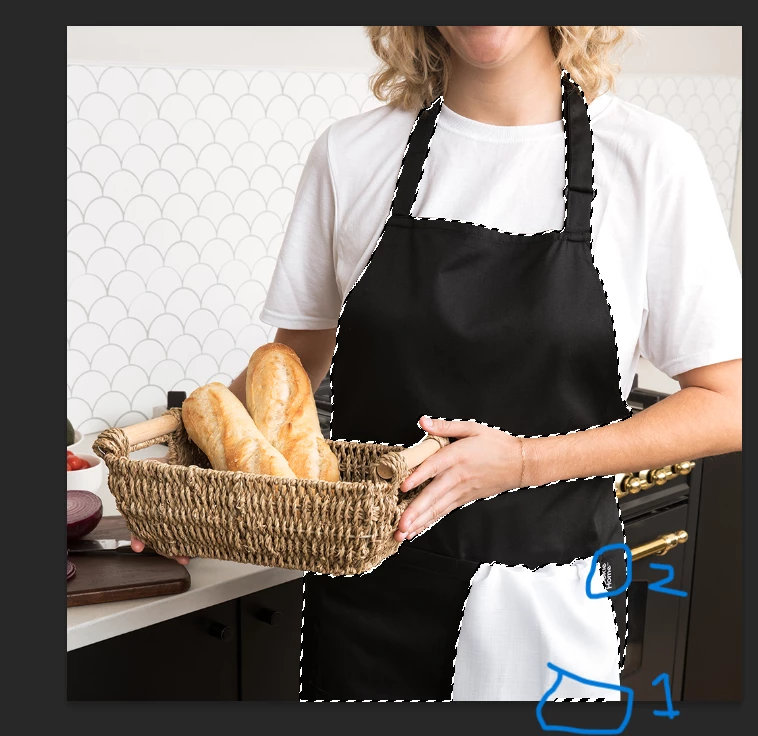
1. In the picture how to I remove the random selected area that got created (number 1 in blue)

2. For 2, I need to move the selection line over to include the logo

I have spent two hours searching the internet and I can't figure it out even though I once knew how to do it. 

Thanks
This topic has been closed for replies.
Correct answer Bojan Živković11378569

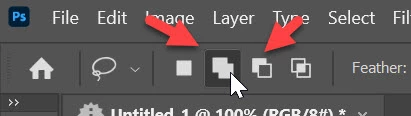
Simple way to add or remove from existing selection is using selection tool like Lasso with Add to selection or Subtract from selection enabled in the Options bar. Second icon on screenshot is add to selection while third when activated will help you to subtract from selection.

1 reply

Bojan Živković11378569
Community Expert
Community Expert
April 19, 2023

Simple way to add or remove from existing selection is using selection tool like Lasso with Add to selection or Subtract from selection enabled in the Options bar. Second icon on screenshot is add to selection while third when activated will help you to subtract from selection.

Participating Frequently
April 19, 2023

Thanks

Participating Frequently
April 19, 2023

See screenshot