
Participant
February 7, 2025
Question

Mask Fill Issue

  • February 7, 2025
  • 2 replies
  • 129 views

When I am creating a layer mask, there continues to be a portion of masks that is not filled the way I want it to be.

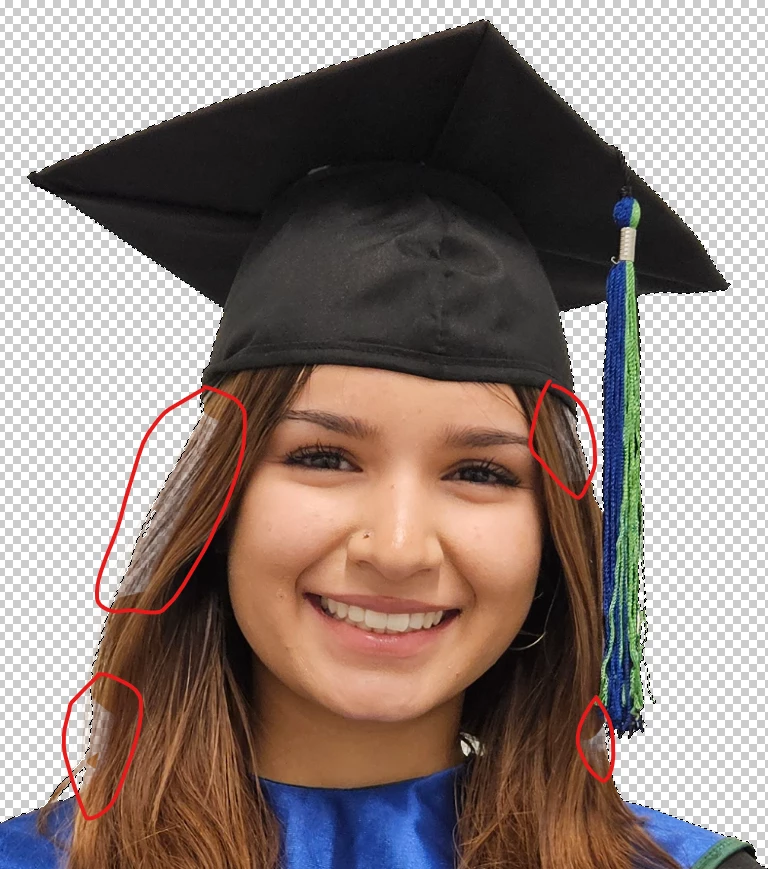
This happens whether I:

  1.  Click layer mask button in Layers panel with object selected
  2. Create layer mask via menu bar with object selected
  3.  Create a layer mask, select object and fill with black.

Additionally, even if I try to paint inside the selection, it bleeds out of the slection.

Similar issues with multiple images.

2 replies

Participant
February 7, 2025

I am creating the selection using the object selection tool. With the exception of cleaning up using the lasso tool, there was no "refining"

jane-e
Community Expert
Community Expert
February 7, 2025

@defaultlwm98qlze4of 


You didn't mention how you are refining your selection before making the mask. Try these steps from Colin Smith to see if they help:

https://www.youtube.com/watch?v=J93ARHHx51g&t=134s


Jane