Mask Option Menu Missing

Copy link to clipboard
Copied
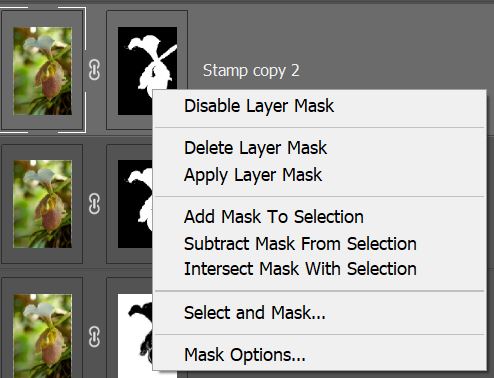
Th option to right click on a mask and get the submenu to Apply the Mask or Delete the Mask is NO LONGER available. The right click now brings up the properties window. I've successfully got the pressure sensetivity working again with the reinstall of the Wacom drivers but this menu won't work and it is NOT available anywhere from the menu bar. Here is the MISSING menu and WRONG menu that come up on the right click



Explore related tutorials & articles
 12
Replies
12
12
Replies
12


Copy link to clipboard
Copied
Would you give a screenshot for your Layers panel?!

Copy link to clipboard
Copied
Hi
It's working fine for me with Photoshop version 22.1, tested with the right click of the mouse and Wacom pen, are you sure you're right clicking on the layer mask
What exact version of Photoshop and operating system are you using, can you post a screenshot of the entire PS interface with all the pertinent panels opened

Copy link to clipboard
Copied
Actually.. continuing to test... if Windows Ink is on for Photoshop, then NONE of my right click functions are working... If I turn OFF the Windows Ink setting under the Wacom mapping area, then all the right click funtions work fine, but my pressure sensitivity for my brushes goes away again... I guess I either get pressure sensitivity or menus that work... UGH!!
Copy link to clipboard
Copied
Yes, When Windows Ink is active from the wacom settings for any application, Your pen will not working well and has problems. The wrong Wacom Driver may affect the pen pressure function and make a pen delay. Make sure that your driver is the compitible one with your operation system.
Copy link to clipboard
Copied
Yes.. I'm on Windows 10, current version on PS.. just installed this morning and also uninstalled Wacom and reinstalled the latest drivers and did the restarts. Here are my settings.


Copy link to clipboard
Copied
For the pen pressure, you need to create a text file called PSUSerConfig with a .txt extension

Add the following to the text file
# Use WinTab
UseSystemStylus 0
Save the file to this location
C:\Users\Your Name\AppData\Roaming\Adobe\Adobe Photoshop 2021\Adobe Photoshop 2021 Settings

Disable Windows Ink in the Wacom setting and the pen pressure should work
Copy link to clipboard
Copied
BUT THIS IS THE OLD SOLUTION before Photoshop and Wacom supposedly FIXED it in the latest version!! What's up with that... This is what we did back in 2014 when it didn't work.... I thought we were suppose to get Windows Ink and Wacom compaitility with PS in this latest version...
Copy link to clipboard
Copied
Adobe made a change so that pen pressure would work with Windows Ink in a previous version, can't remember exactly which version it was, it was one of the 21.x versions but that caused other issues for people including myself, so they reverted it back to using the PSUSerConfig file again in one of the 21.x versions
Pen pressure works fine for me with that file included and I have no issues with menu items with the Wacom pen with Windows Ink disabled
Copy link to clipboard
Copied

The old solution no longer works. PS is forcing us to turn on Windows Ink. We need a resolution to the fact that R Click is not working when the Windows Ink is turned on.
Copy link to clipboard
Copied


Copy link to clipboard
Copied
Yes.. this is the setup I have on the Wacom software with the PSUserConfig file in the Settings directory but I still get the triangle over the Pressure Sensitivity field. I did a restart... still no luck with the old Stylus solution..
# Use WinTab
UseSystemStylus 0


Copy link to clipboard
Copied
I THINK I FOUND THE ISSUE and it's not with either WACOM or PS... it is with Windows! I removed this old solution and began digging into the Windows Pen settings at the system level. I found this screen from the Control Panel. The bottom setting was not enabled for right click. I turn this on. Then tested again with the Windows Ink turned on with a PS icon in Wacom and I had both pressure on the brushes and my right click menus.


Get ready! An upgraded Adobe Community experience is coming in January.
Learn more
 AdChoices