
Answered
Mask Thumbnail
After the last update, a small mask icon appeared next to the layer thumbnail in the layers panel, which partially obscures the thumbnail. Is there a way to disable this?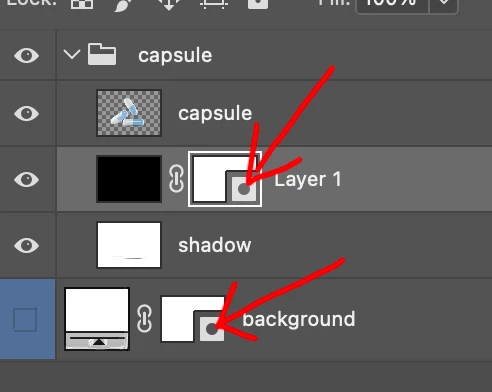
After the last update, a small mask icon appeared next to the layer thumbnail in the layers panel, which partially obscures the thumbnail. Is there a way to disable this?
@Milomi958898 not in the current version, but you will be able to disable it in a future release, not sure why Adobe thought the icon was a good idea as it serves no purpose that I can see
https://community.adobe.com/t5/photoshop-beta-discussions/layer-mask-icons-in-25-1/m-p/14189781
Already have an account? Login
Enter your E-mail address. We'll send you an e-mail with instructions to reset your password.
 AdChoices