
robinr055
Participant
March 6, 2021
Answered

Match color is grayed out in Photoshop

  • March 6, 2021
  • 1 reply
  • 45207 views

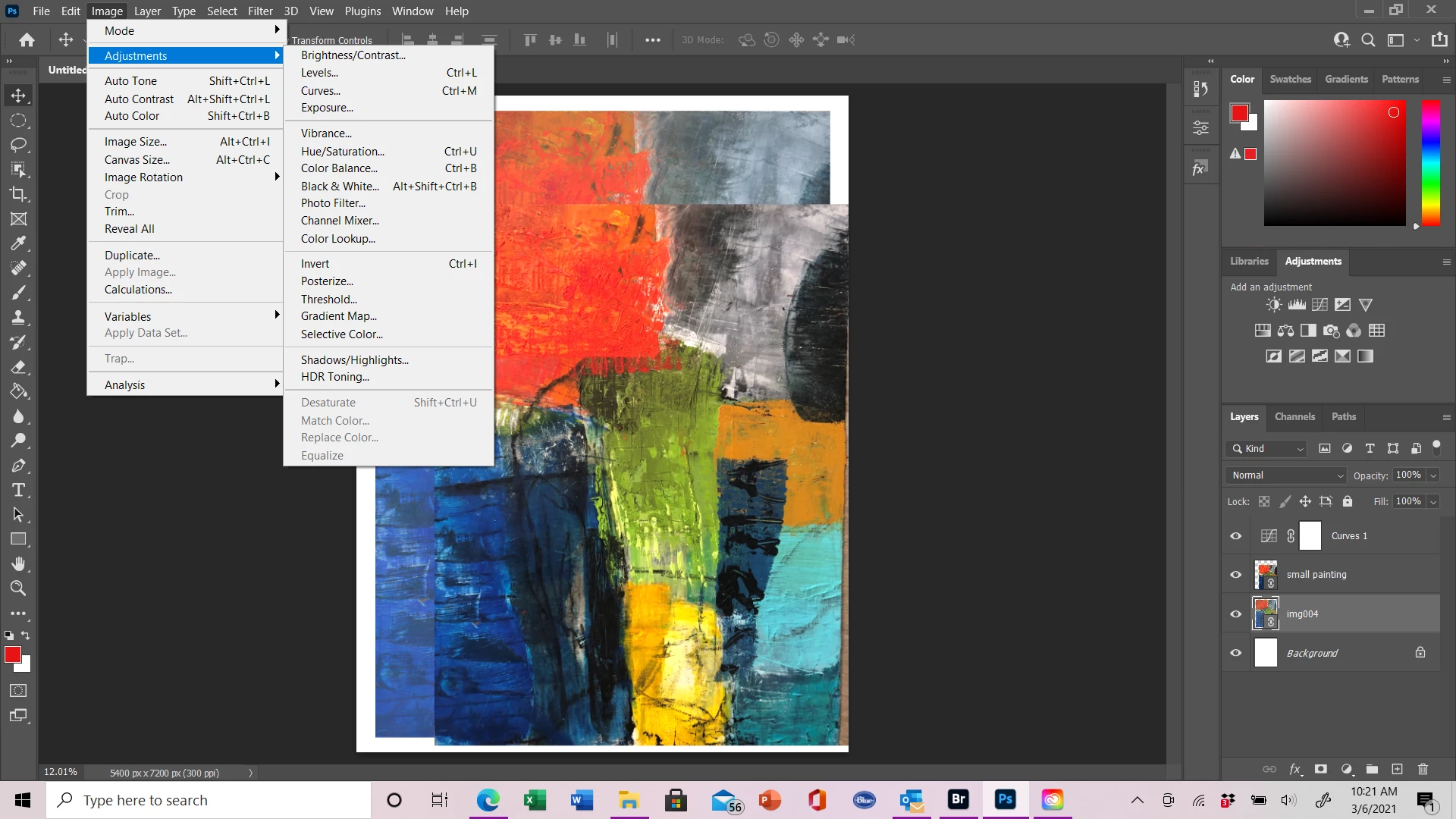
I am new to photoshop. I have two images, one is a scanned image of my artwork and one is a photo of the same artwork, they are in the same file on separate layers. The scanned image colors are not right so I want to color match against the photo. I read the instructions on how to do this, but when I go to Image, then Adjustments, I can't select "color match" because it is grayed out. I don't know what I am doing wrong - any ideas? The file is RGB 8 bit. See my screen shot.
 

Correct answer Charlotte39002488wbaq

Hi, I changed the mode from CMYK to RGB. The colour has changedd, but its still not the colour I selected.


Nvm I solved it by setting the paint bucket mode to Normal.

1 reply

c.pfaffenbichler
Community Expert
Community Expert
March 7, 2021

Match Colors works destructively (and is, in my opinion, therefore unfit for serious work) but the Layer you have selected appears to be a Linked Smart Object. 

You would need to rasterize it (or a copy). 

Participant
January 1, 2023

thanks a lot. you save my day