
Participant
July 25, 2020
Question

Memory Error photoshop

  • July 25, 2020
  • 1 reply
  • 352 views

Hello everyone,


It's my first post on the website and I need some help for a problem I have seen today.


When I am in the photoshop software, I try to use the "content aware" function but an error message appears: "Could not fill because there's not enough memory".
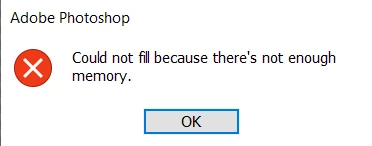
So it's impossible to use the "content aware".


I have photoshop 20.0.3 and I have 16 Go of Memory (RAM). I don't understand the problem because I have enough memory on my computer.

I look into the "Preferences => Performance" window in photoshop and just 2 Go was allocated for Photoshop, whereas I have 16 Go on my computer.
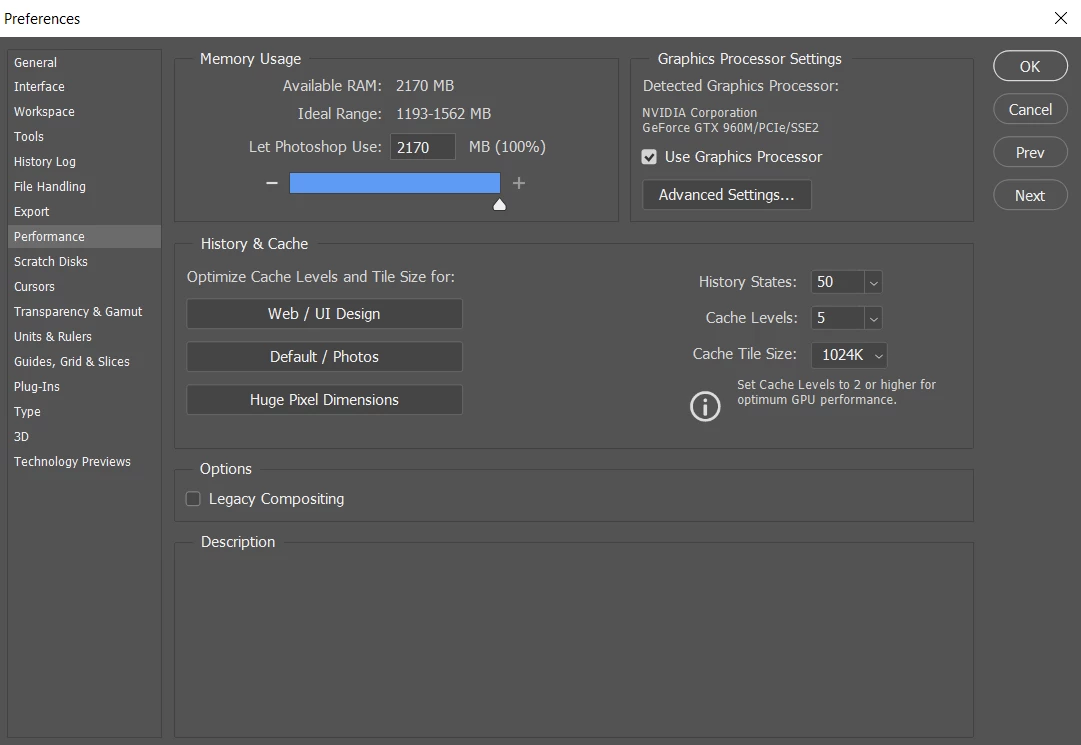
 

Can someone have an idea to fix this problem ?


Thank you for your help.

This topic has been closed for replies.

1 reply

JJMack
Community Expert
Community Expert
July 25, 2020

You need more ram 4GB is required 8GB is recommend I would suggest 16GB

What does you system show for ram my shows 40GB your Photoshop shows 2GB


System Requirements


Windows
  • 1.6GHz or faster processor with SSE2 support
  • Microsoft Windows 10 (recommended versions 1809, 1903) or Windows 8.1 (Windows 7 not supported); 64-bit versions only (32-bit not supported)
  • 4GB of RAM (8GB recommended)
  • 5.2GB of available hard-disk space to install applications; additional 2.4GB to download all optional content (cannot install on a volume that uses a case-sensitive file system or on removable flash storage devices)
  • 1280x800 display resolution (at 100% scale factor)
  • Microsoft DirectX 9 or 10 compatible display driver
  • DVD-ROM drive (for installation from DVD)
  • Internet connection required for product activation and content download*


JJMack
Aymeric08Author
Participant
July 25, 2020

hello JJMack,


Thank you for your answer but as you can see below, i have 16 GB for RAM. So i don't understand why i just have 2GB for photoshop.


JJMack
Community Expert
Community Expert
July 26, 2020

Report the problem to Adobe photoshop_family 

JJMack