

miguel a.p79479515
Participating Frequently
November 14, 2023
Answered

Metadata in PSD

  • November 14, 2023
  • 3 replies
  • 726 views

Hello!!
Does anyone have this problem?

In my work, I often reuse old PSDs to make new projects and it seems that this has generated metadata that makes it weigh much more. I don't care about the PSD itself but when it comes to exporting the Masters in any format (PNG, JPG) they weigh a lot (1920x1080 PNG or JPG) 25MB

I managed to remove that metadata by first exporting to (.WEBP) and then to the correct format, but I am looking for a way to "clean up" my PSDs so that when exporting the files are not so heavy.


Thank you very much for the help!
This topic has been closed for replies.
Correct answer Kevin Stohlmeyer

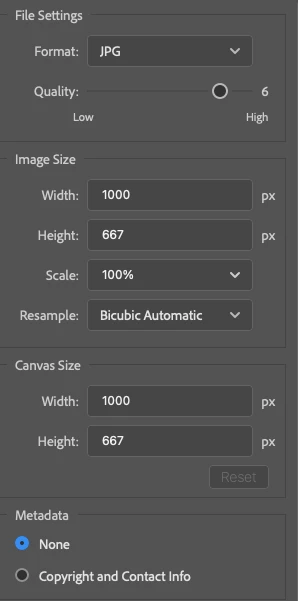
@miguel a.p79479515 If you use Export As (not legacy) it has an option strip out the metadata to a flattened file format. (see bottom option)


3 replies

Brainiac
November 15, 2023

You can use a script or use EXIFTool to remove this bloat directly from the PSD files. I have a Photoshop script to integrate EXIFTool with Photoshop so it can run directly on open files.

miguel a.p79479515
Participating Frequently
November 15, 2023

I already use a script but I didn't know this one, I will try it!
Thank you very much!
Best regards!

Stephen Marsh
Adobe Expert
November 15, 2023
miguel a.p79479515
Participating Frequently
November 15, 2023

It seems like that... Thank you very much, that's how I fixed it

Kevin Stohlmeyer
Kevin StohlmeyerCorrect answer
Adobe Expert
November 14, 2023

@miguel a.p79479515 If you use Export As (not legacy) it has an option strip out the metadata to a flattened file format. (see bottom option)


miguel a.p79479515
Participating Frequently
November 14, 2023

I managed to clean up the PSD's and it no longer happens to me in the normal "save" but I didn't think of "Export" in this way, I have tried it and it works perfect.

Thank you very much for your help Kevin!!!. 😉