Participant
November 6, 2020
Answered

Missing destination files when duplicating layers

  • November 6, 2020
  • 8 replies
  • 6336 views

Has anyone encountered the problem where duplicating layers to different open files often has files missing? The only solution I've found is to duplicate to a completely new document and from there, all open files are visible. This is a recent issue for me.

Correct answer AlexScopely

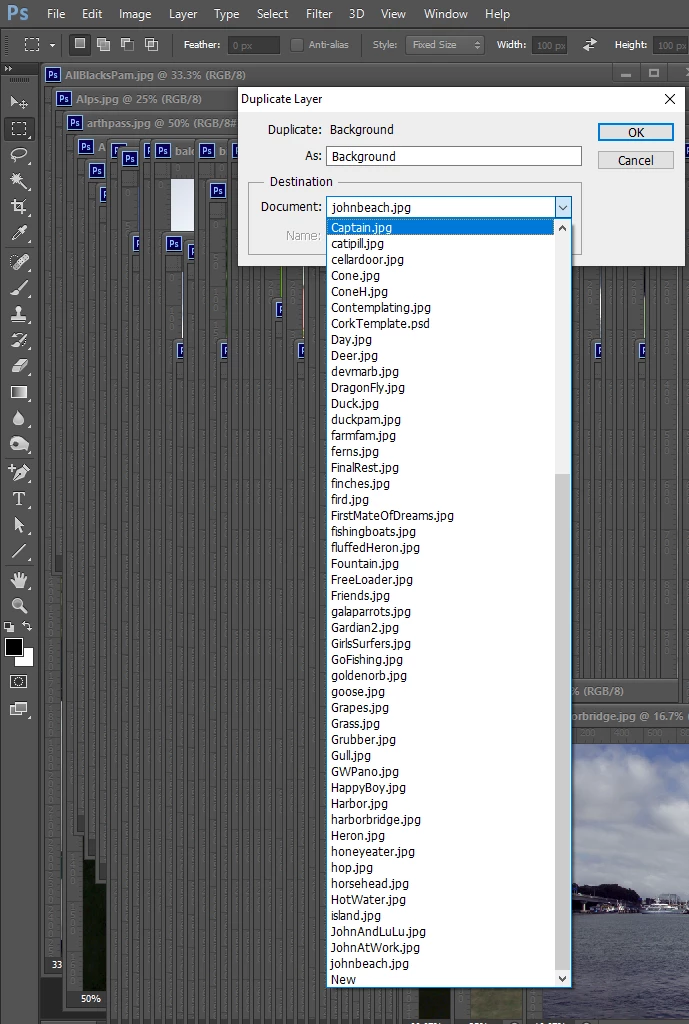
I use Windows 10 in current  Photoshop 2021 though it has issues. Duplicate Layer seem OK.  I just opened a large number of images  of images,  In Duplicate layer dialog destination I get a pull down list that I can scroll and select the destination to be any of the opened documents. All 70 open images are in the list plus NEW
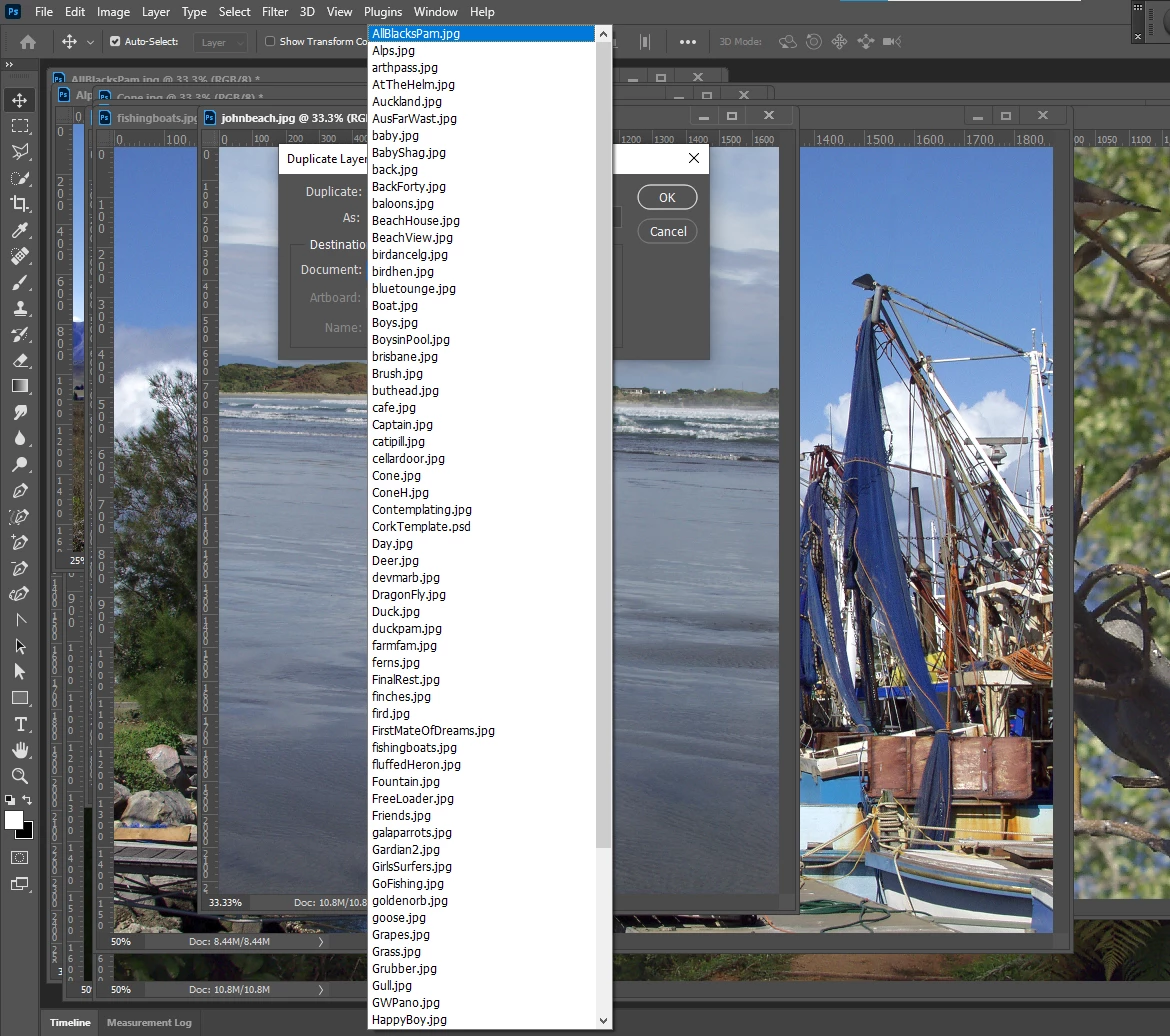
I see the same in CS6

Here is the demo of the bug. It still present.
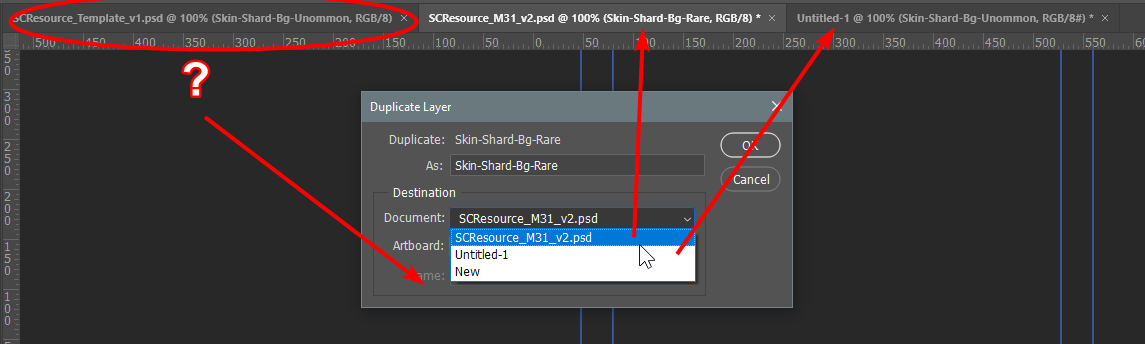
Documents are identical in color profiles, DPIs' etc
Adobe Photoshop Version: 22.3.1 20210406.r.122 990be2c x64

8 replies

JeffPWest
Known Participant
February 18, 2023

This bug is still happening version 24.1.1

Participant
September 28, 2022

Hello,


I'm suddenly having this same problem after updating to the latest verstion of PS. I really wish I hadn't done the update. Has anyone found the solution? I've tried everything, nothing works. Now, suddenly, all I can do is duplicate layers (or groups) to a new artboard but PS doesn't see the other files I have open, the ones i need to duplicate to.

Participant
September 28, 2022

Hey it ended up being that the files I wanted to duplicate to were just in a different color mode. I think the update has CMYK as the default setting but most photoshop work I do is in RGB so I just needed to change the color mode.

lollozip
Known Participant
July 26, 2022

I don't know if it could be a solution, but in my case, it depends on the selected layer in the Layer palette of the destination file.

If it's selected an empty layer group, the destination file does not appear in the opened files list:


If the selected layer is a layer, the file does appear in the list:


Maybe it can help.

Cheers

Lorenzo

robbcape
Participant
August 31, 2023

Thanks! I think this might well be the solution. Same as a lot of Photoshop issues... always check the layer you have selected.

Participant
April 9, 2022

I am also now having this problem after updating to version 23.2.2. Not giving me options to duplicate layers to certain files in the dropdown within the Duplicate Layer window

Participant
April 9, 2022

Update, I've noticed it seems to be adjustment layers which aren't being allowed to duplicate to a different file

Participant
March 23, 2022

Also having this problem. It just started up in the last couple days. It doesn't happen with all documents, just some randomly. And even if I duplicate the layers to a new document and then try to duplicate into the document I need them in from there, it still does not work. This is a big problem when you have to duplicate assets across a campaign with lots of ad sizes and types.

Participant
February 25, 2022

This same problem is happening for me. Two years later. Has anyone figured out a fix?

Participating Frequently
March 17, 2022

I am also experiencing this issue

Just Shoot Me
Legend
November 10, 2020

In the future, So people don't have to download the image you have attached, please use the Insert Photos icon found in the Tool Bar of the Post and Reply text entry dialog window as pictured below.
Since you Can't Edit your original post to remove the Attached screen shot Please include the screen shot you attached to a new reply to this conversation by clicking the Blue Reply button under your original post and use the Insert Photos icon in the tool bar.
The Insert Photos icon is this one in the Tool Bar.


Thank you.

JJMack
Community Expert
Community Expert
November 6, 2020

I do not understand your question Photoshop is a document editor.  Files open into Photoshop  as a Photoshop document that may have layers or only  have a single layer. You duplicate Layer into other open documents  you do not duplicate file into other documents,  You can place in file as a smart object layer. Photoshop works on Documents and works with layers not files. 


Your image show you open several file  into Photoshop and the document name reflect they were PSD files, You can duplicate layer into those open document that have been open from psd files. You can select them as the destination for the duplicate. As will as the new unsaved document Untitled-1, or even create a new document to receive the layer or group of layers.

JJMack
Participant
November 10, 2020

Hi JJMack – let me rephrase my issue.  


The two screenshots I attached are when I duplicate a layer from a document I'm working on (with lots of working layers) vs. when I duplicate from a new (mostly blank) document. Open documents are *missing* when I try to duplicate a layer from the document I'm working on. The *same* number of documents are open when I took both of these screenshots.


This is a very annoying bug and it's time consuming to duplicate to a blank document before I can duplicate to another open working document.

AlexScopelyCorrect answer
Participant
June 11, 2021

I use Windows 10 in current  Photoshop 2021 though it has issues. Duplicate Layer seem OK.  I just opened a large number of images  of images,  In Duplicate layer dialog destination I get a pull down list that I can scroll and select the destination to be any of the opened documents. All 70 open images are in the list plus NEW

I see the same in CS6


Here is the demo of the bug. It still present.

Documents are identical in color profiles, DPIs' etc
Adobe Photoshop Version: 22.3.1 20210406.r.122 990be2c x64