

rbanks88
Inspiring
November 20, 2019
Beantwortet

Missing gradient presets

  • November 20, 2019
  • 4 Antworten
  • 9506 Ansichten

I’m trying to use the gradient adjustment layer Photographic Toning gradient presets that I’ve seen in some tutorials (they say they are included with Photoshop), but when I open the menu, no presets are listed, including Photographic Toning. See the attached screenshot, where they should be listed at the bottom of the popup menu. 


Using the current subscription version on Mac.
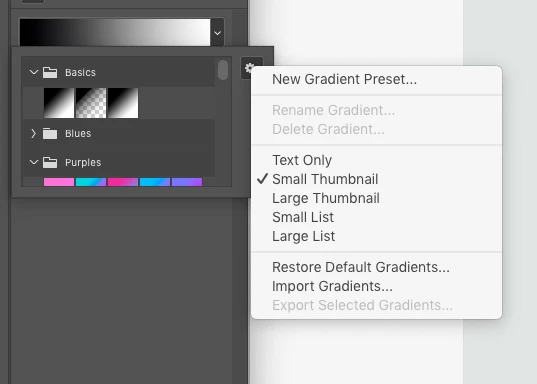


How can I get them to appear?


Thanks,
Russell

Beste Antwort von Semaphoric

You did scroll down to the bottom of the popup, right?

If it's not there, look in the Gradients panel (open it via the Window menu), and open the panel menu. Scroll down, and if you see Legacy Gradients, click on it.

4 Antworten

Participant
February 1, 2022

Using Photoshop 23.1.1 ...

Trying to use the Gradient Overlay tool but there are no gradients. 

Have read and tried many of the previous comment recommendations... there are no Legacy Gradients that I can find.

Please help! 😩 ty!

PECourtejoie
Community Expert
Community Expert
February 1, 2022

Hello, unfortunately, for a reason that escapes me, the Ps team has decided to have the option to load the legacy presets only present in the new preset panels: Gradients, Patterns, Shapes... But NOT in the local menus found in the option bar, nor in the local menu found in the Right-click of the tools....

Only the Brush tool has this option, making the new behaviour out of line with the convention.

PECourtejoie
Community Expert
Community Expert
February 1, 2022

So, you need to open the gradient Panel (windows>gradients) and there you will find the legacy option, NOT in the option bar, nor in properties, or in the contextual menu of the gradient tool.

silk-m
Community Expert
Community Expert
November 20, 2019

Hi,

What version of Photoshop are you currently using? . In 21.0.1, the Gradients panel looks like this.


2019’s Gradients can be read from Legacy Gradients.


--Susumu Iwasaki
Known Participant
January 2, 2021

Why on earth have those been deemed "legacy"? .. they seem pretty useful............

Semaphoric
Community Expert
SemaphoricCommunity ExpertAntwort
Community Expert
November 20, 2019

You did scroll down to the bottom of the popup, right?

If it's not there, look in the Gradients panel (open it via the Window menu), and open the panel menu. Scroll down, and if you see Legacy Gradients, click on it.

rbanks88
Inspiring
November 20, 2019

Found them. Thanks!

November 20, 2019

Hi

If you still have CC 2019 installed you can import them, not sure what the path is for a Mac but for Windows it's

C:\Program Files\Adobe\Adobe Photoshop CC 2019\Presets\Gradients

rbanks88
Inspiring
November 20, 2019

Found them. Thanks!