sheenam251699
Participant
March 19, 2017
Answered

Missing layers when saving PDF

  • March 19, 2017
  • 4 replies
  • 9653 views

I am having trouble when saving my PSD to a PDF. Some of the text layers seem to be missing content even though it is all correct when looking at the PSD.

I have tried updating Photoshop as well as looked through many forums without any luck. Please help.

    This topic has been closed for replies.
    Correct answer jane-e

    sheenam251699  wrote

    Windows 10 • Photoshop cc 2017 • Steps: Save as PDF. ( not sure of another way to save PDF)

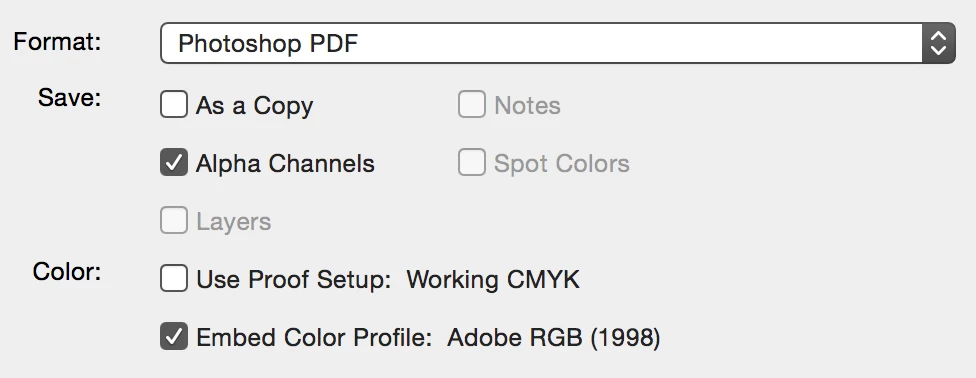
    You mean Save as > Photoshop PDF, right?
    Also, please explain more about

    1. the missing text layers.

    Are the entire layers missing? Are they visible in the Layers panel? Is part of the text layer missing? What font are you using? Can you post screen shots from Photoshop and from the PDF?

    and

    2. your PDF settings

    What setting do you have in the first screen (above)

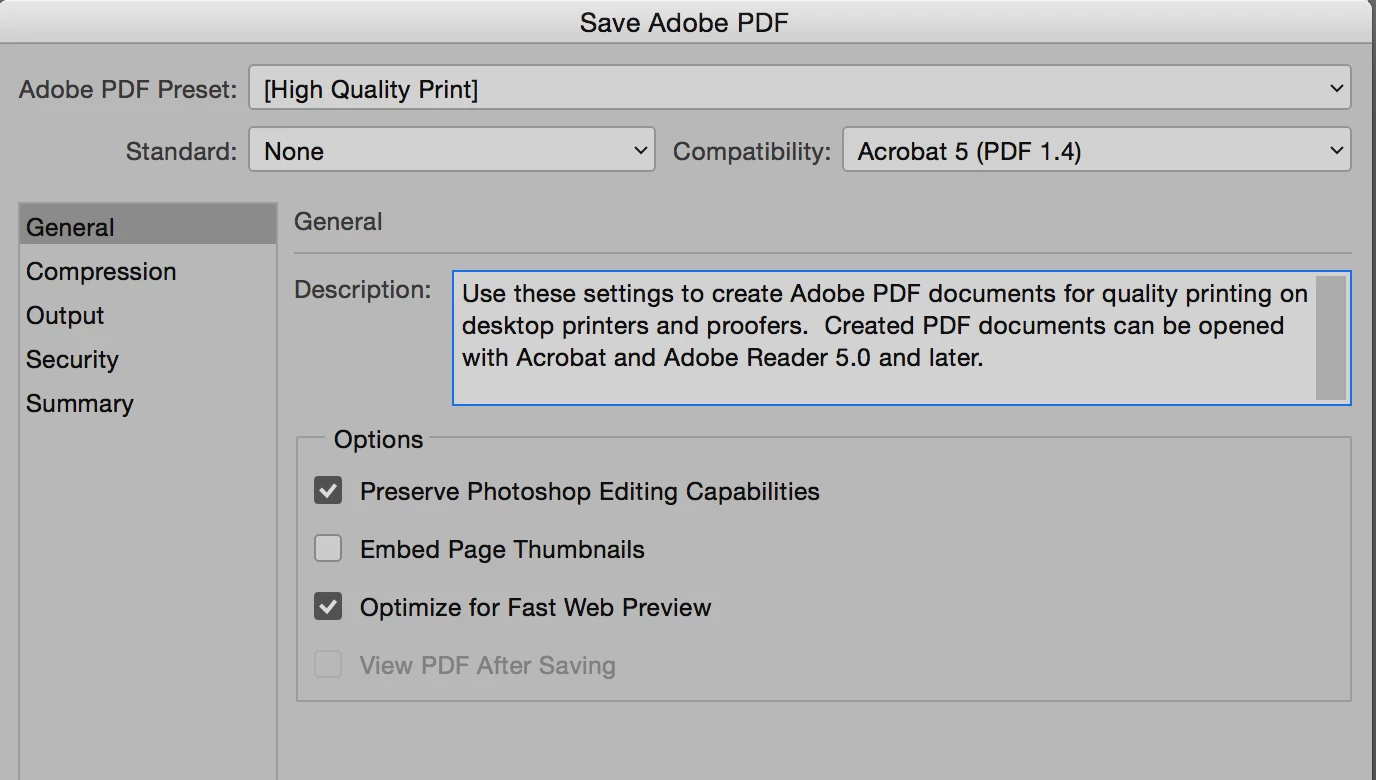
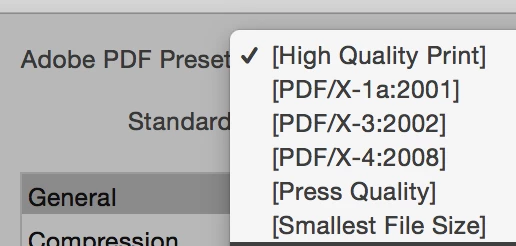
    and in the screen that follows, what are you using for the Adobe PDF Preset, and are you using it straight or is it modified?
    4 replies

    Trevor.Dennis
    Community Expert
    Community Expert
    March 19, 2017

    What font(s) are giving trouble?  Elaborate script fonts like Bickham Script Pro can do this — especially if you enable all the ligature options in the Character panel.  The fix is to add a space or two at the beginning and end of the text line.

    Incidentally, the first time I encountered this, I reached out to Nigel French who does the Photoshop Design titles on Lynda.com. This was his answer (Note: I hadn't asked him about colour. Just the cut off letters after saving to PDF.

    Hi Trevor,

    Getting a good PDF can sometimes be a dark art. Problems like these usually have something to do with blending modes and color modes. If the document is intended for print, I'd suggest using the Press Quality (or X1a 2001) preset rather than the somewhat erroneously named High Quality Print. These convert colours to your destination CMYK profile, whereas High Quality print makes no change to the colours.

    Cheers,

    Nigel

    sheenam251699
    Participant
    March 21, 2017

    Thank you for the reply. I tried this with no success. The text layers are still missing and the colour quality becomes poor.

    Any other ideas how I might fix this ?

    Participant
    May 18, 2022

    I had the same problem, I treid printing it to PDF instead of saving it.


    Community Expert
    March 19, 2017

    Put all your layers in a group and make sure all the layers you want in the pdf are visible. Now duplicate that group. Then take all the layers in that duplicated group and Merge only the duplicate layers and then try to export it as a PDF.

    Do not merge with original layers, so you can still make changes if needed.

    sheenam251699
    Participant
    March 21, 2017

    Thank you for the reply. I tried this with no success. Any other ideas as to how I might fix this ?

    jane-e
    Community Expert
    Community Expert
    March 19, 2017

    A screen shot of the psd and pdf would also be useful.

    Barb Binder
    Community Expert
    Community Expert
    March 19, 2017

    We will need a little more information to help:

    • What operating system?
    • What version of Photoshop?
    • What version of Acrobat or Reader?
    • What steps, exactly, are you taking to convert your layered PSD to a PDF?
    ~Barb at Rocky Mountain Training
    sheenam251699
    Participant
    March 21, 2017

    Windows 10

    Photoshop cc 2017

    Steps: Save as PDF. ( not sure of another way to save PDF)

    jane-e
    Community Expert
    jane-eCommunity ExpertCorrect answer
    Community Expert
    March 21, 2017

    sheenam251699  wrote

    Windows 10 • Photoshop cc 2017 • Steps: Save as PDF. ( not sure of another way to save PDF)

    You mean Save as > Photoshop PDF, right?

    Also, please explain more about

    1. the missing text layers.

    Are the entire layers missing? Are they visible in the Layers panel? Is part of the text layer missing? What font are you using? Can you post screen shots from Photoshop and from the PDF?

    and

    2. your PDF settings

    What setting do you have in the first screen (above)

    and in the screen that follows, what are you using for the Adobe PDF Preset, and are you using it straight or is it modified?
