Inspiring
May 3, 2016
Answered

Missing Plugins folder CC2018

  • May 3, 2016
  • 4 replies
  • 25226 views

Heya, does anyone know where the plugins folder is for Photoshop CC2018? I can't find anywhere to install my 8bf files for my plugins....

Thanks in advance

Gary

    This topic has been closed for replies.
    Correct answer JJMack

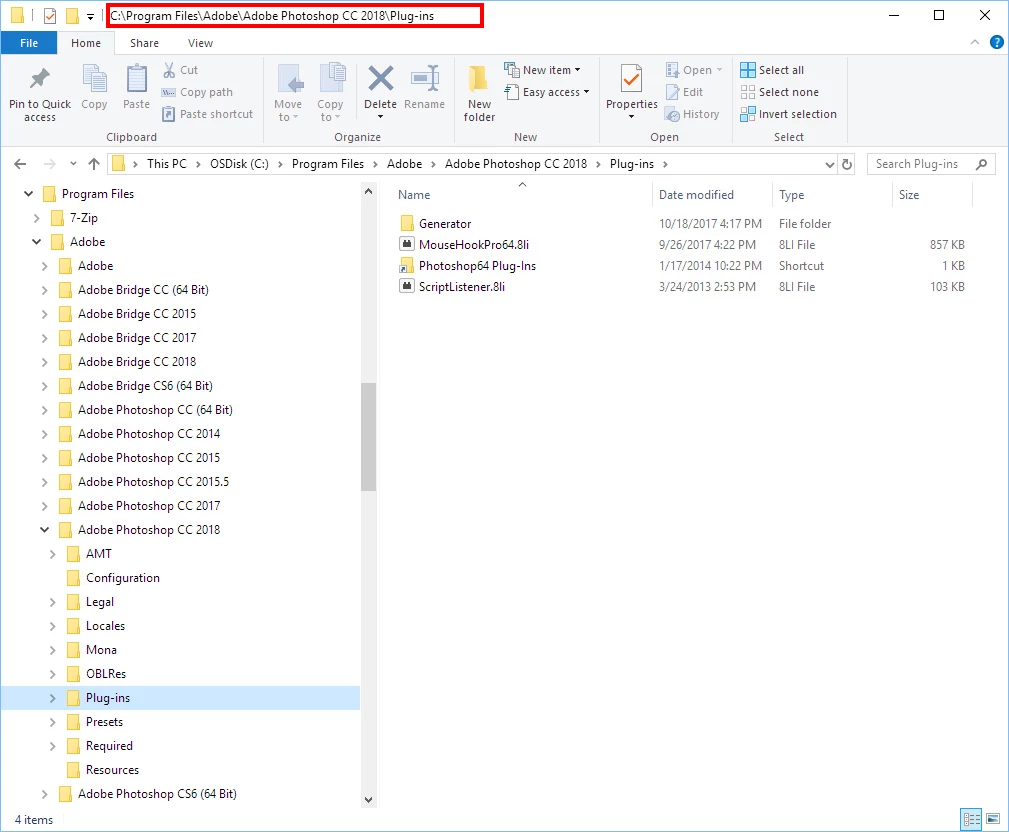
    Same place as earlier versions of Photoshop on windows anyway. I link Adobe's Plug-in folder to my Plug-in folder via a shortcut link.
    4 replies

    Participant
    September 12, 2018

    I've been struggling with this since downloading CC2018, and I just found a solution!! Re-installing and then RESTARTING MAC straight after, did the trick! See here:

    How to install the plugins in Photoshop CC 2014 - Powered by Kayako Help Desk Software

    All I did was restart my MacBook after the installation, and it worked

    Participant
    March 25, 2018

    My portraiture and noiseware plugins have to be reinstalled every time i open photoshop cc2018. What is the fix for this? MacOS High Sierra 10.13.3

    Jeff Arola
    Community Expert
    Community Expert
    October 19, 2017

    Same place as previous photoshop versions on mac as well.

    /Applications/Adobe Photoshop CC 2018/Plug-ins

    JJMack
    Community Expert
    Community Expert
    October 19, 2017

    That is an Adobe Plug-in Folder the is share between Adobe Photoshop and and Adobe Bridge and is where ACR is installed.  It it not the folder where your Photoshop third Party Plug-in should be installed. Though I see  you have installed your there.  As I wrote I link Adobe normal third party plug-in folders to my Photoshop Plug-ins folders for Photoshop 32Bit and Photoshop 64 Bit versions.

    JJMack
    Participant
    July 5, 2016

    If Adobe has not responded to a message started in 2012 Creative Cloud for Linux (Ubuntu)  by announcing plans to support Linux, I seriously doubt that starting a new request is going to get Adobe to change course


    Ignoring the issues will not get Adobe to change course either. How is Adobe supposed to gauge the community's needs if the community is not willing to speak?

    JJMack
    Community Expert
    JJMackCommunity ExpertCorrect answer
    Community Expert
    October 19, 2017

    Same place as earlier versions of Photoshop on windows anyway. I link Adobe's Plug-in folder to my Plug-in folder via a shortcut link.

    JJMack
    Inspiring
    October 19, 2017

    Cheers JJ....As you'll see above I've found mine, not in the same place as yours. I left my installation to do it's own thing bar deleting older versions I have installed.