
Laethageal
Participating Frequently
March 3, 2022
Answered

Modifying a gradient fill with a script

  • March 3, 2022
  • 1 reply
  • 2310 views

Hello,

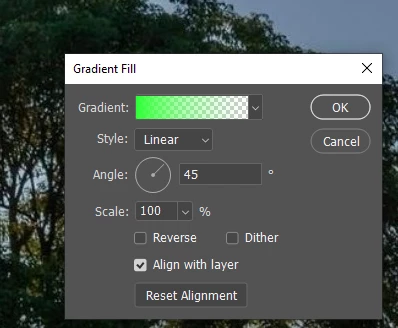
I'm looking to automate a process where I need to have a gradient fill layer modified. Is it possible to modify the Angle at which the linear gradient is applied. I know the values can go from 0-359 but is there a command to actually modify its value with one of the javascript command?  I couldn't find any directly related to a gradient angle. 

Thanks!


This topic has been closed for replies.
Correct answer Stephen Marsh

@Laethageal wrote:

How would I pick a layer in a particular group?


Various methods are explored here:


https://gist.github.com/MarshySwamp/229a0676666a44cdaa007da1cfddc0b7


1 reply

c.pfaffenbichler
Community Expert
Community Expert
March 3, 2022

Have you used ScriptingListener.plugin to record the operation as AM code? 

// 2022, use it at your own risk;
changeAngleOfGradientLayer (30);
function changeAngleOfGradientLayer (theAngle) {
try {
var idset = stringIDToTypeID( "set" );
    var desc5 = new ActionDescriptor();
    var idnull = stringIDToTypeID( "null" );
        var ref1 = new ActionReference();
        ref1.putEnumerated(stringIDToTypeID( "contentLayer" ), stringIDToTypeID( "ordinal" ), stringIDToTypeID( "targetEnum" ));
    desc5.putReference( idnull, ref1 );
    var idto = stringIDToTypeID( "to" );
        var desc6 = new ActionDescriptor();
        var idgradientsInterpolationMethod = stringIDToTypeID( "gradientsInterpolationMethod" );
        var idgradientInterpolationMethodType = stringIDToTypeID( "gradientInterpolationMethodType" );
        var idperceptual = stringIDToTypeID( "perceptual" );
        desc6.putEnumerated( idgradientsInterpolationMethod, idgradientInterpolationMethodType, idperceptual );
        var idangle = stringIDToTypeID( "angle" );
        var idangleUnit = stringIDToTypeID( "angleUnit" );
        desc6.putUnitDouble( idangle, idangleUnit, theAngle );
        var idtype = stringIDToTypeID( "type" );
        var idgradientType = stringIDToTypeID( "gradientType" );
        var idlinear = stringIDToTypeID( "linear" );
        desc6.putEnumerated( idtype, idgradientType, idlinear );
        var idgradient = stringIDToTypeID( "gradient" );
    var idgradientLayer = stringIDToTypeID( "gradientLayer" );
    desc5.putObject( idto, idgradientLayer, desc6 );
executeAction( idset, desc5, DialogModes.NO );
} catch (e) {}
};


Laethageal
Participating Frequently
March 18, 2022

Sorry for the slow reply, new job came in and had to put my project on hold for a few days.

Also, thanks for the tip. I'm no javascript coder and still hardly get by modifying some basic commands on premade script to try and fit what I'm looking for, mostly by addition of some if/else check. I wasn't expecting something so complex 😉

From what I understand, this is the code that scriptlistener gave you when changing a gradient?
How would I pick a layer in a particular group?


Stephen Marsh
Community Expert
Community Expert
March 18, 2022

Thanks.

After seeing your teasing, I was on the defensive tbh. I had also posted right above the method I finally was able to use to select various layers, so I thought your answer was another teasing. 

But I took 1 minute to check it out and it is actually some great information. I can't say I understand all the various form of coding, but some are easy to understand/use for me and as I learn more coding, I am pretty sure it'll be useful for me.

Thanks!

Would you happen to know how I can change the degree of the gradient when I already have code pointing to a particular gradient layer, as posted above? 

function Visible() {
  var Grps = app.activeDocument.layerSets; // loops through all groups
  for(var i = 0; i < Grps.length; i++){
    var tmp = app.activeDocument.layerSets[i].layers.length;
    app.activeDocument.layerSets[i].visible=true;
    var groupChildArr = app.activeDocument.layerSets[i].layers;
    var randLays = Math.floor(Math.random() * tmp);
    if ( i = 4 ) {
        ... code for modifying gradient degree of groupChildArr[randLays] ...
    }
    groupChildArr[randLays].visible = true;
  }
  Save();
  Revert();
}


@Laethageal wrote:

Thanks.

After seeing your teasing, I was on the defensive tbh. I had also posted right above the method I finally was able to use to select various layers, so I thought your answer was another teasing. 

But I took 1 minute to check it out and it is actually some great information. I can't say I understand all the various form of coding, but some are easy to understand/use for me and as I learn more coding, I am pretty sure it'll be useful for me.

Thanks!


You will have to forgive my sense of humor. All of us are at different stages with scripting, I still class myself as a beginner. I just put it out there in case it was helpful. I have added your example to the gist. There is often a good chance that somebody has done what you wish to do before. I generally use the following "Active Layer Inspector" script to get info on the selected layer:


https://gist.github.com/MarshySwamp/ef345ef3dec60a843465347ee6fcae2f


Would you happen to know how I can change the degree of the gradient when I already have code pointing to a particular gradient layer, as posted above? 


The other forum members have explained the process, this is what I came up with:


if (app.activeDocument.activeLayer.kind === LayerKind.GRADIENTFILL) {

    gradAngle(-90);

    function gradAngle(angle) {
        var s2t = function (s) {
            return app.stringIDToTypeID(s);
        };
        var descriptor = new ActionDescriptor();
        var reference = new ActionReference();
        reference.putEnumerated(s2t("contentLayer"), s2t("ordinal"), s2t("targetEnum"));
        descriptor.putReference(s2t("null"), reference);
        descriptor.putUnitDouble(s2t("angle"), s2t("angleUnit"), angle);
        descriptor.putObject(s2t("to"), s2t("gradientLayer"), descriptor);
        executeAction(s2t("set"), descriptor, DialogModes.NO);
    }
    
} else {
    alert("The active layer is not a Gradient Fill layer!")
}


I recorded changing the angle of an existing gradient fill layer via script listener, then through "targeted" trial and error removed the code that was not associated with the angle change, then ran the result through the Clean SL script and then added the conditional check.


EDIT: From the other topic, this modified code from jazz-y is cleaner than my attempt:


gradientLayerAngle(-90);

function gradientLayerAngle(theAngle) {
    /* https://community.adobe.com/t5/photoshop-ecosystem-discussions/need-help-with-randomizing-gradient-fills/td-p/12349266 */
    s2t = stringIDToTypeID;
    (r = new ActionReference()).putEnumerated(s2t("contentLayer"), s2t("ordinal"), s2t("targetEnum"));
    (d = new ActionDescriptor()).putReference(s2t("null"), r);
    (d2 = new ActionDescriptor()).putUnitDouble(s2t("angle"), s2t("angleUnit"), theAngle);
    d2.putEnumerated(s2t("type"), s2t("gradientType"), s2t("linear"));
    d.putObject(s2t("to"), s2t("gradientLayer"), d2);
    executeAction(s2t("set"), d, DialogModes.NO);
}