

Achtland
Inspiring
March 10, 2020
Answered

Move anchor point tool disappeared

  • March 10, 2020
  • 1 reply
  • 3633 views

Okay so it's important that I preface this with - I literally JUST USED the move anchor point tool not five minutes before this post and found it in the requisit screen shot but when I went back in there to use it again. It had disappeared.


I've reset my essentials since I thought that maybe I pressed something weird. I also looked in the horizontal ellipses for it and it's just -- gone. 


What did I do? Who has stolen my move anchor point tool? I'm happy to offer a reward of a million smiles if someone would help me locate this function ❤️

 

    This topic has been closed for replies.
    Correct answer jane-e

    Hi

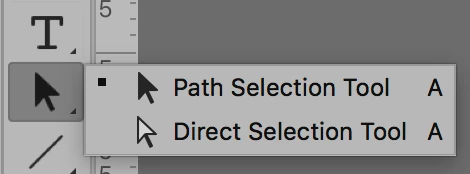
    It's called the Direct Selection tool and should be here with the Path Selection tool. The keyboard shortcut is "A".

    Jane

    1 reply

    jane-e
    Community Expert
    jane-eCommunity ExpertCorrect answer
    Community Expert
    March 10, 2020

    Hi

    It's called the Direct Selection tool and should be here with the Path Selection tool. The keyboard shortcut is "A".

    Jane

    Achtland
    AchtlandAuthor
    Inspiring
    March 10, 2020

    I believe you that is what it's called but why was I able to find it in the screen shot less than five minutes before hand? Could this be a version issue?

    jane-e
    Community Expert
    Community Expert
    March 11, 2020

    Hi

    No, it's not a version issue — the Path Selection and Direct Selection tools have always shared a space and a shortcut in Photoshop. If you go to Edit > Toolbar (or click the Ellipses) and click Restore Defaults, that's where they will be.

    In newer versions, you can customize your toolbar and put the Direct Selection tool where you want it, though. I like to separate out the two tools so they are easier to choose.


    Also, the next time you "lose" a tool, try my favorite trick. Click the magnifying glass, select Photoshop, and start to type the name of the tool. When it appears in the list, click it and PS will take you there.

    ~ Jane