Inspiring
January 21, 2020
Answered

Move tool has disappeared

  • January 21, 2020
  • 2 replies
  • 7772 views

Title says it.  The move too has disappeared from the toolbar. 

This topic has been closed for replies.
Correct answer jane-e

The first thing I tried was dragging it.  It wouldn't move


Hi

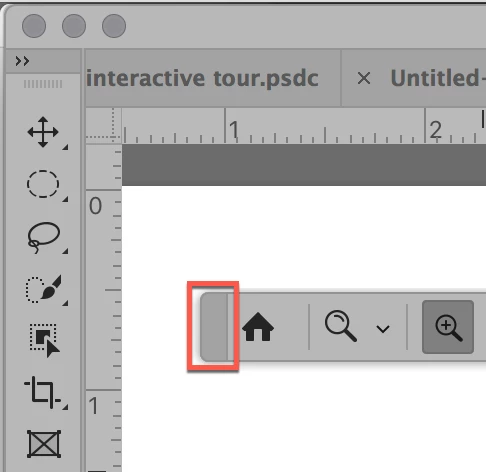
Your cursor has to be in the right place, or the panel won't move. See where it's marked in red. Workspace basics are in this Help file. Scroll down to "Dock and Undock Panels".
 

2 replies

Michael Bullo
Community Expert
Community Expert
January 21, 2020

Could it be hidden behind the Artboard Tool? Any icon within the Tools panel that has an arrow in the bottom right corner has other tools grouped with it. These other tools can be revealed by clicking and holding on that icon.


gener7
Community Expert
Community Expert
January 21, 2020

Go to the Edit menu > Toolbar... and click on the Restore Defaults button.

i_am_jimAuthor
Inspiring
January 21, 2020

I tried that, no help.   The list on the left says the tool is there. 

. Windows 10 -- Premiere Elements 2018 -- Photoshop CC
i_am_jimAuthor
Inspiring
January 22, 2020

Go to Window > Workspace > Reset <Workspace name>


That did it. Thanks. 

. Windows 10 -- Premiere Elements 2018 -- Photoshop CC