
Participating Frequently
January 13, 2025
Answered

Move tool not helpful after last update

  • January 13, 2025
  • 1 reply
  • 304 views

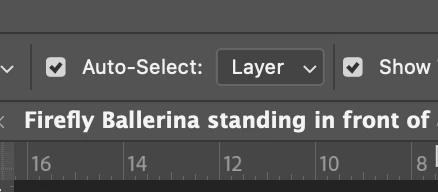
Before the update when selecting layers in the artboard was easy as just moving the cursor above the graphic/text and clicking, now after the update it does not do it. I just selects the most upper layer. Now I have to right click and select the needed layer in the drop down layer, and text layers can only be selected with text tool.


If anyone knows how to fix this I'd be more than greatful because Photoshop is getting more and more apsurd to use with each new update, it's getting ridiculous. 


Cheers
Correct answer Kevin Stohlmeyer

@Hechaldo while the move tool is selected, go to your options bar and uncheck "auto select" - that is allowing the move tool to auto choose the layer based on where you click.


1 reply

Kevin Stohlmeyer
Community Expert
Kevin StohlmeyerCommunity ExpertCorrect answer
Community Expert
January 14, 2025

@Hechaldo while the move tool is selected, go to your options bar and uncheck "auto select" - that is allowing the move tool to auto choose the layer based on where you click.


Participant
September 13, 2025

Thank you so much, you just helped with my headache.

What usually takes me an hour to do took almost 5