
yazdan.bg
Participant
December 24, 2022
Answered

move tool not work

  • December 24, 2022
  • 3 replies
  • 2878 views

hi 

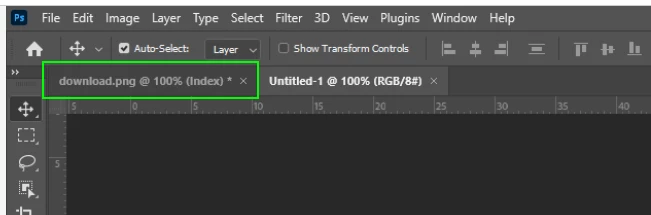
when I want to move the logo this  mark is show me 

and I cant use the move tool

can enyone help?

This topic has been closed for replies.
Correct answer Ged_Traynor

Hi

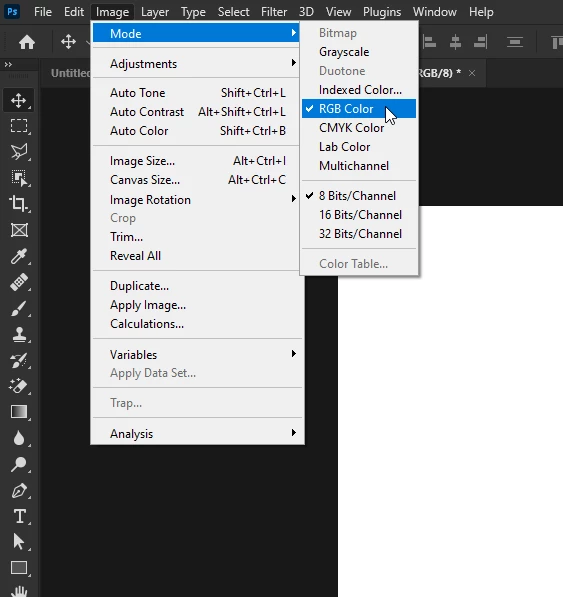
You're working on an Index layer, try changing it to RGB Color
3 replies

ElizabethOOOG
Known Participant
December 25, 2022

Unlock layer. Toggle on pallet. 

Okay
Ged_Traynor
Community Expert
Community Expert
December 25, 2022

@ElizabethOOOG you can't unlock an Index layer, it has to be converted to another format

Trevor.Dennis
Community Expert
Community Expert
December 26, 2022

Ged, I haven't worked ouut why the thumbnail shows content but the document window is empty (full white).  I can't say that I have much experience with Index Colour, but I tried to duplicate it and mine looks exactly as expected.


I am able to move the layer though.  AFAICT from the screen shot the image is zoomed to 100% so it's not like the content is hidden offscreen. 

Ged_Traynor
Community Expert
Ged_TraynorCommunity ExpertCorrect answer
Community Expert
December 25, 2022

Hi

You're working on an Index layer, try changing it to RGB Color
yazdan.bg
yazdan.bgAuthor
Participant
December 26, 2022

thank that's worked

Ged_Traynor
Community Expert
Community Expert
December 26, 2022

You're welcome 👍

Mylenium
Legend
December 25, 2022

There is nothing to move because there's no layer or selection. You may want to start at the beginning and learn the basics.


https://helpx.adobe.com/photoshop/user-guide.html


Mylenium

Ged_Traynor
Community Expert
Community Expert
December 25, 2022

@Mylenium maybe you should look at the screenshot before replying with your slightly condescending reply
