


Inspiring
August 18, 2019
Answered

Multiple Windows with Different Magnifications, Same File

  • August 18, 2019
  • 2 replies
  • 2590 views

Is there a way to have two windows open of the same file, each with its own unique magnification amount?

The project I'm working on requires being really zoomed in while painting, but needs to be zoomed out to assess the results as I go.  The constant zoom in / zoom out is tedious.  All I want to do is paint and then look over at a zoomed out view and then go back to painting.

I tried using the Navigator window, but the magnification of the image is dependent on the width / height of the Nav window and it shows parts of the image I do not need to see.

Thanks,

Marc
    This topic has been closed for replies.
    Correct answer DeanUtian

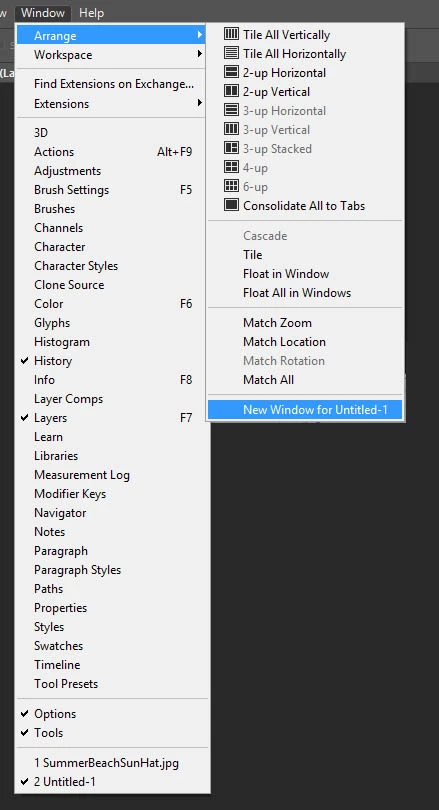
    From the Window menu, choose Arrange > New Window for <image name>.

    2 replies

    JJMack
    Community Expert
    Community Expert
    August 18, 2019

    Photoshop is a document editor.  You can open multiple view of you document in Photoshop  and zoom each view to a different percentage. You use menu Window>Arrange>New Window for xxxx at the bottom of  the item list. Here is an action I use to setup a second view one my Samson galaxy 8.4 or SP3 when I have it attached to my Workstation as third High ppi resolution display.  Its one document with two view. There can be delays updating a view. You may need to complete an operation in one view before the change can be reflected to other view.

    JJMack
    DeanUtianCommunity ExpertCorrect answer
    Community Expert
    August 18, 2019

    From the Window menu, choose Arrange > New Window for <image name>.

    Inspiring
    August 18, 2019

    I am embarrassed I missed that.  When I looked in the Arrange menu I read it so fast I thought it was the choice at the bottom of the Window menu where Photoshop lists the filenames of all your open images.

    Thank you for taking the time to reply,

    Marc

    Community Expert
    August 18, 2019

    Not a problem. Sometimes small things can be overlooked.

    Glad to help.