
Participant
November 2, 2023
Answered

MX Master 3s brush size px per press

  • November 2, 2023
  • 1 reply
  • 1344 views

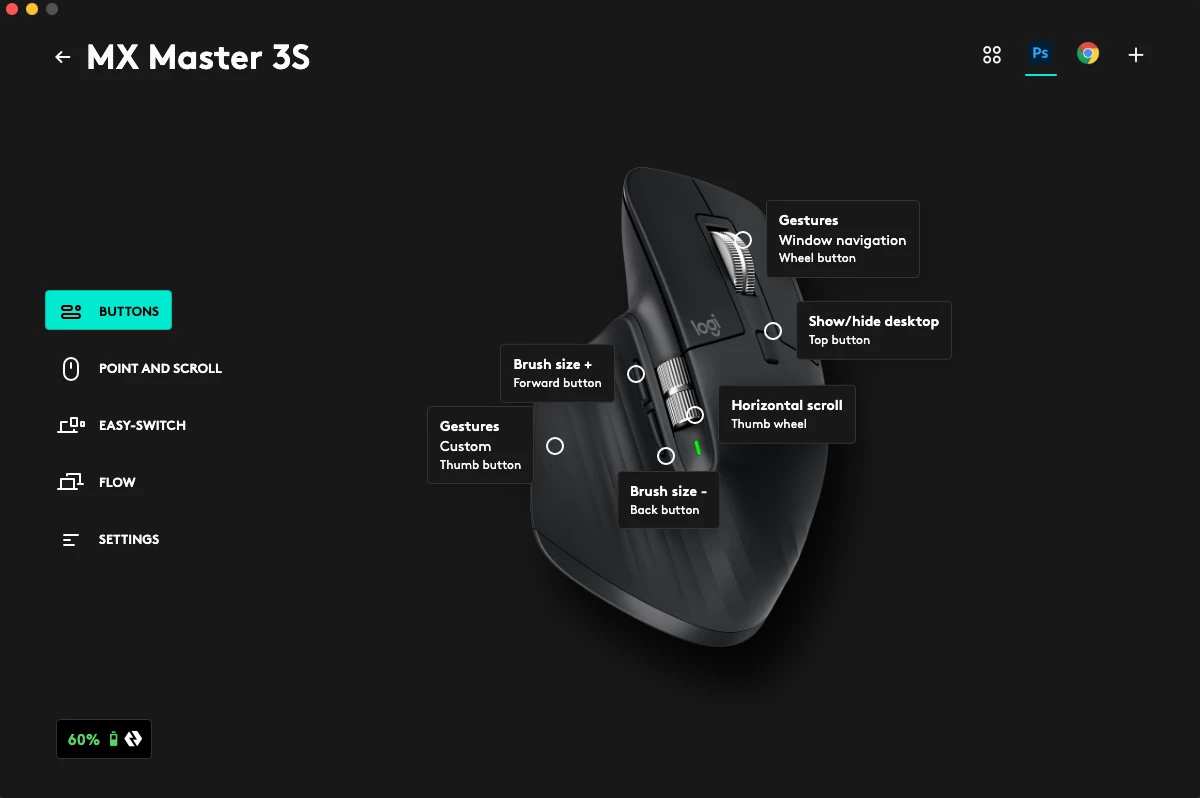
I am using MX Master 3s on a iMac with Mac os 10.15. In the Logitech Options+ I customize the forward button and back button as "brush size +" and "brush size -", and they do work in photoshop. However, comparing to the original shortcut "]" and "[" in photoshop where they increase/decrease 5px per press, the forward and back button on the mouse only increase/decrease 1px per press, which is way too slow for me. Is there any way that I can customize this "px per press" when changing brush size?
Correct answer AlicanAkcol

have you managed to solve this thumb wheel speed for brush size? I coulndt figure it out yet. 😞

1 reply

Trevor.Dennis
Community Expert
Community Expert
November 2, 2023

I use an MX Master 3 (not the S) on Windows 11, and I was involved in a conversation with other users on this forum back in September.  I can't remember all of the details, but the gist of it was that using Options + stuffed up my mouse settings, and I had to use Options (without thje +) to get it working again.


I left mine with the default, which is the thumb wheel controls brush size, and that works nicely.  It has an analogue feel to it, but it is difficult to change the brush size by just one pixel.  One full sweep gives me 200 plus pixels of change.  Thinking about it, the times I have most issues with brush size is in that 1 to 3 pixel area when I generally end up opening the panel, selecting the relevant field and using the arrow keys, so I would love a reliable way of adjusting up and down by 1 pixel.


From your point of view, there is no reason why you can't set both forward and back buttons plus the thumb wheel to control brush size.  The former for fine control, and latter for larger changes.  I might try this myself going forwar.  In fact I have just set this up and it works rather well.  The main bug bear being that I am generally holding the tablet stylus when using tools that use brush presets, so I use a combination of the Wacom Express Wheel, and right click and drag.


I don't know if that has given you anything to think about, but I would certainly be interested in what sort of workflow you decide on?

Participant
November 2, 2023

Thanks for replying!

I just tried to set the thumb wheel to control brush size, but one full sweep only gives me about 30px of changes which is still to slow for me. 200 px changes per a full sweep would be very nice for me, how did you set this? My thumb wheel speed is 50% by defalt, I have also tried to changed it to 0% and 100% but this doesn't affect the brush size px changes per a full sweep haven't in photoshop.

AlicanAkcolCorrect answer
Participant
February 2, 2024

have you managed to solve this thumb wheel speed for brush size? I coulndt figure it out yet. 😞