Known Participant
November 24, 2022
Question

My B&W CMYK print files with the correct color profile end up having a green hue when printed

  • November 24, 2022
  • 5 replies
  • 5504 views

Hello community,


I've had the pleasure of getting assistance from folks here in the past, yet sadly my problem is yet to be resolved;


I work on record covers and continue to do so. Usually this means editing certain images in Ps and converting them into Greyscale to get the B&W colors I want, as I prefer B&W covers, then transferring them into RGB and saving them as a tif.


My current example;
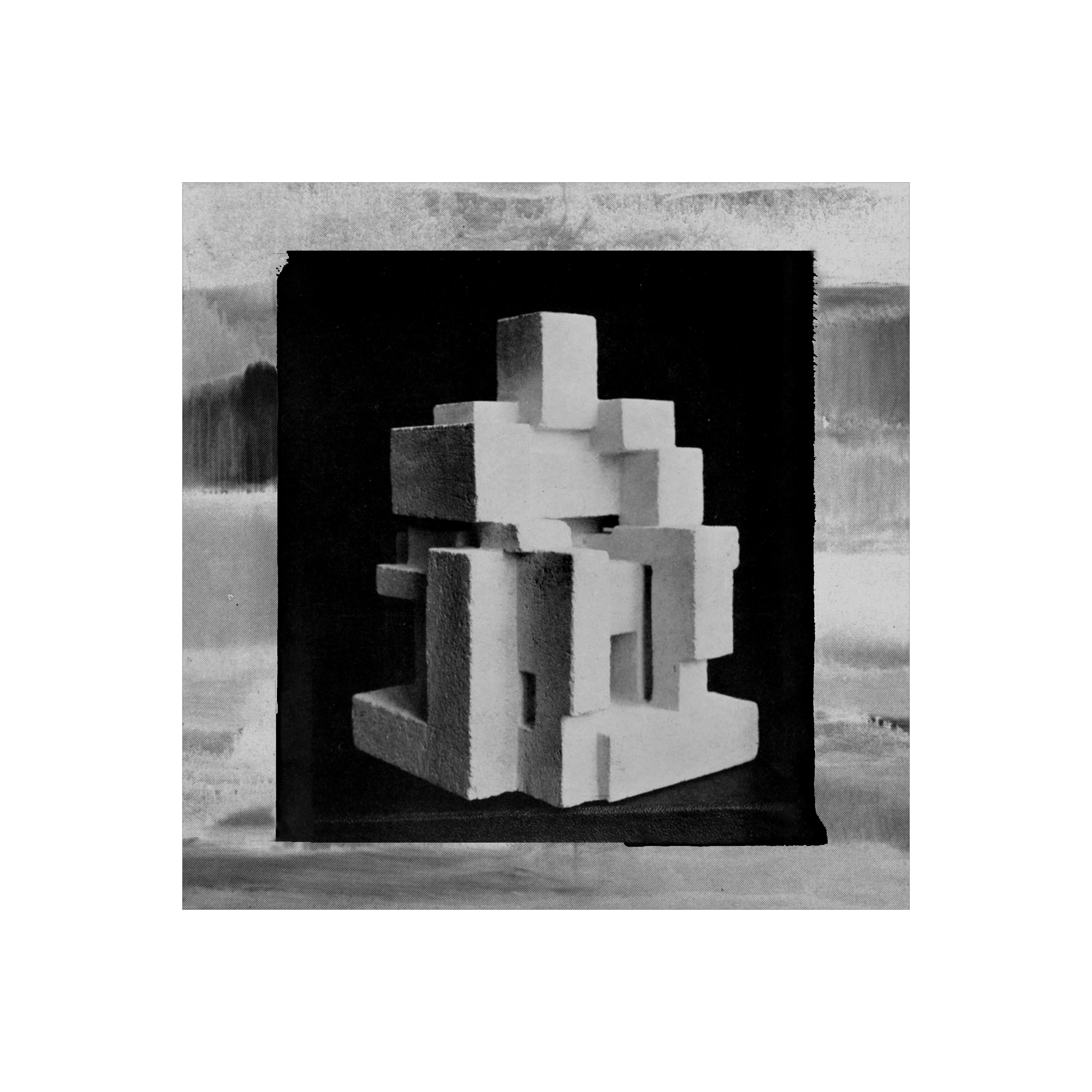
 

These RGB images are then used as the basis of my covers, which are exported into Ai to place them onto the vinyl template and exported as a CMYK PDF according to the color profiles given to me by the pressing plant, while making sure that 'convert to destination (preserves numbers)' and 'Include desitnation profiles' boxes are ticked.


Now, while the final PDF's are to my licking, the end results often are not, whith many of my B&W covers printed in CMYK often ending up being noticably impacted by greenish hues. This is especially frustrating as it keeps happening, and yet it does not show up everytime, making me continously scrath my head as to why this is.


To further highlight this problem, here are the current print previews sent to me by the pressing plant - vs - the LP cover files I had sent them, (notice the green hue on the print previews, vs the B&W of the PDF file's) when viewed via the mac image viewer 'Preview':


LP cover 
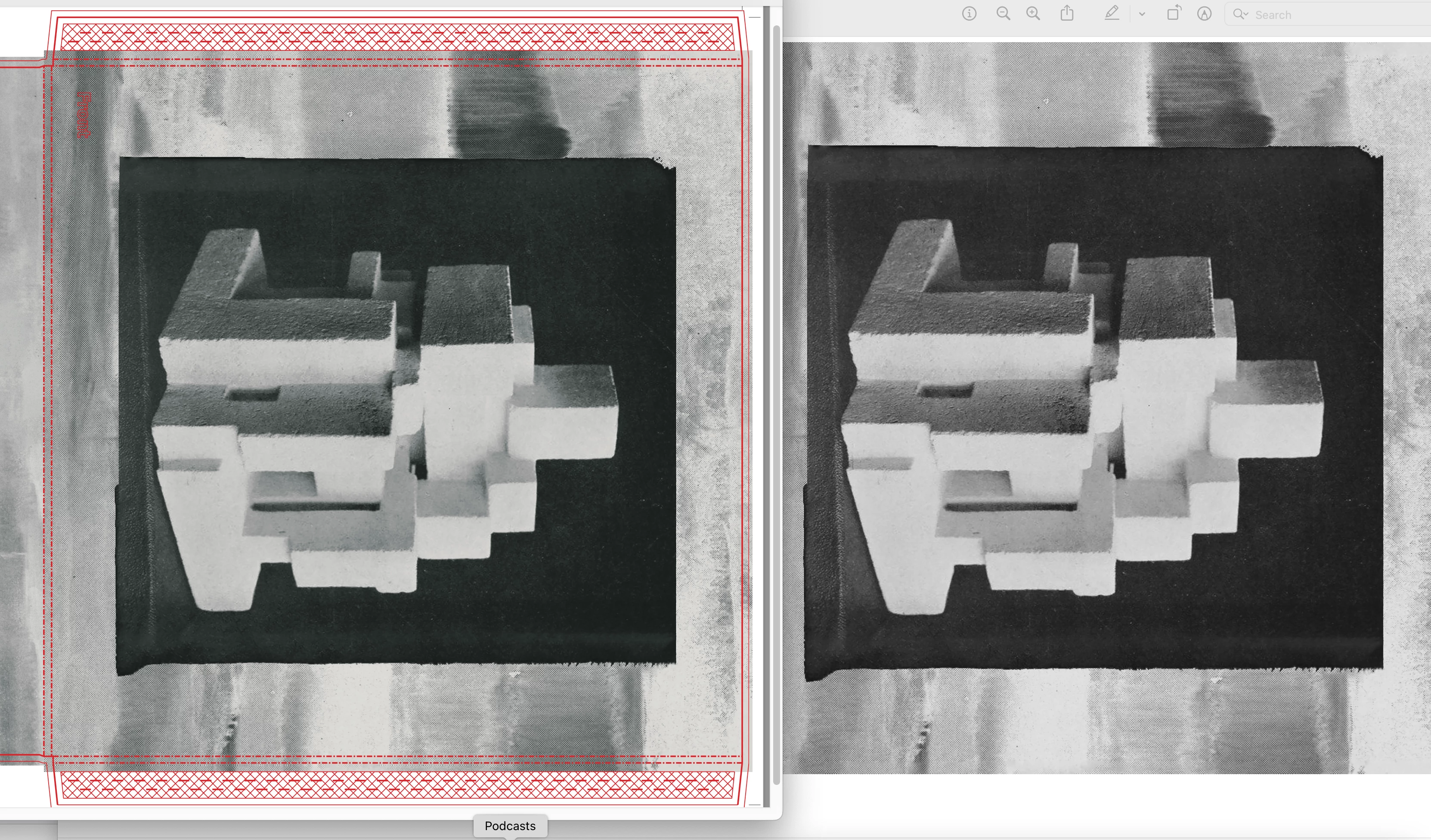


(here reversed, the previews on the right of the labels, vs the file I sent them on the left)
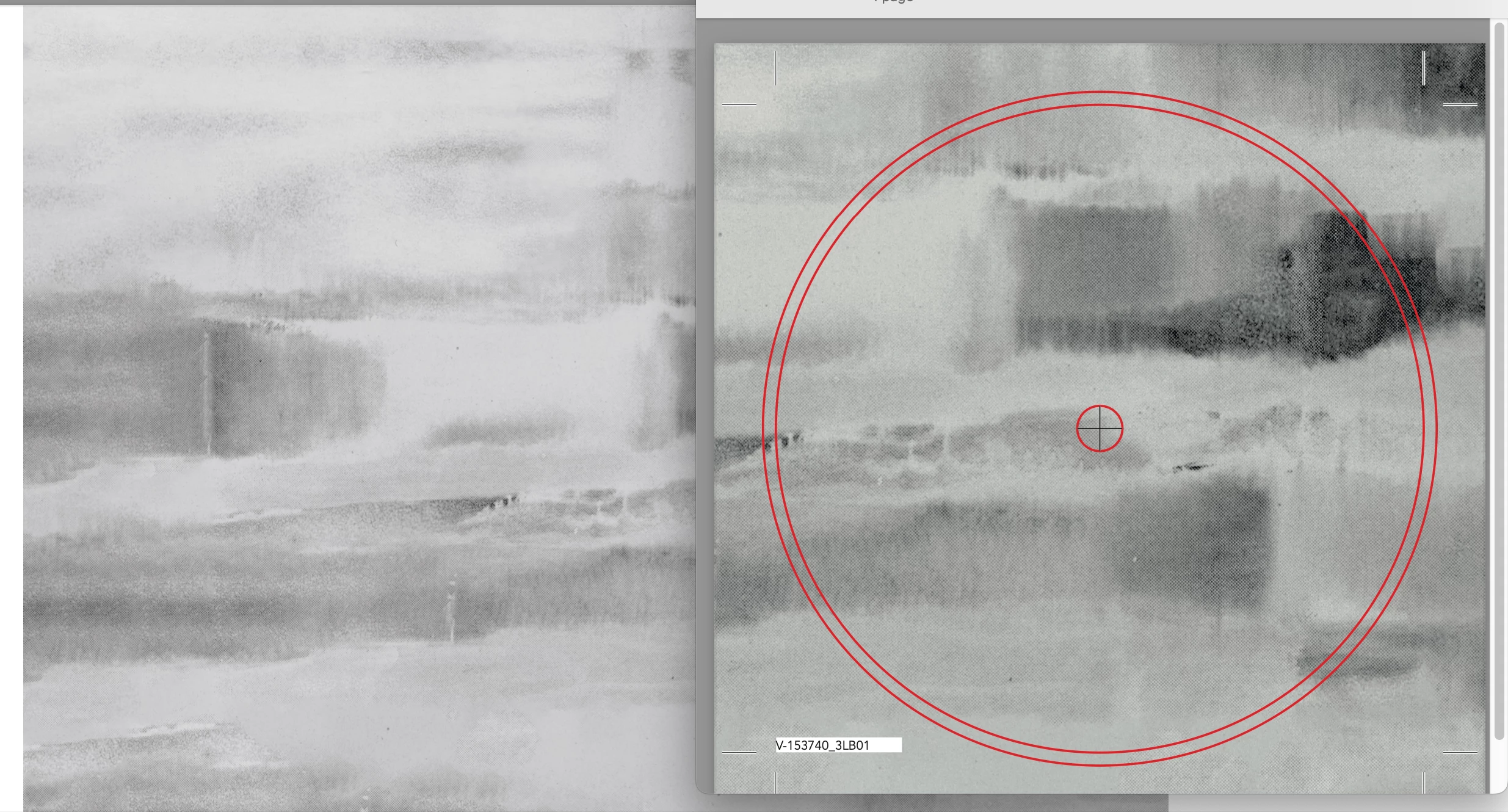
 

Now, it seems to perhaps have nothing top do with the actual exported Ai color profiles of the final PDF (?) as the images above showcase two different color profiles (the LP cover requires a different profile then the vinyl labels), yet both showcase the same exact issue. Though when viewing the greenish images in Ps or Ai, rather then in Preview, the images revert back to the 'correct' B&W color...


If anyone has any idea what I might be doing wrong, or how this problem could be combated, please do let me know. I'm glad to share any information needed and would be beyond thankful if this issue could somehow be resolved.


Sincerely,


O.

5 replies

Jumpenjax
Community Expert
Community Expert
November 26, 2022

Check and see if the bw is a true black and white. Maybe RGB looks bw but if it is not bw it can carry a color hue when printing.

Lee- Graphic Designer, Print Specialist, Photographer
Known Participant
November 30, 2022

Hello, mind you i am not printing RGB but CMYK


If I include profiles, it looks fine like It's supposed to on my computer;


if I do not include profiles during import, it comes out green, which sadly is often how it looks when printed;


Now I know they used euroscale uncoated and FOGRA39, but they want me to specifically not include profiles as they will add them themselves;


  "In this case our graphic designer expect files without any profiles included, made in CMYK with proper ink saturation. Our graphic designer is working in InDesign, using FOGRA39 but with no profiles."


"The files should be made without any profiles and send like that to us.

When your customer include Fogra39 to these files, he will see how the colours will look like after printing on our machines, so it will be some kind of colour simulation.

Our graphics designers do the same - they receive files with no profiles included, then they use Fogra39 to see the colour simulation, but finally artworks with no profiles are passed for printing area.”'


can anyone make sense of this?


Legend
December 6, 2022

Now, please check it's a true black and white by sampling the colour values - not just what it looks like on screen.

Abambo
Community Expert
Community Expert
November 25, 2022

RGB is not Grayscale. And especially not, when you send an RGB over to a printer. Even if you are doing a CMYK separation, and there is a CMY part in your file, you can't expect a neutral greyscale print, except in the perfect world of theoretical colour separation. 

You have so many unknowns in your colour transfer.

ABAMBO | Hard- and Software Engineer | Photographer
Known Participant
November 25, 2022

Thank you all for your answers. Though let me clarify that I am not sending RGB images to a printer, I am saving images as RGB and then converting them into CMYK during the export Ai export.


Which brings me to two questions that might help narrow down this issue;


Does it perhaps make more sense to already apply the correct profiles while editing the images in Ps, rather than during the final export? Perhaps this ensures a better workflow with regard to color management? 


Secondly, the record plant sends me their templates which are only usable in Ai. Though Ai being a vector based program, would it not be better to finalize these print files on Id, (using the correct profiles), or would this not make a big difference?


NB, colourmanagement
Community Expert
Community Expert
November 25, 2022

As others have written the "Euroscale" ICC profile is rather outdated and was always flawed.

you can see it's weirdness if you convert an neutral image

(I suggest you please go here and download the Adobe RGB testimage: https://www.colourmanagement.net/index.php/downloads_listing/ )

Now convert this to Euroscale and then go to edit assign profile and assign a FOGRA 39L based profile, you'll now see that tyne greybalance is quite different between the two.

No matter how accurately the press ICC profile represents a press on a good day there will be variances in printed output. In a "rich black" scenario, where black is printed with CMY AND K inks - then as the amounts of CMY can vary a little the greybalance can change. For this reason as Stephen explained a heavy CGR will help with stability. 

Some mono printing (e.g. some photobooks) is done using black and grey inks and no CMY, of course that's safer but its also more costly. 

Some creators I work with who like a monochrome output but can't predict printed output well enough to reliably get accurate neutral greys resort to adding a slight tint, say bluish (like Cyanotype) or warmish (like sepia) - this still looks good to the creator, but is less likely to reveal small variances in greybalance. Just a thought.

It doesn’t matter that the printer wants no ICC profiles embedded as long as they have had you convert to CMYK correctly.

Not sure why you'd convert to greyscale then RGB, you could simply desaturate the RGB and save a step of conversion


I hope this helps
neil barstow, colourmanagement net :: adobe forum volunteer:: co-author: 'getting colour right'
google me "neil barstow colourmanagement" for lots of free articles on colour management


Stephen Marsh
Community Expert
Community Expert
November 24, 2022

@defaultjagl44beu3er 


1) If the original is neutral and the colour conversion to CMYK is using the correct profile


and


2) The print service provider has good process control and is printing "to the numbers"


Then there is still room for movement (industry standards are generally +/- 1.5 dE76 for gray deviation).


GCR is (mostly) your friend:


http://www.colorwiki.com/wiki/GCR

http://the-print-guide.blogspot.com/2009/04/gcr-reseparation-for-ink-savings-and.html


GCR is built into the ICC profile. It can be fudged manually, however, it is best performed in the original RGB colour conversion or re-separation.


What ICC profile have you been told is the target output space?


Caveat: Providing a higher GCR version assumes that the PSP isn't re-separating your CMYK content.

Stephen Marsh
Community Expert
Community Expert
November 25, 2022

Here is an example of "standard" GCR from a common CMYK profile (upper) vs. "heavy" GCR from another profile (lower) for the same print condition (notice the difference in CMY vs K between the two):


The "heavy" GCR version has been assigned the "lighter" standard profile for the same print condition so that they are both evaluated with the same output in condition in mind. The Lab colour readings are essentially the same, even though the ratio of CMY to K is very different between the two conversions. In theory they should produce the same colour, however, there is less chance of hue shifts in the "heavy" version as it uses more K and less CMY (there is obviously a chance that if the K is misprinted then the entire job will be lighter or darker than intended).

TheDigitalDog
Inspiring
November 25, 2022
quote

Here is an example of "standard" GCR from a common CMYK profile (upper) vs. "heavy" GCR from another profile (lower) for the same print condition (notice the difference in CMY vs K between the two):


By @Stephen Marsh


And to go along, a visual (first composite, then just the K) with (none, low, high):

Author “Color Management for Photographers" & "Photoshop CC Color Management/pluralsight"
TheDigitalDog
Inspiring
November 24, 2022

If the output isn't neutral, that's an issue you must take up with the printer. 

In an RGB Working Space, when R=G=B, you have a neutral. That doesn't mean even a printer that will accept RGB will output a neutral result; that's based upon the conversion to the output color space. Ditto for CMYK, only more complicated because you've gone from numerically neutral RGB to some flavor of CMYK, which may or may not define an actual neutral condition from that CMYK device. There is nothing anyone can do to help you, this is an issue you must take up with whoever prints this CMYK data, whether or not they have a device that can produce a neutral and provide a recipe (via the ICC profile for conversion to CMYK) that could do this.

See:
http://digitaldog.net/files/CMYKPart1.pdf

http://digitaldog.net/files/CMYKPart2.pdf


This is all above and beyond a preview in any application; again, R=G=B is neutral but may not preview neutral on a display. That's a display calibration and profile issue all its own. 

Author “Color Management for Photographers" & "Photoshop CC Color Management/pluralsight"
Mylenium
Legend
November 24, 2022

Preview is not a valid way to check such things, being that it's capabilities to even recognize and use profiles are limted. the rest likely comes down to your conversions creating data on the CMY channels, not just K and/ or the print facility treating your blacks as "rich black" comprised of a mix of black plus the other colors to make it look deeper. That would simply be a bad workflow, as "clean" Blacks are typically printed in a 2K process - one layer of Black derived from the regular CMYK, a second layer created as sort of a "photo black" and printed on top of it to deepen the appearance. I guess you have to talk to the print facility about what process they are actually using.


Mylenium

Known Participant
November 24, 2022

Thank you for your insights, though this issue has appeared in multiple instances, including at least 3 different printing facilities, pointing towards the key issue being somewhere on my end, rather than on theirs.