Participant
February 12, 2023
Answered

My default brushes are gone

  • February 12, 2023
  • 2 replies
  • 3031 views

Hi, I wanted to ask if theres a way to get my default brushes in Photoshop back? I downloaded : ''Kyle's Sample Brush Pack'' a few days ago, but now that I want to go back to Photoshop's default brushes they're gone! They're not in my library either. Please help.


I have Photoshop (24.1.1)

This topic has been closed for replies.
Correct answer Trevor.Dennis

When you say you have checked your library, what was the file path to that library?

Have you checked the options in the brush panel?  I like to use the right click panel (with brush tool selected, right click anywhere in the document window).  Click on the little cog icon in the top right corner, and the groups not in the main panel area should be available there.  When you delete a group from the main panel, they are still available from the library.


Note: I have just noticed that my groups are doubled up and I don't know why.
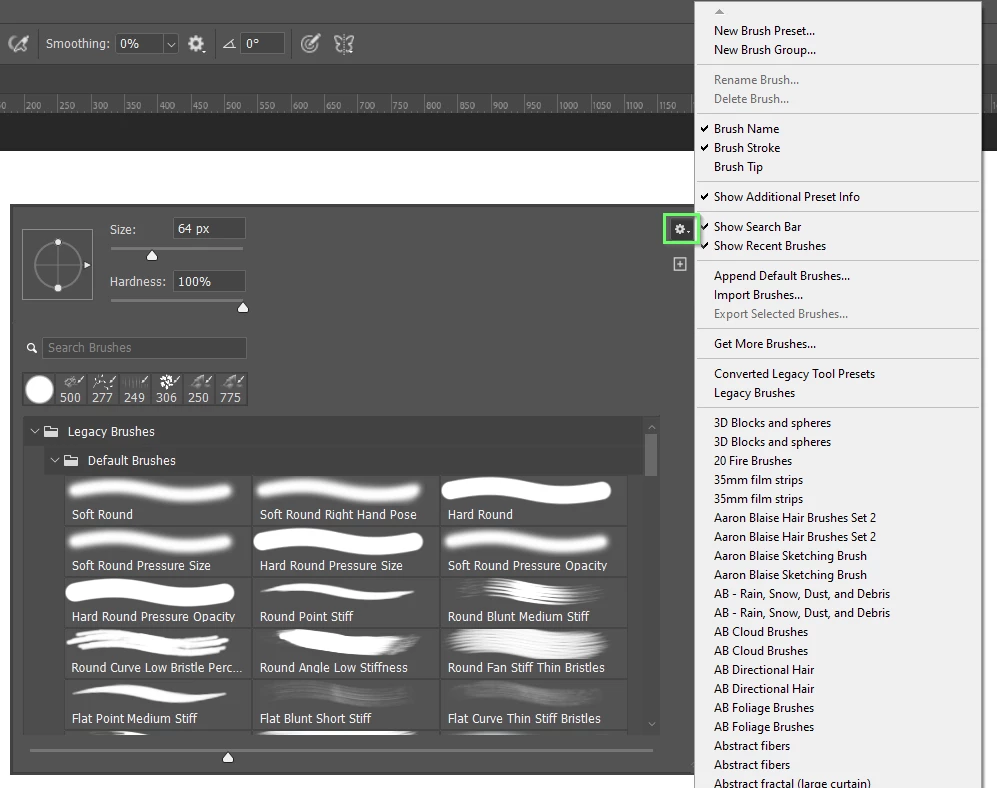
 

The other thing to check is previous versions.  The file path below is for Windows 10

All Photoshop file locations can be found here


C:\Users\[your user name]\AppData\Roaming\Adobe


As you can see, there are all the previous version that were installed on your system since the last OS install.  When I installed the current version, I had to drag the brush groups from the previous version Presets folder, to the current one.
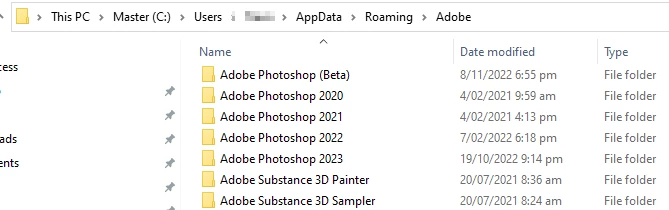
 

Good luck, and let us know how you get on.



2 replies

Trevor.Dennis
Community Expert
Trevor.DennisCommunity ExpertCorrect answer
Community Expert
February 15, 2023

When you say you have checked your library, what was the file path to that library?

Have you checked the options in the brush panel?  I like to use the right click panel (with brush tool selected, right click anywhere in the document window).  Click on the little cog icon in the top right corner, and the groups not in the main panel area should be available there.  When you delete a group from the main panel, they are still available from the library.


Note: I have just noticed that my groups are doubled up and I don't know why.


The other thing to check is previous versions.  The file path below is for Windows 10

All Photoshop file locations can be found here


C:\Users\[your user name]\AppData\Roaming\Adobe


As you can see, there are all the previous version that were installed on your system since the last OS install.  When I installed the current version, I had to drag the brush groups from the previous version Presets folder, to the current one.


Good luck, and let us know how you get on.



Participant
February 17, 2023

Thank you so much!

I got all of my brushes back 🙂

PECourtejoie
Community Expert
Community Expert
February 13, 2023

Hi, did you check replace, rather than append?

Can you post the contents of the brushes panel? check in its local menu?

Participant
February 14, 2023

Hi, not sure if this is what you meant? I sadly cannot change my PS language in any way so im just a tiny bit confused as to what I should do 😕😕 sorry for the trouble

PECourtejoie
Community Expert
Community Expert
February 15, 2023

On the panel in the right column, what is the name of the group of Brushes  you are in? The latest default Brushes sys include some Kyle brushes. Click on the hamburger menu on the top right of that panel to load brush sets, reset brushes, and load legacy brushes sets (the ones that came with older versions)