
Participating Frequently
September 1, 2023
Answered

My gradient tool is set on Classic Gradient and the dropdown is dimmed.

  • September 1, 2023
  • 3 replies
  • 660 views

I have the latest updates for both Photoshop (24.7.0) and the beta, (25.1.0) and in both versions I suddenly no longer have access to the gradient tool. It is stuck on Classic Gradient and the dropdown is dimmed and inaccessible. I am on Windows 11. How do I get the Gradient back?

This topic has been closed for replies.
Correct answer Jeff Arola

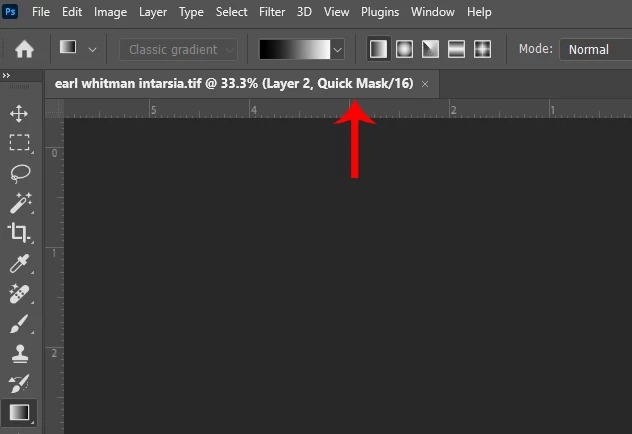
You appear to be in Quick Mask Mode so the Gradient Tool auto switches to Classic gradient.


To Exit Quick Mask Mode press Q on your keyboard, click on the Quick Mask Mode icon in the Tools Panel or

go to Select and uncheck Edit in Quick Mask Mode.


3 replies

Participant
December 23, 2023

*You're


'Your' is only used for possessive, 'you're' is used for 'you are'. 😉

ShowLowAZAuthor
Participating Frequently
September 1, 2023

Quick mask diables the live gradient. Can't believe I never noticed that before. Thank you.

TJ

Jeff Arola
Community Expert
Jeff ArolaCommunity ExpertCorrect answer
Community Expert
September 1, 2023

You appear to be in Quick Mask Mode so the Gradient Tool auto switches to Classic gradient.


To Exit Quick Mask Mode press Q on your keyboard, click on the Quick Mask Mode icon in the Tools Panel or

go to Select and uncheck Edit in Quick Mask Mode.