Participating Frequently
July 22, 2017
Answered

My images are pixelated

  • July 22, 2017
  • 2 replies
  • 14106 views

So I am using Photoshop CS6 and when I place an image on the background this happens. I don't know how to explain it.

Here is a blank background

Then I put This image on the background

And when I placed it this happened

This topic has been closed for replies.
Correct answer JJMack

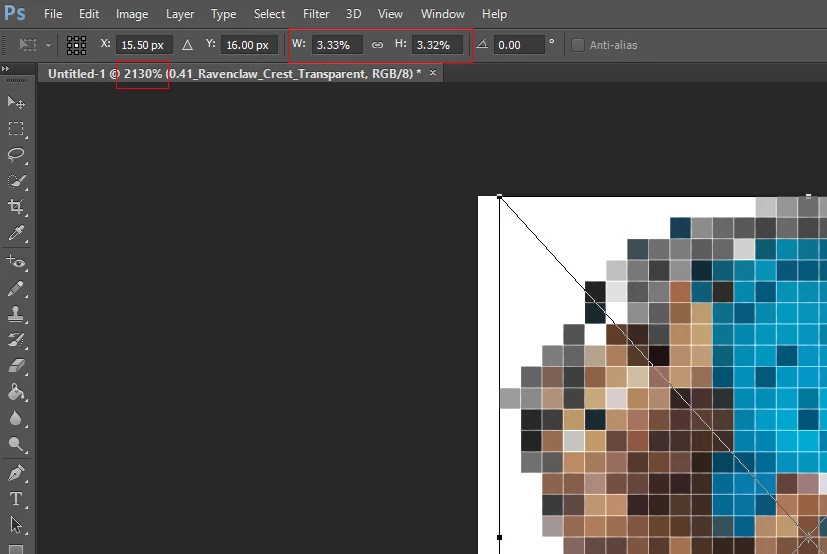
When you place in the image all the pixels you have for the image were rendered for the smart object layer,  However place's default is to scale large images to fit on canvas.  So your Place has scaled your image to 3.33% of its size and you have Photoshop zooming that 3.33% sized image over 2000%. All you image pixels are in the smart object layer. You need to increace the canvas size and then transform the scales down object back up in size.

2 replies

JJMack
Community Expert
JJMackCommunity ExpertCorrect answer
Community Expert
July 22, 2017

When you place in the image all the pixels you have for the image were rendered for the smart object layer,  However place's default is to scale large images to fit on canvas.  So your Place has scaled your image to 3.33% of its size and you have Photoshop zooming that 3.33% sized image over 2000%. All you image pixels are in the smart object layer. You need to increace the canvas size and then transform the scales down object back up in size.

JJMack
Participating Frequently
July 22, 2017

Oh, I'm an idiot. I've zoomed it in so much that in pixelated the image a lot. Thank you for an answer to my idiotic question.

davescm
Community Expert
Community Expert
July 22, 2017

Your first and last screenshots show you are zoomed to over 2000% !!!

You do not have enough pixels in you background image to retain the resolution of the placed image.

Solution - increase the number of pixels in the background (use image size) before placing your image

Dave