kirkr20646835
Participating Frequently
December 1, 2016
Answered

My pen tool problems

  • December 1, 2016
  • 2 replies
  • 917 views

I have a problem on my CS5.1, it has the latest update, I use the pen tool a lot and when I make two lines, it will highlight the line and add an actor point. It did last week. Now it is not working. I can go around my subject, select pen add anchor point and bend the line bt this is doing the job twice now. Help.

    This topic has been closed for replies.
    Correct answer Trevor.Dennis

    Thank you. I did not see that option but I found it after my search. I turned it on, check the rubber bank. It turned on a this new function and it is different than I am used to. It did not assist me with getting my pen line to operate as it used to do. It did not bring back my function of using the pen and going back over that line and putting an anchor point in the middle of that line and then using the command key be able to make a curve in that line. FYI- (I am cutting out the background of round objects).


    OK, I think I understand you now.  Next to the little cog there is a check box for Auto Add/Delete 
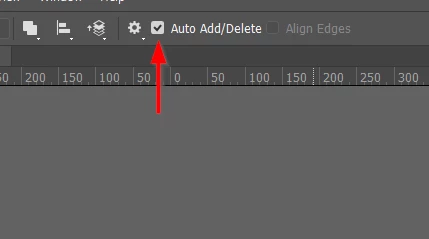
    With that checked you can move the Pen tool back over your line to see the option t add another Point.
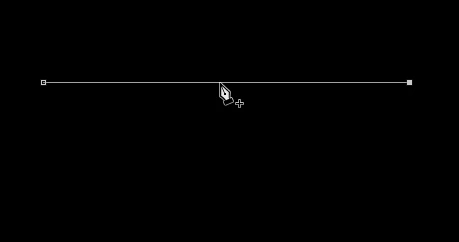
    Or remove an existing one without the need to use any modifier keys

    2 replies

    Trevor.Dennis
    Community Expert
    Community Expert
    December 1, 2016

    Do you mean you are not seeing the line linking the last and next points? If yes, click on the little cog icon and check Rubber Band.  It gets turned off when you reset preferences.

    kirkr20646835
    Participating Frequently
    December 1, 2016

    When in the pen tool mode, I I go from point to point, if I need to curve that line or bend it the arrow would highlight and I could click the link and pull on it and turn it from a straight line to a curve. The arrow does not change. I now go to pen and change it to ad an anchor point mode to do it.

    I am nit able to find that rubber band tab.

    I want to sa thank you for your reply.

    Kirk

    kirkr20646835
    Participating Frequently
    December 2, 2016

    OK, I think I understand you now.  Next to the little cog there is a check box for Auto Add/Delete 

    With that checked you can move the Pen tool back over your line to see the option t add another Point.

    Or remove an existing one without the need to use any modifier keys


    Wow that is so amazing, you understood me and solved a big problem I have been having. I can't thank you enough. It is a huge relief to have it back to normal again.

    Pleas e contact me REMOVED

    You are the best and have made my day.

    Kirk

    [personal information removed per policy - https://forums.adobe.com/docs/DOC-3731]

    [This is an open forum, not Adobe support, please do not post personal information]

    JJMack
    Community Expert
    Community Expert
    December 1, 2016

    If Photoshop was working correctly and is not now try resetting all tools if the does not get it working correctly try resetting your Photoshop preferences.

    JJMack
    kirkr20646835
    Participating Frequently
    December 1, 2016

    Thank you so much. That is correct it worked last week and today not. I do not know how to reset my tools.