
Participant
April 29, 2017
Answered

My photoshop brushes keep on disappearing

  • April 29, 2017
  • 6 replies
  • 32412 views

I made my own brushes i use for lineart and colouring but whenever i turn off the computer, the brushes get deleted or they disappear. This has happened to me multiple times and I really don't want to create the same brushes over and over again. I saved the brush presets and all, i also named them, They do appear in the brush presets but whenever i quit photoshop, it disappears.
This topic has been closed for replies.
Correct answer Trevor.Dennis

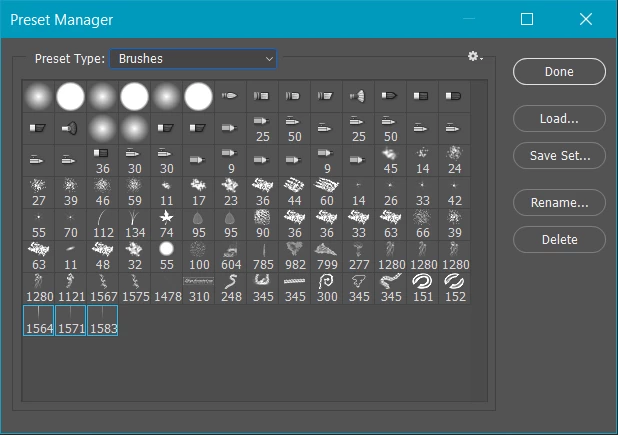
After defining a few brush presets, go Edit > Presets > Preset Manager

Select Brushes from the dropdown at the top.

Select your new brushes, (they will have a blue outline) and Save Set

Where do you put your brushes?

What operating system are you using?

What version of Photoshop?

This tells you the file locations.

Photoshop CS6 preference file functions, names, locations

If you are using Windows, the App Data path is probably best, but you need to make hidden files viewable from File Explorer

C:\Users\Your User Name\AppData\Roaming\Adobe\Adobe Photoshop CC 2017\Presets\Brushes

6 replies

Participant
November 4, 2023

I am also CONSTANTLY having this issue. Under 'presets' it doesn't even let me open brushes; it only has 'contours' and 'tools' as the drop-down menu. You would think for a ridiculously expensive program that now forces us to 'renew' yearly/monthly, they would have this basic stuff taken care of. The 'fixes' do not work for the majority. At this point, with all the new updates making things worse and the increase expense, photoshop just feels like a scam.

Trevor.Dennis
Community Expert
Community Expert
November 4, 2023

Camilo, if you are having difficulty in organising your brush presets, one of use will be happy to help you.  The important thing is to add them to a group and export to a .abr file.  If you don't do this, you stand to lose any presets you have made.


Participant
July 11, 2020

I had the same problem and made an interesting discovery whilst trying the suggestions on this forum. I downloaded and installed many of the Kyle brush packs and chose 'Open in Photoshop' from the menu. This worked, but the abr files were not installed in the Brushes folder, but instead placed in my temp folder. The brushes were all still in temp even after Photoshop lost them all. Obviously, the preset manager couldn't find them to reload them, so I had to move them all to the presets\brushes folder manually. I am hoping they won't now get lost again. The trouble is, my favourite brushes folder, which took some time to build, is still lost.

Shayde48
Known Participant
July 11, 2020
Oh thanks I'll have a look at that later.
Participant
February 20, 2020

Same! This is the 3rd time in a week they disappered.  I wont close photoshop and they still vanish as I am working.

Participant
April 21, 2020

I am having the exact same issue. I was working on a number of projects last year and earlier this year with no trouble at all. I downloaded a number of Kyle's brushes, created my own brush folders so that I could return to brushes that I particularly liked easily and was able to shut down PS and come back the following day with everything there. But this week everything keeps diappearing apart from a few standard Adobe brushes and 4 random groups of Kyle's brushes. 

I have saved all of the .abr files in the PS Presets folder in my hd and made sure that the total size of brush presets I was loading into PS was not over 1.7GB as I read in another thread that it could be an issue. Hasn't made a jot of difference. I just don't understand what we're supposed to do!

Known Participant
May 30, 2020

I have the exat same problem!!!!!!!!

Participating Frequently
January 11, 2020

I don't even have the option drop down menu for brushes, even though the folder is there and is not hidden, I cnahged it to viewable, how does PS break so bad all the time!?

Participant
February 8, 2020

Having the same problem in the newest version of PS 21.0.3; every time I get my brushes loaded and customized, they get wiped out back to the default list when an update to PS occurs. (subscription based).....can anyone let me know how to save the brushes? I'm not seeing the "brushes" option in the dropdown list.

Participant
February 9, 2020

Update: After a bit of research I'm thinking that brushes aren't managed in the Preset Manager. I just backed up my brushes and I guess I'll drag-and-drop into the brushes panel when a PS update ocurrs and wipes everything back to defaults.

Shayde48
Known Participant
October 8, 2019

Two years later and now I'm having the same problem. Custom shapes disappear too for me!

JLMArts
Participant
December 5, 2019

Yep, same here! I have all my brush sets exactly where they are supposed to be on my hard drive. They were there every time I turned on my computer. Just this week they've all disappeared and I have to keep reloading them. Not good. Wish there was a solution for this.


Trevor.Dennis
Community Expert
Trevor.DennisCommunity ExpertCorrect answer
Community Expert
April 29, 2017

After defining a few brush presets, go Edit > Presets > Preset Manager

Select Brushes from the dropdown at the top.

Select your new brushes, (they will have a blue outline) and Save Set

Where do you put your brushes?

What operating system are you using?

What version of Photoshop?

This tells you the file locations.

Photoshop CS6 preference file functions, names, locations

If you are using Windows, the App Data path is probably best, but you need to make hidden files viewable from File Explorer

C:\Users\Your User Name\AppData\Roaming\Adobe\Adobe Photoshop CC 2017\Presets\Brushes

Shayde48
Known Participant
October 10, 2019
My brushes are already saved on my laptop, but every time I load them they disappear again. I've had some of them loaded for over a year with no problems. Now I look like a total noob when I open my menu 😉
Participant
October 21, 2019

I have the same thing happening since a week, for no reason whatsoever?? Everything worked fine all year long, and suddenly, without any warning or without me changing ANYTHING, every change I ever made is gone. Brushes are gone, Swatches are gone, custom Shapes, ... everything is just disappeared. I spent the whole night re-organizing everything and loading in everything I still had... saved it all. It was there in PS and the preset folder... Now I turn my PC on again, and everything is GONE. Just gone? In PS and in the presets folders. Does anybody have a solution for this? I need to work, my client is getting really impatient and me leaving PS/my PC turned on for the whole week so I dont have to re-do everything each time PS closes/opens again can't be the soution...? If anybody got a fix, I'd appreciate it so much. 😞