
Participant
January 3, 2018
Question

My Photoshop CC 2018 has an overscaled UI

  • January 3, 2018
  • 2 replies
  • 1258 views

As the title says, my PS CC 2018 has an overscaled UI and I dont know how to change the size of it all.
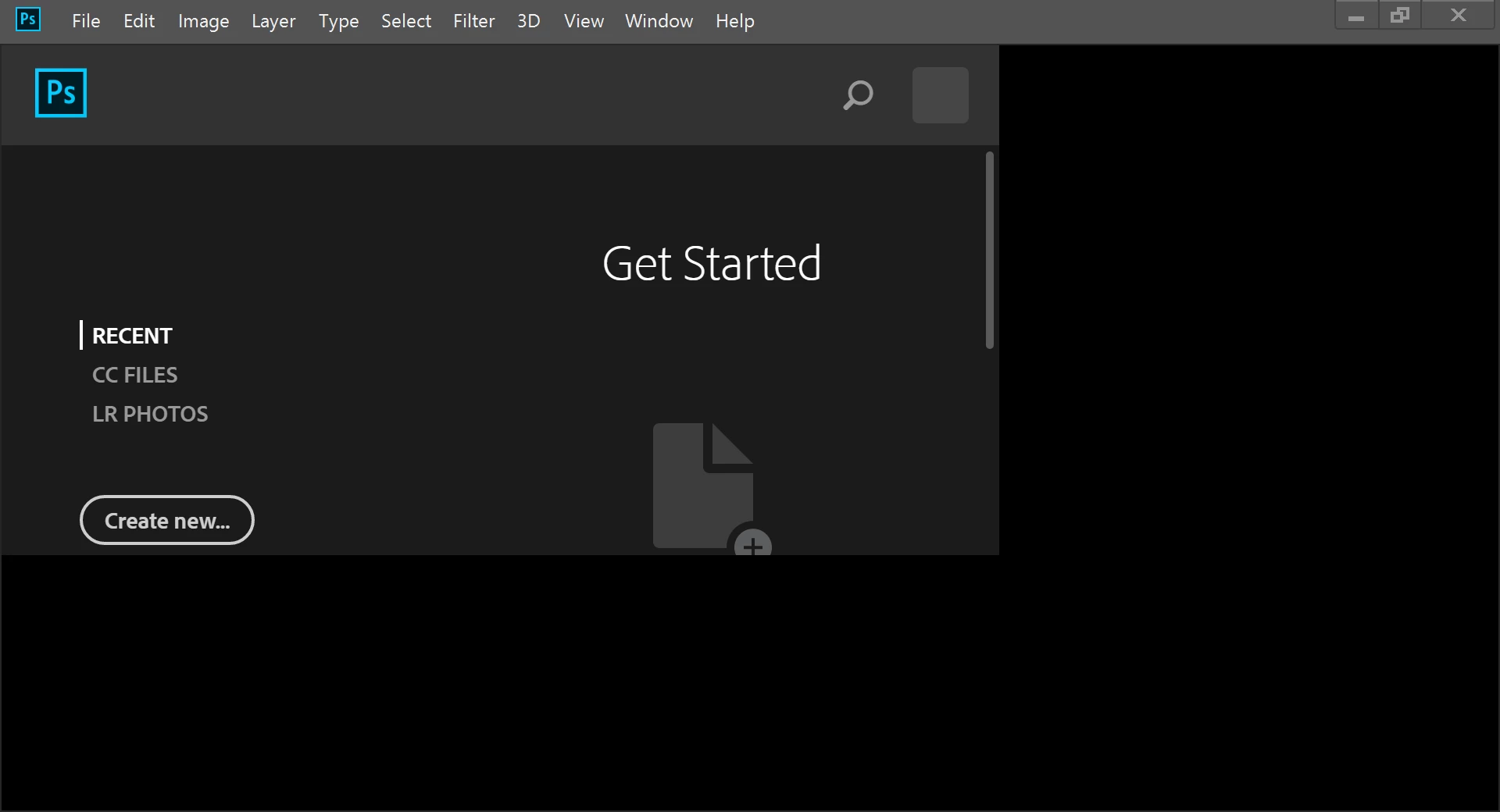
By that, I cant see all the menu, and i really dont know how to change the setting.

I reinstalled it twice and no good. Other adobe products have no problem like this.

What should I do?

(Im not a native English speaker, sorry if it were not clear...)

This topic has been closed for replies.

2 replies

Ahmad_Yousef-ggdwkA
Participating Frequently
January 7, 2018

Auto is the problem and Adobe default setting. Adobe for some reason scales UI 200% on displays that should not be scaled.  In this case Adobe is scaling  a 1920x1080 display 2x in effect making the display a 960x540 ui display. Photoshop requirement is 1024x768 Photoshop's UI will not fit on a 960x540  display.  They need to set the Photoshop Preference UI Scale from Auto to 100%.set to set 1x..

So if you have a Surface Pro 2 or 3 Adobe knows you have a  high resolution display they should also know you do not have the reqired number of pixels to support 2xUI 3MP 2014x1536.  Surface pro 2 1920x1080 and Surface pro 3 2016x1440 do not have the required  3MP.  While the Surface pro 3 has more then 3MP its aspect ratio is 3:2 not 4:3 so it effectively a 1080x720 2X display the 720 falls short of the required 768.

CC 2015 is even worse Adobe changed ScriptUI and it does its own Dialog Scaling and does not use Photoshop Scale UI setting. Setting 100% does not help some Script dialogs will not fit on screen when scaled and will not be useable.

Abambo
Community Expert
Community Expert
January 3, 2018

Hi William,

Your problem description is quite clear.

Please look here: Edit->Preferences

ABAMBO | Hard- and Software Engineer | Photographer
Participant
January 3, 2018

Thank you very much!

It kind of "started" solving the problem!

Once I changed the Preferences/Interface/Text/UI Scaling

from "auto" to "100%", the very first screen just fit to the right size. Seemed right.

But then, form next screen, the problem persists...

But also, only that kind of gray window screens and the expanded menu bars seemed in bigger font sizes.

Nancy OShea
Community Expert
Community Expert
January 3, 2018

It looks like you have a HiRes display.

Are you making things bigger in your operating system settings?

Nancy O'Shea— Product User & Community Expert