Exit
  • Global community
    • Language:
      • Deutsch
      • English
      • Español
      • Français
      • Português
  • 日本語コミュニティ
  • 한국 커뮤니티
0

My photoshop panels will not dock, home screen and toolbar

New Here ,
Jun 06, 2021 Jun 06, 2021

I have a new iMac that came with Big Sur OS and now my homescreen and toolbar will not dock to PS main bar, here is a screenshot of the problem.
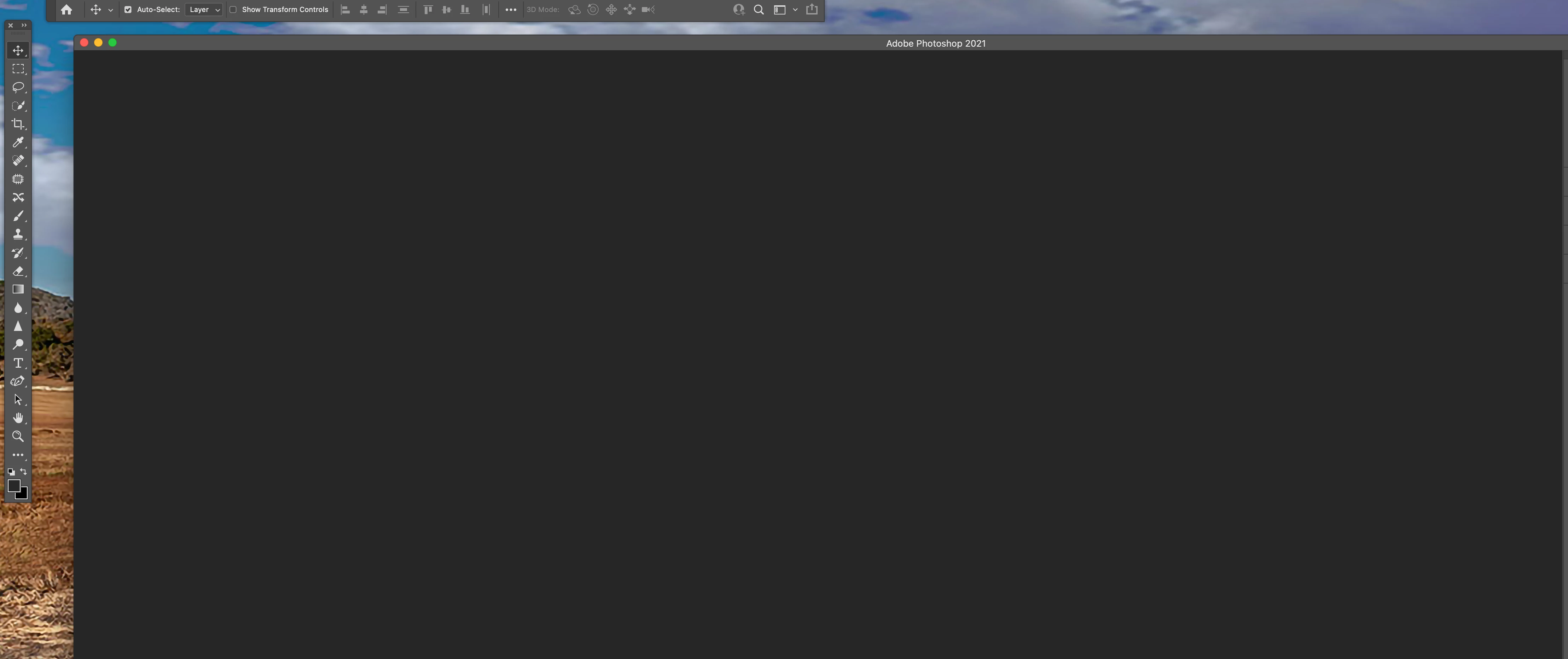

Screen Shot 2021-06-06 at 06.51.42.png


1.6K
Translate
Report
Community guidelines
Be kind and respectful, give credit to the original source of content, and search for duplicates before posting. Learn more
community guidelines
Adobe
Community Expert ,
Jun 06, 2021 Jun 06, 2021

Go to Window>Workspace and click on Reset Workspace

Translate
Report
Community guidelines
Be kind and respectful, give credit to the original source of content, and search for duplicates before posting. Learn more
community guidelines
Community Expert ,
Jun 06, 2021 Jun 06, 2021

If you are using a mac make sure you are displaying Photoshop's application frame so you can dock to it.

JJMack
Translate
Report
Community guidelines
Be kind and respectful, give credit to the original source of content, and search for duplicates before posting. Learn more
community guidelines
Community Beginner ,
May 11, 2024 May 11, 2024

And how do you know if you are displaying Photoshop's application frame?

Translate
Report
Community guidelines
Be kind and respectful, give credit to the original source of content, and search for duplicates before posting. Learn more
community guidelines
Community Expert ,
May 11, 2024 May 11, 2024
LATEST

@jtstarr 


If you are on macOs, go to the Window menu and see if Application Frame is checked or not. If you are on Windows, the Application Frame is always on.


Jane


Translate
Report
Community guidelines
Be kind and respectful, give credit to the original source of content, and search for duplicates before posting. Learn more
community guidelines