
Participating Frequently
November 8, 2017
Answered

My rectangular marquee can't be dragged anymore? Since 19.0 patch

  • November 8, 2017
  • 2 replies
  • 3847 views

Hello,

Updated to 19.0, I am no longer able to drag a marquee (without selection) using the rectangular marquee tool. All other marquee tools work.

When I draw a selection with this tool, rather than getting a small white arrow and square drawn with a dotted line (which allows me to drag the marquee), I get instead a vertical and horizontal cross hair (the marquee tool before you draw with it) and a little 'x' - meaning if I click I just get rid of the marquee.

If I change to another marquee tool, I can then drag the square/rectangle marquee but not without this workaround step.

I have tried resetting the tools

I have tried starting Photoshop holding down the buttons to rest preferences

Neither worked.

OS Sierra 10.12.6

iMAc Reina 5k / 4Ghz Intel Core i7

Any ideas? Thanks
    This topic has been closed for replies.
    Correct answer davescm

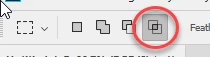
    Change the options from this (Intersect with selection)

    to this (New Selection) :

    Dave

    2 replies

    Participating Frequently
    November 8, 2017

    Thanks for the speedy and correct reply. Really appreciated.

    Anthony

    davescm
    Community Expert
    Community Expert
    November 8, 2017

    You're welcome

    Dave

    davescm
    Community Expert
    davescmCommunity ExpertCorrect answer
    Community Expert
    November 8, 2017

    Change the options from this (Intersect with selection)

    to this (New Selection) :

    Dave

    Participant
    June 3, 2021

    I had the same problem.  I did change the options.  The marquee did add new but when I went to move the new section the entire  subject moved behind.  So new to all this.
