/t5/photoshop-ecosystem-discussions/need-some-advice-on-creating-a-hologram-pattern-in-photoshop/td-p/12136625Jun 24, 2021
Jun 24, 2021
Link in Zwischenablage kopieren
Kopiert
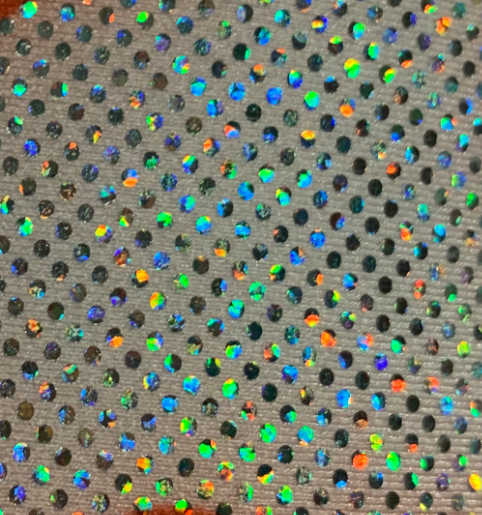
I'm trying to turn the attached photo into a digital photoshop file, but not sure what the best way to go about it. I have a repeatable dots texture, but how should I emulate the random rainbow inside those dots?
Seien Sie freundlich und respektvoll, geben Sie die ursprüngliche Quelle der Inhalte an und suchen Sie vor dem Absenden Ihres Beitrags nach Duplikaten.
Weitere Informationen
Myra Ferguson • Community Expert, Jun 24, 2021Jun 24, 2021
Here's one way to make that texture:
Fill a layer with 50% gray (#808080)
Select the gray layer and go to Filter > Pixelate > Color Halftone
The default settings should work, so click OK
With that layer still selected, go to Filter > Blur > Gaussian Blur and set it to a smallish radius that allows for the colors to still be seen but just a little blurred
If you have already created a repeatable dots texture that includes black dots on a white background, then add that pattern to a layer above t
/t5/photoshop-ecosystem-discussions/need-some-advice-on-creating-a-hologram-pattern-in-photoshop/m-p/12136699#M556548Jun 24, 2021
Jun 24, 2021
Link in Zwischenablage kopieren
Kopiert
Here's one way to make that texture:
Fill a layer with 50% gray (#808080)
Select the gray layer and go to Filter > Pixelate > Color Halftone
The default settings should work, so click OK
With that layer still selected, go to Filter > Blur > Gaussian Blur and set it to a smallish radius that allows for the colors to still be seen but just a little blurred
If you have already created a repeatable dots texture that includes black dots on a white background, then add that pattern to a layer above the blurred layer
With the dots layer selected, in the Layers panel, set the Blend mode to Lighten
If you need the gray texture in between the dots, you can make that pattern and use a copy of the black dots layer as a mask.
Seien Sie freundlich und respektvoll, geben Sie die ursprüngliche Quelle der Inhalte an und suchen Sie vor dem Absenden Ihres Beitrags nach Duplikaten.
Weitere Informationen
You are awesome! Thank you so much, this worked and looks pretty close. I adjusted some settings around and added some things manually to the dots. It looks pretty close to the actual fabric, thank you!
Seien Sie freundlich und respektvoll, geben Sie die ursprüngliche Quelle der Inhalte an und suchen Sie vor dem Absenden Ihres Beitrags nach Duplikaten.
Weitere Informationen






 2
Antworten
2
Antworten


 AdChoices