
AntDX316
Inspiring
March 15, 2020
Answered

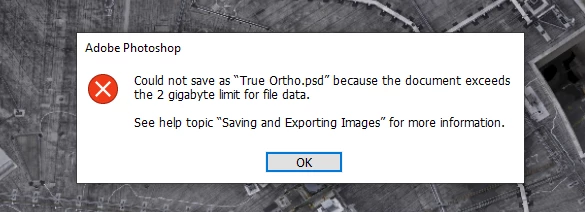
Need to fix the 2GB limit for file data PSD.
  • March 15, 2020
  • 4 replies
  • 5051 views

    This topic has been closed for replies.
    Correct answer jane-e

    Info on PSBs from Help:

    https://helpx.adobe.com/photoshop/using/file-formats.html


    "Large Document Format (PSB)

    "The Large Document Format (PSB) supports documents up to 300,000 pixels in any dimension. All Photoshop features, such as layers, effects, and filters, are supported. (With documents larger than 30,000 pixels in width or height, some plug-in filters are unavailable.) You can save HDR, 32-bits-per-channel images as PSB files."

    4 replies

    Participant
    August 24, 2020

    This is the problem I'm having and I dont have the PSB option so how do I fix this? Ive been stuggling with this for years but its happening more offen and I need a fix now not a work around. I was on chat for over 2 hours and nothing has been fixed 


    jane-e
    Community Expert
    Community Expert
    August 25, 2020

    Whaat version of PS do you have and what is your OS?

    davescm
    Community Expert
    Community Expert
    March 15, 2020

    For info, one of the objections to psb in the past was that Lightroom couldn't handle PSB files. However, since the last release, it can and psb files appear in the Lightroom catalogue just like PSD.

    AntDX316
    AntDX316Author
    Inspiring
    March 15, 2020

    So PSB is basically Windows 10 exFAT and PSD is Windows XP with FAT32 (in a way)?  Also, how does PSD interact w/ Lightroom when they are both opened?  I don't understand how the PSD modifications link to Lightroom???

    davescm
    Community Expert
    Community Expert
    March 15, 2020

    Nothing to do with the FAT, which is the way the file is stored on a disk.

    PSD and PSB differ in the the way the file itself is constructed. PSD has a 2GB filesize limit and a pixel dimension limit of 30,000 x 30,000.   PSB has a filesize limit  of 4 Exabytes and a pixel limit of 300,000 x 300,000.


    Lightroom catalogues various types of file and can read the additional flattened image that is stored inside a PSD file when "Maximise Compatibilty" is checked in Photoshop preferences. Until recently, Lightroom could not read the same for PSB files, but that was fixed and the current version can now read psb files (albeit with a limit of 60,000 pixels on either height or width which is the maximum for Lightroom).


    Dave

    Chuck Uebele
    Community Expert
    Community Expert
    March 15, 2020

    Yes, PSB. It's in the dropdown list of files. It's for large files over 2 GB. 

    JJMack
    Community Expert
    Community Expert
    March 15, 2020

    Use PSB instead of PSD that  files format has no size limit.

    JJMack
    AntDX316
    AntDX316Author
    Inspiring
    March 15, 2020

    PSB?

    jane-e
    Community Expert
    jane-eCommunity ExpertCorrect answer
    Community Expert
    March 15, 2020

    Info on PSBs from Help:

    https://helpx.adobe.com/photoshop/using/file-formats.html


    "Large Document Format (PSB)

    "The Large Document Format (PSB) supports documents up to 300,000 pixels in any dimension. All Photoshop features, such as layers, effects, and filters, are supported. (With documents larger than 30,000 pixels in width or height, some plug-in filters are unavailable.) You can save HDR, 32-bits-per-channel images as PSB files."
