
Participant
November 10, 2012
Answered

Need to reset brush tools

  • November 10, 2012
  • 2 replies
  • 32394 views

I have photoshop CS6. The eraser and brush tool is not working properly. I get a small dot on the page irrespective of the size of the eraser or brush that I select. Also I'm not sure if this is a feature of CS6. I've produced a graphic that involves a large number of layers, on past versions of photoshop if I needed to edit a layer I would select that layer and go to it on the page and edit it. On CS6 after I select the layer when I put my curser anywhere on the page it would automatically select the layer that I am touching, which is similar to Coral Draw or Illustrator. Is this correct?
    This topic has been closed for replies.
    Correct answer conroy

    Allen Togwell wrote:

    I have photoshop CS6. The eraser and brush tool is not working properly.

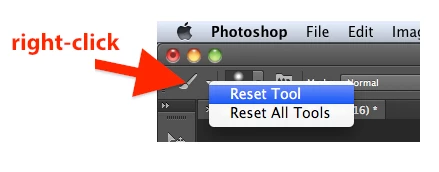
    Try resetting each problem tool by right-clicking where indicated by the red arrow and picking "Reset Tool" (or "Reset All Tools" for every Photoshop tool).

    On CS6 after I select the layer when I put my curser anywhere on the page it would automatically select the layer that I am touching

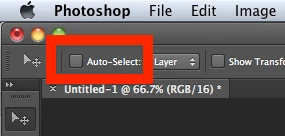
    I guess you need to disable Auto-Select in Options bar when Move Tool is activated. Also, holding down Cmd/Ctrl key will temporarily invert that setting (although the checkbox status will not change).

    2 replies

    conroy
    conroyCorrect answer
    Participating Frequently
    November 10, 2012

    Allen Togwell wrote:

    I have photoshop CS6. The eraser and brush tool is not working properly.

    Try resetting each problem tool by right-clicking where indicated by the red arrow and picking "Reset Tool" (or "Reset All Tools" for every Photoshop tool).

    On CS6 after I select the layer when I put my curser anywhere on the page it would automatically select the layer that I am touching

    I guess you need to disable Auto-Select in Options bar when Move Tool is activated. Also, holding down Cmd/Ctrl key will temporarily invert that setting (although the checkbox status will not change).

    Participant
    November 11, 2012
    John Waller
    Community Expert
    Community Expert
    November 10, 2012

    Best to post this in the Photoshop forum

    http://forums.adobe.com/community/photoshop/general

    Jeffrey_A_Wright
    Community Manager
    Community Manager
    November 10, 2012

    Moving this discussion to the Photoshop General Discussion forum.