
Novel R
Participating Frequently
August 9, 2021
Question

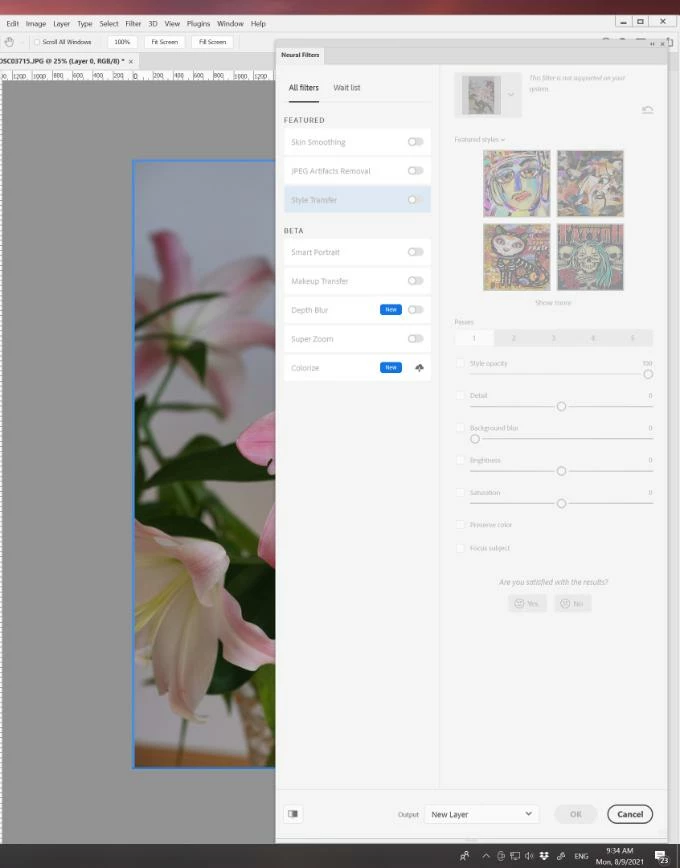
Neural Filters are all greyed out

  • August 9, 2021
  • 5 replies
  • 20321 views
I am able to select Filters > Neural Filters. The Neural Filters panel is all greyed out. I am able to click different filters but all options are greyed out and unable to select. Please help to fix this issue. Thank you.
5 replies

Jeremy AB
Known Participant
March 29, 2022

What ended up working for me was installing the latest version of Photoshop. The filters don't work in Photoshop 2021 but they work in 2022.

Participant
August 10, 2022

This worked for me. Thank you! 

longfeil65923875
Participant
February 13, 2022

I have exactly the same issue. Did you find a solution yet?

best,

AuroraPenticton
Inspiring
February 24, 2022

Exactly the same problem here!

Participant
January 4, 2022

i have this problem too.  as you can see, there is small circle under the colorize but i can't do anything to solve it, and this circle has no more information to solve it


Participant
January 27, 2022

I have the same problem for months now. Even an Adobe help did not figure out how to solv this. super annoying!

Participating Frequently
March 29, 2022

it's a stability issue on Adobe's end. Unfortunately they have a bad habit of releasing new features without stabilizing the ones they currently "support". best thing you can do is contact billing and demand 30 days credit for your account.

Participant
October 31, 2021

I have the same issue. Have tried EVERYTHING! Open -> jpg in photoshop-> straight to neural filter -> NOTHING WORKS 😞

Participant
January 2, 2022

Same thing here.  
All of the neural filters are greyed out except for color transfer.  


HELP!! 

Participant
March 21, 2023

This is my issue too! They were all working and then I had problems with photoshop even opening at all and once I got it to open I went to the neural filters to use them and can't select anything except for color transfer. Have you found any solutions yet?

JohanElzenga
Community Expert
Community Expert
August 9, 2021

You need to toggle the switch behind the name of the filter.

-- Johan W. Elzenga
Novel R
Novel RAuthor
Participating Frequently
August 10, 2021

@Johan_Elzenga


The Neural Filters panel is all greyed out. I am able to click different filters but all options are greyed out and unable to select. Not able be turn the Filters on/off either.


Attached is the screenshot...

JohanElzenga
Community Expert
Community Expert
August 10, 2021

I am not sure if these filters need GPU support, but I do think do. Check in the Preferences - Performance if your GPU is supported and if support is enabled.

-- Johan W. Elzenga