Exit
  • Global community
    • Language:
      • Deutsch
      • English
      • Español
      • Français
      • Português
  • 日本語コミュニティ
  • 한국 커뮤니티
0

NEW BUG OS X: Dynamic guides / snapping causing clipping of image

Engaged ,
Nov 30, 2018 Nov 30, 2018

The latest Photoshop is exhibiting a bug. You know those magenta lines that pop up dynamically as you move layers around in your .PSD document? Well, those little lines are causing a weird bug where it clips the layer you are moving. It literally crops off that part of the image and that cropping appears in an export as PNG or JPEG.


It even does it to type. I notice it with the hanging letters like lower case g or y. The magenta snap/guide lines appear as I move the layer, and it clips.

If I move that same layer that is clipped up or down so that the dynamic guide doesn't appear, the clipping disappears and all is fine.

If I go into VIEW and turn off the guides and snapping, the problem goes away.

Photoshop 20.0.1

OS X 10.14.1

Mac Pro 2013

32 gigs RAM

Dual Radeon 700 gpu

715
Translate
Report
Community guidelines
Be kind and respectful, give credit to the original source of content, and search for duplicates before posting. Learn more
community guidelines

correct answers 1 Correct answer

Deleted User
Nov 30, 2018 Nov 30, 2018

Hi

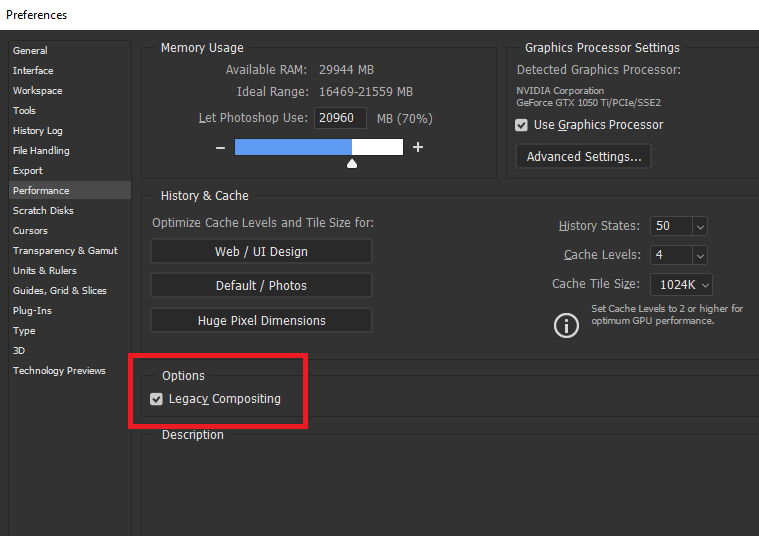
Try enabling this option in preferences and restarting Photoshop to see if it helps

Translate
Adobe
Guest
Nov 30, 2018 Nov 30, 2018

Hi

Try enabling this option in preferences and restarting Photoshop to see if it helps

Translate
Report
Community guidelines
Be kind and respectful, give credit to the original source of content, and search for duplicates before posting. Learn more
community guidelines
Engaged ,
Nov 30, 2018 Nov 30, 2018

That fixed it.

Thanks!
Scot

Translate
Report
Community guidelines
Be kind and respectful, give credit to the original source of content, and search for duplicates before posting. Learn more
community guidelines
Guest
Nov 30, 2018 Nov 30, 2018
LATEST

You're welcome

Translate
Report
Community guidelines
Be kind and respectful, give credit to the original source of content, and search for duplicates before posting. Learn more
community guidelines