
Participating Frequently
December 31, 2016
Answered

New document: how to clear 'Your recent items'? [2016]

  • December 31, 2016
  • 5 replies
  • 10792 views

Hi,


I'm using CC2017 and when I create a New document in Photoshop the dialog opens with the 'Recent' tab as active tab.  It shows 'Your recent items (xx)'. This screen is getting overcrowded and I want to clear this section, but I don't know how.


Can anyone tell me how to refresh this section?


Best regards, Leo
Correct answer Terri Stevens

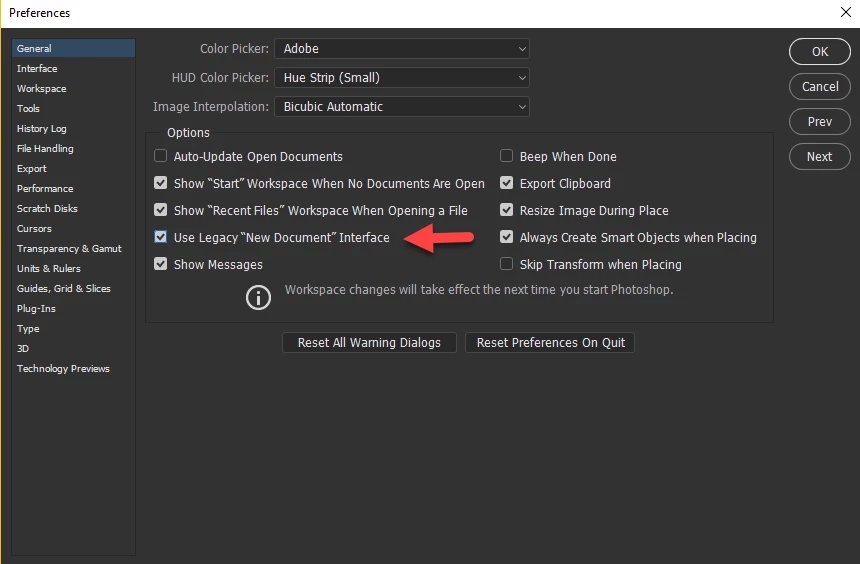
I don't think you can currently clear that list, but could be wrong. I don't use the new 'Start' workspace as I find it slow, but if you set it up as below with Use Legacy 'New Document' Interface  checked ctrl-N or command-N will bring up the old new document dialog and you won't see that whole New document dialog. Doing that will mean you won't have access to the new template features but maybe that doesn't matter to you. The Start workspace is a work in progress and I imagine Adobe will incorporate the ability to delete unwanted recently saved docs at some point in the future. It might be worth putting in a request

Photoshop Family Customer Community

5 replies

Participant
November 11, 2023

The accepted answer works, but it's like the old joke:

 - "Doctor, my shoulder hurts when I do this."

 - "Well, don't do that."


I have an ACTUAL answer for this, for Photoshop 2024. First quit Photoshop or it will just rewrite the file when it exits.


On the Mac, the file you want  is in ~/LIbrary/Preferences/Adobe Photoshop 2024 Settings (In the Finder, select "Go to Folder..." from the "Go" menu to get there). Go there, and drag "MRU New Doc Sizes.json" to the trash. That's it. The Recent pane will now be cleared except for the Adobe default.


On the PC, you do much the same; I don't have a Windows machine to confirm, but according to Shinex Media's video on YouTube, the file is probably in "AppData\Roaming\Adobe\Adobe Photoshop 2024\Adobe Photoshop 2024\Settings". The file is named just "MRU New Doc Sizes".  (If someone who does have Windows could cross-check this path and correct it if necessary for Photoshop 2024, we could have an actual fix for this that works for everyone!)


Adobe, do please consider making this something we don't have to do by a hack. Thanks.

Participant
April 2, 2023

Watch this video - https://www.youtube.com/watch?v=EZb4nGx5Nzw it's in a different language but still, you can get the idea, before you execute the action make sure you exit from the PS and then re-open. Its works for the current version as well.

Participant
February 20, 2021

Here is the 2021-Feb version answer, so far:

I had the same question and found a way....

Click on File>Preferences>File Handling
Go to the bottom of the page where it shows "Recent file list contains:" and enter "0" (zero)

Just for good measure, on the same page at the top, I also entered on Saving Files I selected: "Ask when saving".


Participant
February 21, 2021

This is a 2021 Update: Open Edit>Preferences>General>File Handling -- then go down to the bottom and on Recent File List Contains enter "0"


Participant
March 19, 2021

thk a lot i also facing this problem


Terri Stevens
Legend
December 31, 2016

Hi Leo,

this is easy to do. I don't use the Start screen usually but have switched it on to illustrate the point.

Go to the file menu /open recent and at the bottom 'Clear Recent File List'

and now your recent list will look like this

MeLeoAuthor
Participating Frequently
December 31, 2016

Trevor, Terri,

Many thanks for responding. However, this is not what I meant. I want to clear the list with blank documents in the Recent tab:

This dialog opens if you choose New document (or CTRL-N).

Any ideas?

Terri Stevens
Terri StevensCorrect answer
Legend
December 31, 2016

I don't think you can currently clear that list, but could be wrong. I don't use the new 'Start' workspace as I find it slow, but if you set it up as below with Use Legacy 'New Document' Interface  checked ctrl-N or command-N will bring up the old new document dialog and you won't see that whole New document dialog. Doing that will mean you won't have access to the new template features but maybe that doesn't matter to you. The Start workspace is a work in progress and I imagine Adobe will incorporate the ability to delete unwanted recently saved docs at some point in the future. It might be worth putting in a request

Photoshop Family Customer Community

Trevor.Dennis
Community Expert
Community Expert
December 31, 2016

It's right at the bottom of the File > Open Recent

Terri Stevens
Legend
December 31, 2016

your to fast for me today Trevor lol

I heard on the radio it's 2017 in New Zealand now Happy New Year to you and Chris

Terri