


- Home
- Photoshop ecosystem
- Discussions
- Re: New document transparent background by default...
- Re: New document transparent background by default...

Copy link to clipboard
Copied
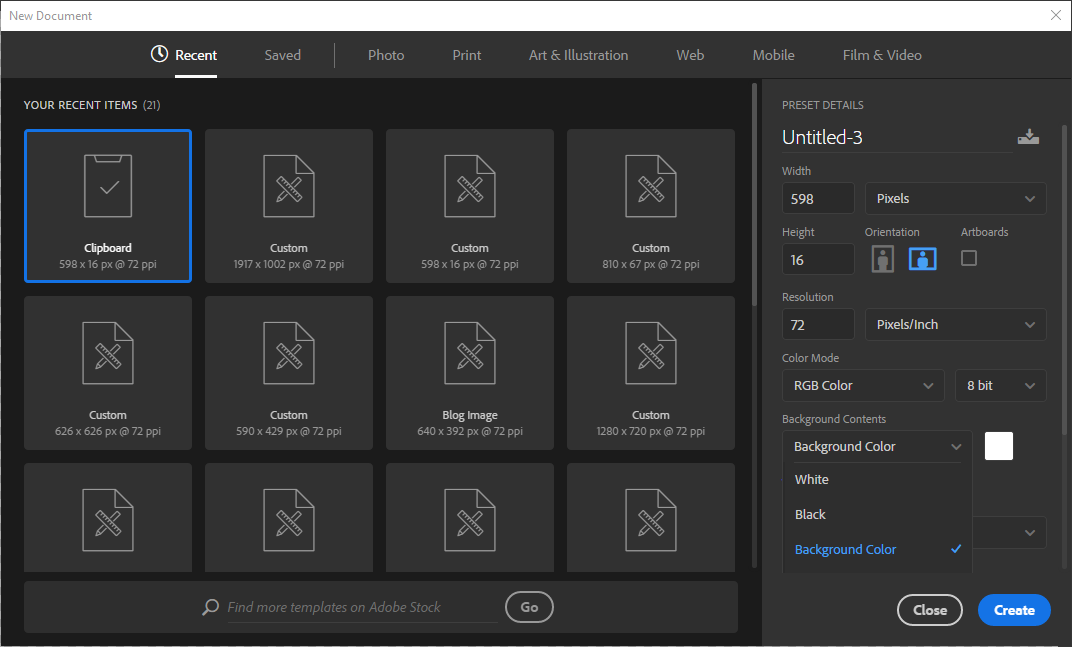
I've just updated to the 2017 version of Photoshop and I can't figure out how to have a transparent artboard by default (when creating new documents).
It used to be a preset option but I can't find it there anymore . . .


 1 Correct answer


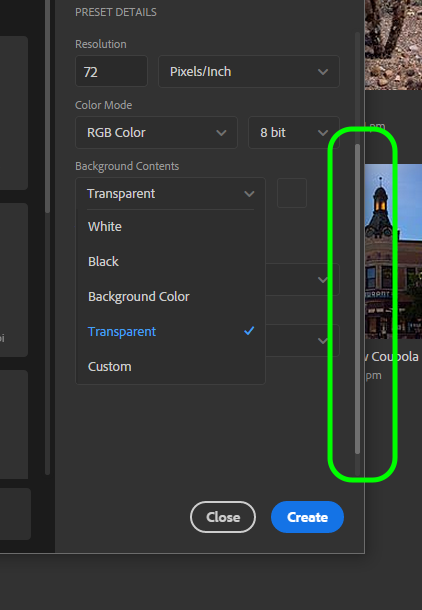
You need to scroll down to see it, but the scroll bar is so inconspicuous that a lot of people don't see it:


Explore related tutorials & articles
 20
Replies
20
20
Replies
20

Copy link to clipboard
Copied
You need to scroll down to see it, but the scroll bar is so inconspicuous that a lot of people don't see it:

Copy link to clipboard
Copied
Wow! Thank you! That is quite the interface design flaw
Copy link to clipboard
Copied
MAJOR interface design flaw! Agreed!!

Copy link to clipboard
Copied
It`s amazing! I couldn't find it some weeks. Seems I scroll everything, but finely didn't find out. Thanks!

Copy link to clipboard
Copied
You're the best! Talk about a simple UI design flaw.

Copy link to clipboard
Copied
Thank you, I totally missed it too !

Copy link to clipboard
Copied
Amazing, thanks!
Never would have seen that!

Copy link to clipboard
Copied
You are a legend. Now to see if I can see it

Copy link to clipboard
Copied
With the latest update to 2020 now the transparent background doesn't stay as default when creating a new document. With every new document it defaults back to white and pasting a new image goes onto a new layer. This is a total wase and an additional step as I have to now delete the white layer because I never use it.
Put back the ability to set the default to whatevey backgoround the user wants to use for new documents.

Copy link to clipboard
Copied
Yes! Completely agree. I'm here because I thought I had somehow done something wrong to cause this. What a stupid 'update'.
Copy link to clipboard
Copied
I also agree with you. Adobe, please fix this flaw.

Copy link to clipboard
Copied
Co-signed. This is driving me up a wall having to manually switch it to transparent background every single time.

Copy link to clipboard
Copied
I also agree. Having to select transparent with every new file is bulky and slows down my workflow Please establish a way for us to make new file background, resolution, and color mode (including custom color modes) default to user-set options.
Copy link to clipboard
Copied
I managed to get round this by going to the preferences > General and selecting the Use Legacy "New Document" interface. OK, it's not as pretty looking as the new one, but at least it works in selecting the transparent document as default.

Copy link to clipboard
Copied
Thank you, Blue Ranger. Even though it's a workaround, it's many times better than without it! Love you for sharing!

Copy link to clipboard
Copied
This is right up there with the update that doesn't overwrite a file and just makes it a copy. Another update that just adds another step (or more) to a once simple process.

Copy link to clipboard
Copied
Agree! Cannot believe I have to toggle through background options to set to transparent. I used to have it set as default. No more. This is a flaw. Adobe, please fix.

Copy link to clipboard
Copied
Yes... please, please, please put it back. I can't tell you how many times I create and delete a new document because I forget the default doens't stick with transparent. Please...
Copy link to clipboard
Copied
Why is it marked as solved? The question is about making it the default option, it doesn't do that unless "Legacy" is brought back. It looks like what professional designers and coders have been doing forever is called Legacy now and the mainstream Adobe programmers don't work full time with the apps to know better what the consequences of the introduced changes are. Among my list of "updates" gone wrong, each adding steps to a once simple process or making it an annoying new one: the possibility of setting a resolution as the default, so that every new file created from the clipboard keeps the last resolution used -- this is essential when creating images for Retina displays -- is not there anymore, so one has to double the resolution and dimensions manually every time a new image is created; Save for Web as a primary option in the File menu was removed, it's now hidden under Export and called Legacy, adding another unnecessary step. Adobe, please fix these.

Copy link to clipboard
Copied
Hey there, renatoj93608056!
I now what you mean, none of these posts adresses the issue or solves the problem. I had the same thing and it was driving me crazy.
Good news though, there is a solution to your problem (well, sort of), you have to change the mode in the preferences from the redesigned new document box to the classic legacy new document box like this:
https://www.photoshopessentials.com/basics/legacy-new-document-dialog-box-photoshop-cc/
Still, in the good old days the "New" button autmatically created an image size based on the size of the chosen copied area, now a "New" document is created with the same size as the image you are copying from so you have to manually crop each and everyone of them. Do that for a day and a half and relise that life is very short.
Is there a way to change default "New" document size to match the clip board copy rather than the original image you are copying from?


Find more inspiration, events, and resources on the new Adobe Community
Explore Now
 AdChoices