
Participant
September 1, 2023
Answered

New file screen looks different

  • September 1, 2023
  • 1 reply
  • 1425 views

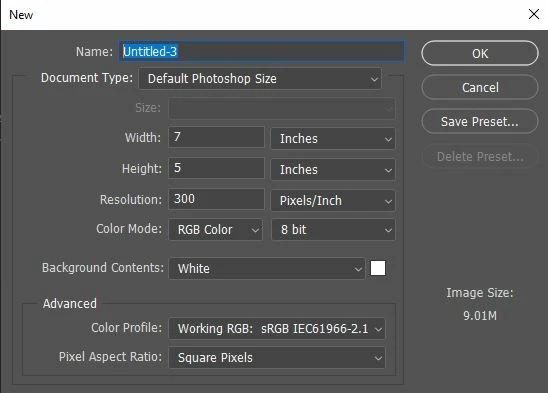
Image below is what my current menu looks like when clicking New File on the Home page. It used to have a different look, with an option to preview whether or not the canvas would be vertical or horizontal, along with recent canvas sizes used. Is there some way to get that old look of the menu back?
 

This topic has been closed for replies.
Correct answer Semaphoric

Go to Edit > Preferences > General, and in the Options section, Un-check "Use Legacy 'New Document' Interface".

1 reply

Semaphoric
Community Expert
SemaphoricCommunity ExpertCorrect answer
Community Expert
September 1, 2023

Go to Edit > Preferences > General, and in the Options section, Un-check "Use Legacy 'New Document' Interface".