
minglessis
Inspiring
March 27, 2022
Answered

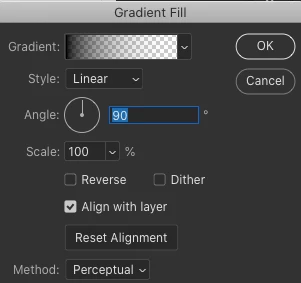
New gradient layer opens up black to transparent

  • March 27, 2022
  • 2 replies
  • 681 views

Hello, 

Using PS 2022, Catalina 10.15

My understanding is that when you open a new gradient layer, the layer should be solid and filled, by default, with the colors you have as the background and foreground colors. But in my case, it is opening with a black to transparent gradient. Which is not what I want.

Any advice?

Thank you!


This is what I get, even is my foreground and background color are red and blue. 


This topic has been closed for replies.
Correct answer c.pfaffenbichler

The default on my station seems to be »Color to Transparent«, too, and no way to override it has come to my mind so far. 

Same thing for Photoshop 2020. 

2 replies

D Fosse
Community Expert
Community Expert
March 27, 2022

I've no idea what the default is or is supposed to be - but you set gradient type here:

minglessis
Inspiring
March 27, 2022

yes, I heard about the default in a tutorial and that is how it work in this person's computer, maybe it was an old version of PS? I can't find the tutorial anymore.

In any case, thanks. I know how to edit the gradient, but I was hoping to save me some steps by getting a default that is not transparent.


Thanks again

c.pfaffenbichler
Community Expert
Community Expert
March 27, 2022

My understanding is that when you open a new gradient layer, the layer should be solid and filled, by default, with the colors you have as the background and foreground colors.

What is this assumptions based on? 


Could you please post screenshots with the pertinent Panels (Toolbar, Layers, Options Bar, …) visible? 

minglessis
Inspiring
March 27, 2022

Hi, 

The assumption is based on something I heard in a couple of tutorials :(...maybe it used to be like that?

I know how to edit the gradient, but that takes extra steps. I thought I could get my default gradient layer not to be transparent.


Here screenshot


c.pfaffenbichler
Community Expert
c.pfaffenbichlerCommunity ExpertCorrect answer
Community Expert
March 28, 2022

The default on my station seems to be »Color to Transparent«, too, and no way to override it has come to my mind so far. 

Same thing for Photoshop 2020.