
Known Participant
May 3, 2024
Question

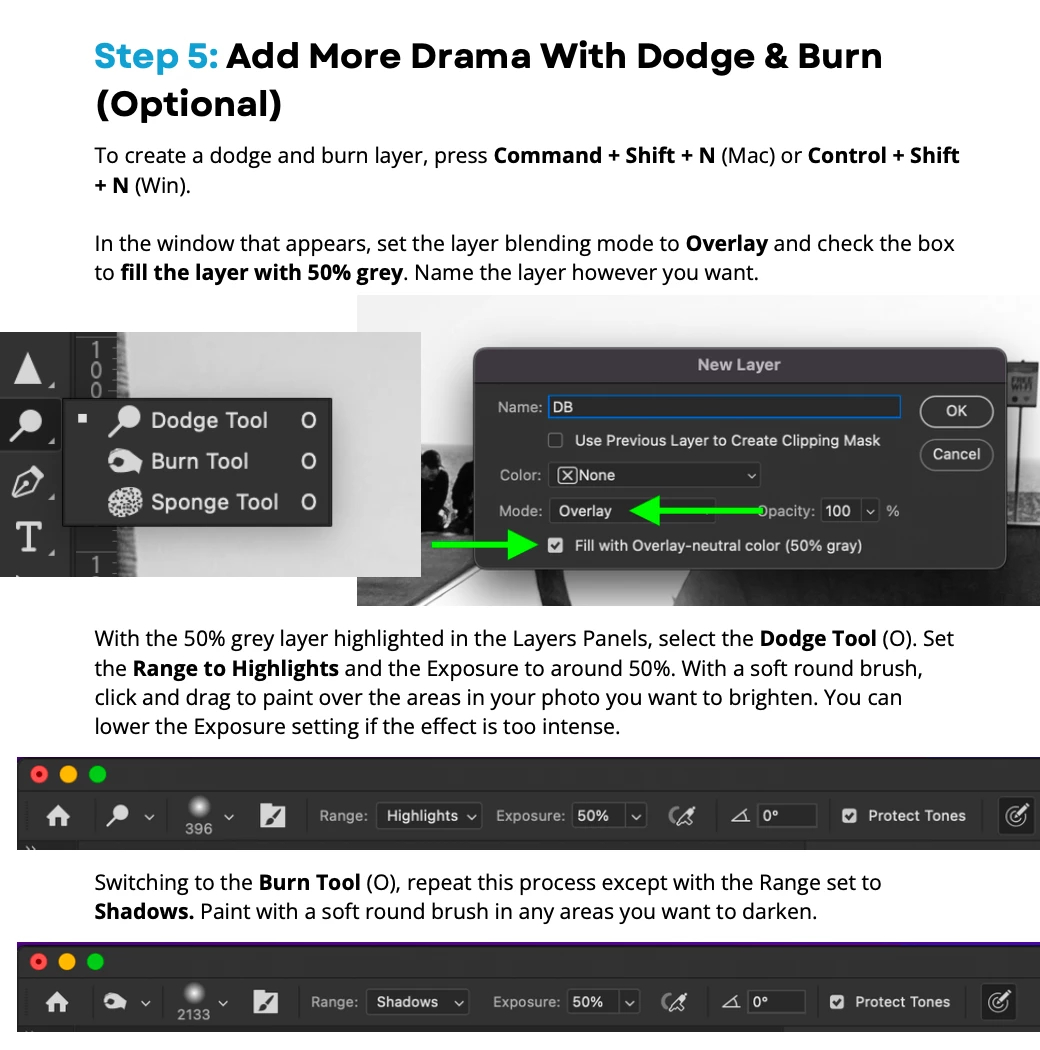
New grey layer with overlay

  • May 3, 2024
  • 1 reply
  • 432 views

Hello everyone

I want to understand the reason for creating a new dodge and burn layer with 50% grey and blend mode set to overlay to create dramatic black-and-white 

images using gradient maps. 

Please help

Thanks


This topic has been closed for replies.

1 reply

Jeff Arola
Community Expert
Community Expert
May 3, 2024

It's a "non destructive" way of using the Dodge and Burn tools since Adobe doesn't provide a way to "Sample All Layers"

like for example, the Spot Healing Brush Tool has, so one could dodge and burn on a blank layer.


https://www.tourboxtech.com/en/news/neutral-gray-photoshop.html


from the Adobe help page

https://helpx.adobe.com/photoshop/using/layer-opacity-blending.html

"Fill new layers with a neutral color

You can’t apply certain filters (such as the Lighting Effects filter) to layers with no pixels. Selecting Fill With (Mode)-Neutral Color in the New Layer dialog box resolves this problem by first filling the layer with a preset, neutral color. This invisible, neutral color is assigned according to the layer’s blending mode.

If no effect is applied, filling with a neutral color has no effect on the remaining layers. The Fill With Neutral Color option isn't available for layers that use the Normal, Dissolve, Hard Mix, Hue, Saturation, Color, or Luminosity modes.