
DKBJ28
Participant
June 19, 2020
Question

New PHotoshop 21.2 Text issues

  • June 19, 2020
  • 3 replies
  • 277 views

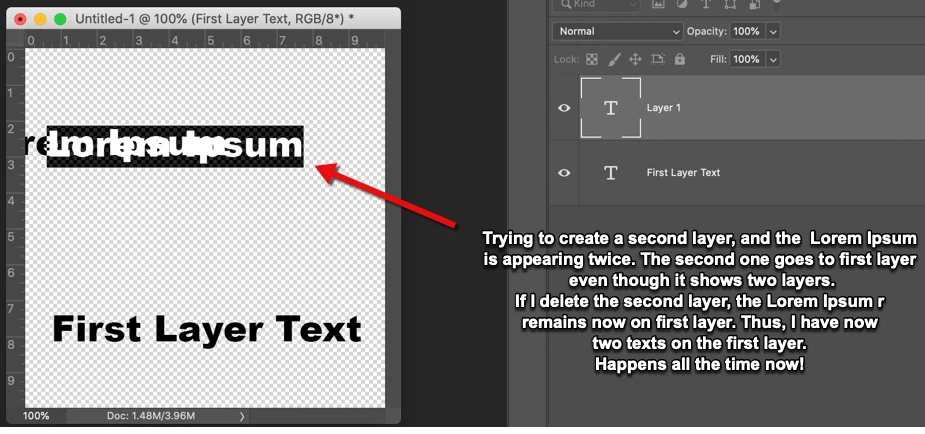
When I type something on the first layer, it's normal, but when I try  typing again, it creates another text layer, but leaves the "lorem ipsum" on the first layer even after I delete the second layer. Now, I'm back to the 2017 version because I can't use this stupid new updated version. Hey Photoshop, you make a lot of money off of us, why not test your work before pushing it out on us???  Why can't you give your genius developers a break and leave the versions that work alone for a while????


This topic has been closed for replies.

3 replies

Participant
July 5, 2020

I have same issue. Also when I did any changing in the setting like spacing , sizing... it double up my own text again . I was curious if that is just a viewing problem so I try to save file and reopen the file, turn out it really draw imprint on my image.

Very frustrated.

davescm
Community Expert
Community Expert
June 28, 2020

Go to Preferences > Performance and uncheck Legacy Compositing. Then restart Photoshop.

Dave

sgossman
Participant
June 27, 2020

Same issue along with many others - random grey boxes appearing, screen lags.  Considering reverting back to an older version