Dabatross
Known Participant
September 21, 2018
Question

New smart object layer from copy not showing

  • September 21, 2018
  • 2 replies
  • 2406 views

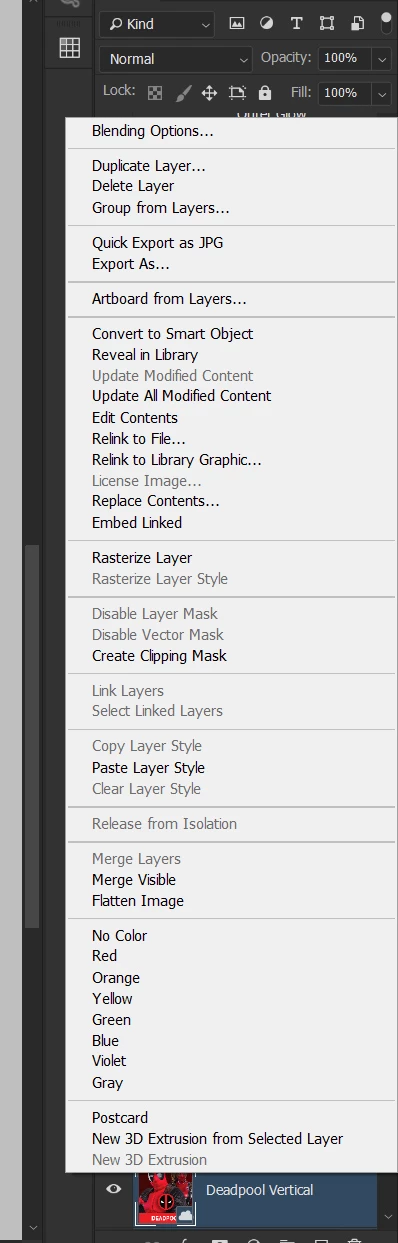
Having an issue with smart objects where I want to duplicate them and edit them separately so they don't affect the master smart object. I right click on the smart object and look for the "New smart object layer from copy" but its not there. Any ideas on why its not showing?
    This topic has been closed for replies.

    2 replies

    JJMack
    Community Expert
    Community Expert
    September 21, 2018

    To have independent smart object layers they need to be embedded object IE menu File>Open ACR open RAW Shift as an Object,    menu File>Place Embedded... and to create independent smart object layer with the menu Layer>Smart Objects>New Smart Object via Copy

    If you duplicate a smart object layer the duplicate and the originals will share a single object they will only have independent transforms a good way toe make Picture package templates.

    I do not use creative cloud libraries.

    JJMack
    davescm
    Community Expert
    Community Expert
    September 21, 2018

    Hi

    It is not a ordinary smart object at present it is a layer linked to the library (see the cloud symbol on the layer).

    To do what you want, and get an unlinked copy, just duplicate (Ctrl+J) and then Convert to SO

    Dave

    Dabatross
    DabatrossAuthor
    Known Participant
    September 21, 2018

    Thanks Dave, I remember creating a smart object first of that layer and then dragging it into creative cloud libraries. How come when I dragged it out of libraries it doesn't stay a smart object then?

    davescm
    Community Expert
    Community Expert
    September 21, 2018

    Hi

    It is still a smart object (you can open it and edit the layered content) - but it is linked to the library rather than being an ordinary, independent, smart object in your document.

    Dave